
DayTime Counter
作者:rebot | 分类:模组
Minecraft 版本: 26.2
平台: fabric
标签: adventure optimization utility
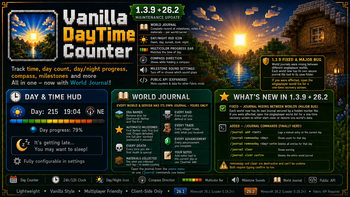
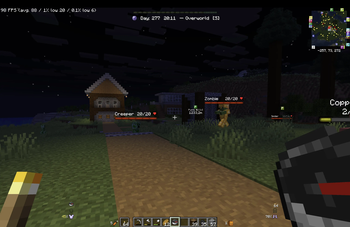
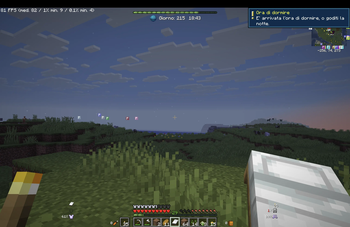
A lightweight, vanilla-style day and clock counter for the HUD. Uses the overworld clock time, so it always matches the visible day/night cycle — no drift, no guessing, no syncing issues in multiplayer.
The whole thing is built to blend into vanilla's own UI: the progress bar reuses Minecraft's XP bar sprites, the HUD icon shows the actual time of day (dawn, day, sunset, dusk, night), and the counter sits centered near the top or bottom of the screen, exactly where a HUD element should live.
? Official website coming soon
We are preparing the official website for our mods, where you will be able to discover upcoming projects, report issues through the ticket system, and suggest ideas or new features. The link will be added to the mod descriptions as soon as the website is available.
The website will not host mod downloads directly: all mods will remain connected to Modrinth and will continue to be downloaded exclusively from this platform.
✨ Features
- Current world day counter
- 24-hour or 12-hour clock format
- Day progress bar drawn with vanilla XP bar sprites, with an optional day/night color tint
- Dawn/day/sunset/dusk/night HUD icon that follows the actual in-game time
- Compass direction shown in the HUD label while holding a compass
- Vanilla-style toast reminder when it's getting late enough to sleep
- Small milestone sound on notable days (50, 100, 365...) — turn it off, or pick which sound plays, from the settings screen
- Top or bottom HUD placement
- Built-in Mod Menu settings screen — no config file editing needed
- Fully client-side — safe to use on any server, vanilla or modded
? World Journal
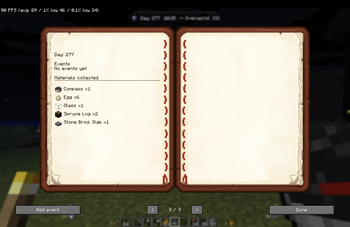
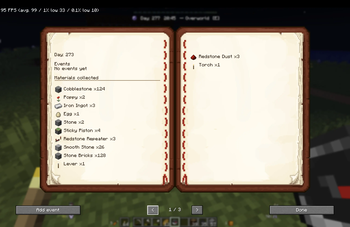
Open the World Journal from the pause menu:
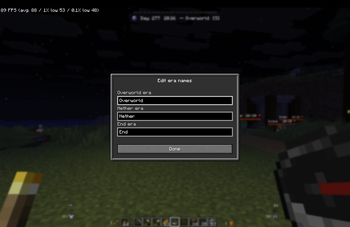
- Rename each dimension's era (Overworld/Nether/End) to whatever fits your playthrough
- Automatic milestones, logged for you: first Nether visit, first End visit, the Ender Dragon defeated, and a full year survived — if you'd already reached one before installing the mod, it's estimated retroactively instead of being skipped
- Every death, not just the first — the very first one is still called out specially
- Every raid you defend or lose
- Every villager trade, with exactly what you received
- Every advancement you complete
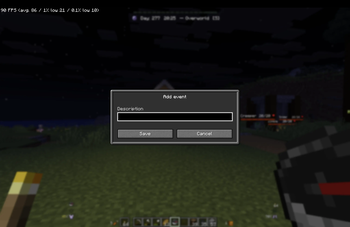
- Add your own notes, tied to the current in-game day, either from the book screen or with the
/journal addcommand (see Commands below) - See what you've collected each day — smart enough to not count items you already owned that you only dropped and picked back up, or that followed you through a game mode switch
Journals are per-world (singleplayer) or per-server (multiplayer), saved locally on your own client — every player keeps their own.
1.3.9 fixed a serious storage bug: on this Minecraft version, the way the game reports a singleplayer world's own save folder could resolve to the same path for every world instead of that world's actual one, so every singleplayer world ended up sharing a single journal file instead of getting its own — a brand-new world could show entries that actually happened in a completely different world. This is now fixed for good: each world's journal is tied to its own save folder through a small hidden marker file, independent of the folder's name. If you're upgrading and had already been affected, opening the singleplayer world list once shows a recovery screen offering to either start every world clean or pick which world should keep the old shared file's entries.
? Controls
- H — open the Vanilla DayTime Counter settings screen
The keybind can be remapped at any time from Minecraft's own Controls menu.
⌨️ Commands
Client-side /journal commands, for quick edits without opening the book screen:
/journal add <text>— logs a manual entry on the current in-game day/journal removeday <day>— shows how many entries exist for that day;/journal removeday <day> confirmdeletes all of them/journal clear— shows a warning about what's about to happen;/journal clear confirmpermanently wipes the current world's entire journal
removeday and clear are destructive and can't be undone, which is why both require typing confirm as a separate step instead of running immediately.
?️ Settings
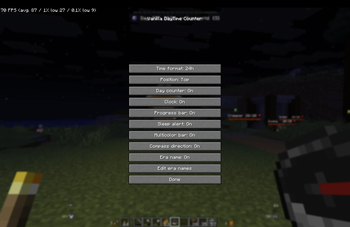
From the settings screen you can toggle:
- 12-hour / 24-hour clock format
- Top / bottom HUD position
- Day counter visibility
- Clock visibility
- Progress bar visibility, and its day/night multicolor tint
- Compass direction display
- Era name display
- Sleep-time toast visibility
- Milestone sound, on/off and which sound plays
⚙️ Compatibility
Two separate jars are published, one per Minecraft version — download the one matching your game:
- Minecraft
26.1— Fabric Loader0.19.2+ - Minecraft
26.2— Fabric Loader0.19.3+ - Requires: Fabric API
- Environment: Client-side only
? Config
Settings are saved to Fabric's config folder as:
vanilladaytimecounter.json
World Journal data is saved per world/server under config/vanilladaytimecounter/worlds/. No manual editing needed — everything is managed from the in-game screens and the /journal command.
? For developers — the API keeps growing
Vanilla DayTime Counter exposes a small public API (dev.notesow.vanilladaytimecounter.api.v1) so other Fabric mods can build on top of it instead of reinventing their own day counter. This mod's source isn't public, so everything a developer needs is written out below, in full — there's no separate repo or docs site to link to.
New in 1.3.8: read how many times the player has died, defended or lost a raid, traded with a villager (and what they got), or completed an advancement — each either as a world/server total or scoped to a single in-game day. (1.3.9 doesn't change this API — it's a storage/command fix release.)
? What you can build with it
- A horror mod that triggers a scripted event on a specific day, or the first time the player has been "out too long" after dark.
- A progression/RPG mod that reacts once the player has collected enough of a given material, died too many times, or completed a specific advancement.
- A companion mod that logs its own milestones into the player's journal alongside this mod's automatic ones (first boss kill, first structure found, whatever fits your mod).
- Anything that just wants a reliable "what day/time is it" without re-implementing overworld-clock math.
? Depending on this mod
There's no published Maven/Gradle repository or API-only artifact — this mod is built with a plain javac script, not Gradle/Loom. To depend on it: grab the built jar (e.g. from a release download), add it to your own project's compile-time classpath the same way you'd add any other Fabric mod jar, and declare it in your own fabric.mod.json:
"depends": {
  "vanilladaytimecounter": ">=1.3.8"
}(>=1.3.7 is enough if you only need the material/journal/event methods that existed before the death/raid/trade/advancement counters — those were added in 1.3.8.) No registration or init call is required on your side — import classes from dev.notesow.vanilladaytimecounter.api.v1 and use them directly, as soon as both mods are loaded. Because this is a client-only mod ("environment": "client"), your integration code should also live in your client-side entrypoint/package.
? Quick start
package com.example.horrormod;

import dev.notesow.vanilladaytimecounter.api.v1.DayTimeApi;
import dev.notesow.vanilladaytimecounter.api.v1.DayTimeEvents;
import net.fabricmc.api.ClientModInitializer;
import net.minecraft.resources.Identifier;

public final class HorrorModClient implements ClientModInitializer {
    private static final Identifier SCREAM_DAY_13 =
            Identifier.fromNamespaceAndPath("horrormod", "heard_scream_day13");

    @Override
    public void onInitializeClient() {
        DayTimeEvents.DAY_CHANGED.register(day -> {
            if (day == 13 && !DayTimeApi.hasLoggedEvent(SCREAM_DAY_13)) {
                triggerScareEffect();
                DayTimeApi.logCustomEvent(SCREAM_DAY_13, "You heard a scream in the dark");
            }
        });
    }

    private void triggerScareEffect() { /* ... */ }
}
? Reading current state — DayTimeApi
Static-only facade: no instances, no init call needed, every method safe to call at any time.
DIMENSION_OVERWORLD, DIMENSION_NETHER, DIMENSION_END are the string constants accepted by getEraName; any other string just won't match a configured era.
| Method | Returns | When no world is loaded |
|---|---|---|
isWorldLoaded() |
whether a world/server is currently joined | false |
currentDay() |
current in-game day, 0-based, derived from the overworld clock |
0 |
currentTimeOfDay() |
ticks within the day, 0–23999 (0 dawn, 6000 noon, 12000 dusk, 18000 midnight) |
0 |
getEraName(String dimensionKey) |
player-set era name for a dimension, or "" if unset |
"" |
listJournalEntries() |
all journal entries, sorted by day ascending, immutable snapshot | empty list |
hasLoggedEvent(Identifier eventId) |
whether that exact event id was already logged (including this mod's own automatic milestones) | false |
logCustomEvent(Identifier eventId, String text) |
logs a de-duplicated entry on the current day; text is plain text, not a translation key; no-op if the id was already logged |
no-op + stderr warning, never throws |
getMaterialsCollectedOnDay(long day) |
item id → net amount collected that day | empty map |
getMaterialLog() |
full day-ascending history: day → (item id → amount) | empty map |
getDeathCount() / getDeathCount(long day) |
times the player died, total or on one day | 0 |
getRaidCount() / getRaidCount(long day) |
raids that ended (won or lost — not distinguishable via this API), total or on one day | 0 |
getTradeCount() / getTradeCount(long day) |
villager trades completed (per occurrence, not per item), total or on one day | 0 |
getTrades() / getTrades(long day) |
TradeRecord snapshot of what was received, sorted by day ascending |
empty list |
getAdvancementCount() / getAdvancementCount(long day) |
advancements with a visible title completed (hidden/recipe-unlock ones never count), total or on one day | 0 |
getCompletedAdvancements() / getCompletedAdvancements(long day) |
AdvancementRecord snapshot of which ones, sorted by day ascending |
empty list |
listJournalEntries(), getMaterialLog()/getMaterialsCollectedOnDay(), and getTrades()/getCompletedAdvancements() all return immutable snapshots taken at call time, not live views — call again, or use the events below, to observe changes over time. The four counters (deaths, raids, trades, advancements) each have a no-arg overload for the world/server total and a (long day) overload scoped to one in-game day.
? Subscribing to events — DayTimeEvents
Each is a static ListenerList field; call .register(listener) once, typically from onInitializeClient. Listeners that throw a RuntimeException are caught and logged — they don't crash the game or block other listeners.
| Event | Listener signature | Fires when |
|---|---|---|
DAY_CHANGED |
void onDayChanged(long day) |
the in-game day changes, and once immediately on join (even for day 0), so you get a baseline for free |
JOURNAL_EVENT_LOGGED |
void onJournalEventLogged(JournalEntry entry) |
any journal entry is logged — this mod's own automatic milestones, the player's manual notes (from the book screen or /journal add), or another mod's (or your own) custom entries via logCustomEvent, after it's already persisted to disk |
MATERIAL_COLLECTED |
void onMaterialCollected(Identifier itemId, int amount, long day) |
the player's net item count for something increases compared to the previous client tick; only positive net gains are reported, and a same-tick pick-up-then-drop may not be observed (detection is based on periodic inventory snapshots) |
? The DTOs
JournalEntry — immutable, three public final fields:
public final long day;          // in-game day (0-based) this entry belongs to
public final String text;       // already-resolved human-readable description
public final Identifier sourceId; // null if typed manually in-game; otherwise who logged it
public boolean isManual();      // shorthand for sourceId == null
For this mod's own automatic milestones, sourceId is namespaced under vanilladaytimecounter; for entries you log yourself, it's exactly the Identifier you passed to logCustomEvent.
TradeRecord and AdvancementRecord — returned by getTrades()/getTrades(long) and getCompletedAdvancements()/getCompletedAdvancements(long). Both immutable, one instance per occurrence (a trade handing over a stack of 3 is one record with amount == 3, not three):
// TradeRecord
public final long day;
public final Identifier itemId; // what was received, e.g. minecraft:emerald
public final int amount;        // how many, accounting for stack size

// AdvancementRecord
public final long day;
public final Identifier advancementId; // e.g. minecraft:nether/root
? Rules & limits — what you can't do
- Namespace your own entries.
logCustomEvent/hasLoggedEventtake a MinecraftIdentifier: always use your own mod id as the namespace (e.g.Identifier.fromNamespaceAndPath("yourmod", "your_event")), nevervanilladaytimecounter— that's reserved for this mod's own entries and using it risks colliding with them. - Each exact event id can only be logged once, ever, per world/server. There's no "log this again on a later day" — if you need a repeatable trigger, mint a new id per occurrence (e.g. suffix the day number into it, like
"scream_day_" + DayTimeApi.currentDay()). - Client-side only. Every call has to happen on the Minecraft client thread, same as any other Fabric client-side code — there's no server-side counterpart, and no way to read another player's data from a dedicated server; every player who needs this data must have the mod installed on their own client.
- No breaking changes within
api.v1. New capability is added as new methods/events, never by changing what's already here. A hypothetical breaking change would ship as a newapi.v2package alongside (not replacing)api.v1. Onlydev.notesow.vanilladaytimecounter.api.v1is covered by this policy — internal implementation classes (journal storage, file format, HUD rendering) can change at any time.
❓ Common gotchas
- Reading
currentDay()/currentTimeOfDay()fromonInitializeClientgives0/ no data. That's expected: it runs at game startup before any world is joined, soisWorldLoaded()isfalsethere. RegisterDayTimeEventslisteners inonInitializeClient, but only read "current" values from inside a listener callback (or your own tick hook) once a world is actually loaded. NoSuchMethodError/ClassNotFoundExceptionat runtime, but it compiles fine. You compiled against a different Vanilla DayTime Counter jar version than the one actually present inmods/. Make sure your"depends"constraint matches the jar you compiled against, and that only one version of this mod's jar exists inmods/.- Will my own mod get notified about an event it logs itself? Yes —
logCustomEventfiresJOURNAL_EVENT_LOGGEDthrough the same path as every other entry, including to listeners registered by the mod that called it. If you only want to react to other sources, checkentry.sourceIdagainst your own namespace and skip it. - Unregistering a listener works via
ListenerList#unregister, but only if you kept a reference to the exact lambda/instance passed toregister— a freshly written lambda is a different object and won't match, even with identical code. - Works from Kotlin/Scala/Groovy with no special adapter — every listener type is a plain
@FunctionalInterfaceand everyDayTimeApimethod is static Java.
请登录后举报
暂无评论,抢个沙发吧~