
Introduction
Hey you! Yes you, dear stranger, who enjoys playing vanilla Minecraft alone or on a server with your friends™, have you ever stopped to think that Minecraft has a rather bland visual style and clunky gameplay? Do you like the visuals and feel of modded minecraft but don't want to commit to playing in a modded instance, only to have to start over as mojang continues to add new stuff to the game?
N-no? Oh well...
Maybe it's just me, But in case it isn't I hereby present you with a compilation of mods considered "essential" by yours truly to relax and have a cozy time while playing minecraft in your forever world after a long day.

Features
Animations

- [Fresh Animations _(Resource pack)_](https://modrinth.com/resourcepack/fresh-animations), [Punchy](https://modrinth.com/mod/punchy-fpa) and [Fancy World Animations](https://modrinth.com/mod/fwa) work together to make the world come alive providing a gameplay experience more satisfying to look at and interact with.
Shaders
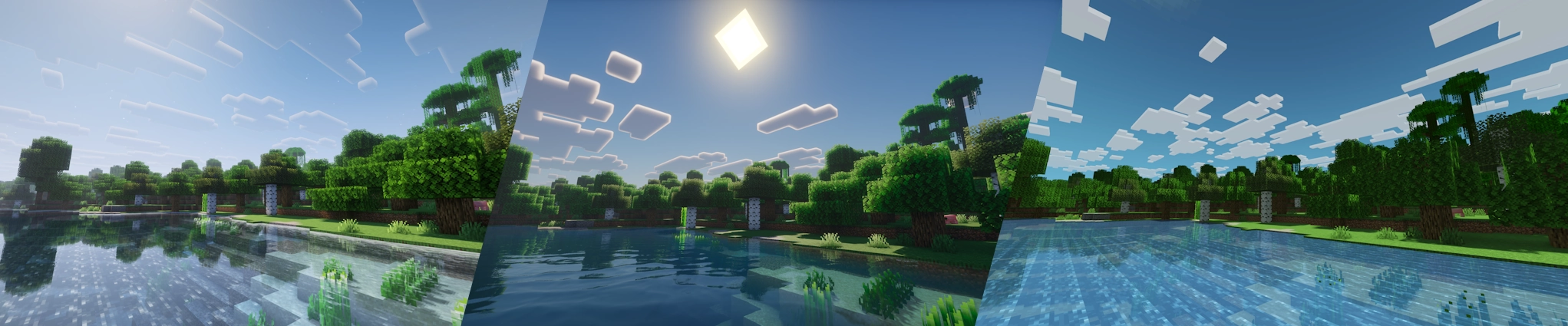
- [Euphoria Patches](https://modrinth.com/mod/euphoria-patches) with [Complementary](https://modrinth.com/shader/complementary-reimagined) improves the game's lighting by orders of magnitude while still retaining the game's blocky aesthetics. I recommend using generated normals and pixelated shadows if your computer can handle it, but as always you are free to customize everything to your liking.
- Other shader options included are [Photon](https://modrinth.com/shader/photon-shader) as well as [Mellow](https://modrinth.com/shader/mellow) and [MakeUp - Ultra Fast](https://modrinth.com/shader/makeup-ultra-fast-shaders) to better accommodate lower end computers.
GUI
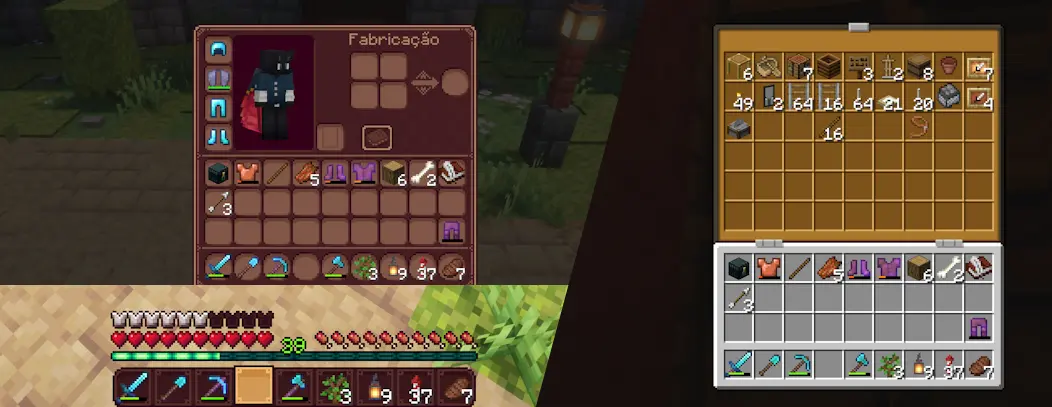
- [Inventory Essentials](https://modrinth.com/mod/inventory-essentials) adds better functionality to managing your storages, my favorite feature being the ability to drag your mouse over items to place them in chests.
- [Immersive Hotbar](https://modrinth.com/mod/immersive-hotbar) adds a few animations of the items in your hotbar to make it fancier.
- [Smooth Gui](https://modrinth.com/mod/smooth-gui), subtle animations when opening and closing interfaces (inventory, pause menu, crafting table, etc)
- [Dark Coffe Gui _(Resource pack)_](https://modrinth.com/resourcepack/dark-coffe-gui) and [Recolorful Containers _(Resource pack)_](https://modrinth.com/resourcepack/recolourful-containers-gui) as options to change from the vanilla simple gray interface. Pay attention to the order you place their respective optional addons.
- [Enchanted Books: Re-covered _(Resource pack)_](https://modrinth.com/resourcepack/enchanted-books-re-covered) to give a unique sprite to each enchanted book.
- [Item interactions mod](https://modrinth.com/mod/item-interactions-mod)
Sound
- [Ambient Sounds](https://modrinth.com/mod/ambientsounds) and [Sound Physics Remastered](https://modrinth.com/mod/sound-physics-remastered) for more immersion in forests as well as underground.
Inventory management
- [ClickTrough Plus](https://modrinth.com/mod/clickthrough+) allows you to right click through signs and item frames to access chests behind them, making it much easier to organize your storage room. I like to combine it with [Invisible Item Frames _(Resource pack)_](https://modrinth.com/resourcepack/invisible-item-frames) to use renammed blocks to mark chests. _(You can use f3+B to see where the item frames are at)_.
- [Shulker Box Tooltip](https://modrinth.com/mod/shulkerboxtooltip)
Extra functionality
- [Scribble](https://modrinth.com/mod/scribble) Gives you full access to customize text in books using minecraft's own markdown system _(Using the double page view mode also makes it better to read trough)_.
Details
- [3D Skin Layers](https://modrinth.com/mod/3dskinlayers)
- [Invisible Player Armor](https://modrinth.com/mod/invisible_player_armor) (An invisible armor resource pack would make armor in mobs invisible as well, so this mod was chosen instead)
- [Particular](https://modrinth.com/mod/particular-reforged) adds a variety of particle effects to the game.
Building Tools
- [Axiom](https://modrinth.com/mod/axiom) Basically blender if it was built in minecraft, extremely useful to build in creative.
- [Litematica](https://modrinth.com/mod/litematica) to help you bring said creative blueprints to your survival world.
Miscellaneous
- [Mod Menu](https://modrinth.com/mod/modmenu) Allows you to configure installed mods directily in game trough the "Mods" button in the pause menu.
Optimisation
- [Sodium](https://modrinth.com/mod/sodium) for rendering optisation.
- [Lithium](https://modrinth.com/mod/lithium) for general optimisation.
There are many other optimisation mods out there, however the scope of this modpack is to _preserve_ vanilla game mechanics as much as possible, thus thease are the only 2 included in the pack. You as always is free to try and add other mods to your instance, but keep in mind the pack has not been play tested with other mods.
- [Spark](https://modrinth.com/mod/spark) allows you to figure out what is causing you lag should you encounter it. _(Disabled by default)_
Dependencies
- [Fabric API](https://modrinth.com/mod/fabric-api) _(Required for [Axiom](https://modrinth.com/mod/axiom), [Fancy World Animations](https://modrinth.com/mod/fwa), [Inventory Essentials](https://modrinth.com/mod/inventory-essentials), [Immersive Hotbar](https://modrinth.com/mod/immersive-hotbar), [Ambient Sounds](https://modrinth.com/mod/ambientsounds), [ClickTrough Plus](https://modrinth.com/mod/clickthrough+), [3D Skin Layers](https://modrinth.com/mod/3dskinlayers), [Mod Menu](https://modrinth.com/mod/modmenu))_
- [Iris Shaders](https://modrinth.com/mod/iris) _(Required run shader packs)_
- [CreativeCore](https://modrinth.com/mod/creativecore) _(Required for [Ambient Sounds](https://modrinth.com/mod/ambientsounds))_
- [[EMF] Entity Model Features](https://modrinth.com/mod/entity-model-features) and [[ETF] Entity Texture Features](https://modrinth.com/mod/entitytexturefeatures) _(Required for [Fresh Animations](https://modrinth.com/resourcepack/fresh-animations))_
- [YetAnotherConfigLib (YACL)](https://modrinth.com/mod/yacl) _(Required for [Immersive Hotbar](https://modrinth.com/mod/immersive-hotbar))_
- [Balm](https://modrinth.com/mod/balm) _(Required for [Inventory Essentials](https://modrinth.com/mod/inventory-essentials))_
- [MaLiLib](https://modrinth.com/mod/malilib) _(Required for [Litematica](https://modrinth.com/mod/litematica))_
- [Text Placeholder API](https://modrinth.com/mod/placeholder-api) _(Required for [Mod Menu](https://modrinth.com/mod/modmenu))_
- [BaguetteLib](https://modrinth.com/mod/baguettelib) _(Required for [Particular](https://modrinth.com/mod/particular-reforged)
Notes
All mods included are completelly optional, if you don't like any one of them, you should be able to disable it no problem.
Once the mods included start supporting newer versions of minecraft, the pack will also be ported to the latest possible version. If a few of the mods don't update, a temporary alternative may be included in the latter versions instead.
Keybinds and usefull controls
- **Left Alt:** _Axiom's default creative tools keybind. If you are on survival and have commands enabled it will put you in creative as a sideffect._
- **Right Shift:** _Enter axion's build mode._
- **F9:** _Toggle Clicktrough+ on/off. (you can sneak to interact with itemframes even when active)_
- **Stick (item):** _Used as the tool to control litematica's features._
- **M:** _Opens litematica's menu._
Version info.
-
Alpha: Does not yet include most of the intended mods for that minecraft version as the respective mods have not yet updated to that version.
-
Beta: Contains most if not all of the intended mods for that minecraft version but is still being playtested.
-
Release: Contains all mods intended for that minecraft version and has been playtested for enogh time with no issues found.

暂无评论,抢个沙发吧~