
Fork Client
作者:rebot | 分类:模组
Minecraft 版本: 26.2
平台: fabric
标签: game-mechanics social utility
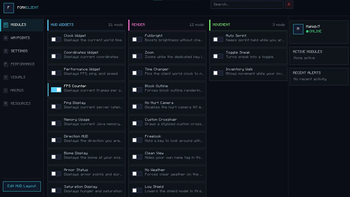
Fork Client is a client-side utility mod for Minecraft Fabric that provides a customizable HUD, a modern Click GUI, and a collection of quality-of-life features while preserving the vanilla gameplay experience.
Visit our official website: Fork Client Website
The mod improves the overall Minecraft experience with a lightweight, configurable, and modular interface. Each feature can be enabled, disabled, and customized independently, letting players tailor the client to their preferences without changing the game's core mechanics or requiring server-side support.
Fork Client includes a variety of HUD widgets, rendering enhancements, gameplay utilities, and interface improvements that integrate seamlessly with the vanilla game. Each module is easy to configure while remaining compatible with other Fabric mods.
Fork Client runs entirely on the client and does not require installation on servers. It works with most multiplayer servers and alongside other Fabric mods, making it suitable for both single-player and multiplayer gameplay.
Installation
Install the latest version of Fabric Loader and Fabric API, then place the Fork Client JAR file into your mods folder. Launch the game using the Fabric profile, and the mod will be loaded automatically.
Configuration
Fork Client includes a built-in Click GUI and HUD Editor, allowing modules, settings, keybinds, and HUD components to be configured directly in-game. Changes are saved automatically and restored the next time Minecraft is launched.
Compatibility
- Client-side only
- Requires Fabric Loader 0.19.3 or newer
- Requires Fabric API
- Compatible with most multiplayer servers
- Compatible with most Fabric modpacks
MotionBlur
MotionBlur module is an efficient Minecraft module that provides clean motion blur and keeps your game smooth. Unlike shader packs, which consume a lot of resources, this mod is designed to provide only motion blur, making it good for PvP, Survival, Bedwars, and other games. Customizing the effect to your liking is possible with MotionBlur. I want to give the MotionBlur GUI and command style credits to spunkyinsaan
MotionBlur was added in version 1.1.2+26.2. Older versions don't support MotionBlur. Future versions also support MotionBlur.
Here, you can simply:
- Enable/Disable the Motion Blur effect.
- Change the amount of blur from low to high.
- Make visual adjustments to get the perfect motion blur effect for your gameplay.
- MotionBlur has one of the most important features that makes it better than many other shader packs.
How it works:
Open Settings UI, Default Keybind M.
Commands:
/motionblurplus percentage <0-100>
Sets the Motion Blur intensity from 0% to 100%.
/motionblurplus toggle Enable
Enables Motion Blur.
/motionblurplus toggle Disable
Disables Motion Blur.
This shader does not consume much GPU power and, thus, doesn't affect your FPS. This is because MotionBlur produces a premium-quality motion blur effect.
Developer: Mahidx7 || YouTube: https://www.youtube.com/@Mahidx7
请登录后举报
请 登录 后赞助作者。
暂无评论,抢个沙发吧~