
BeatBlocks Control
作者:rebot | 分类:模组
Minecraft 版本: 1.21.9
平台: fabric
标签: game-mechanics utility


BeatBlocks Control
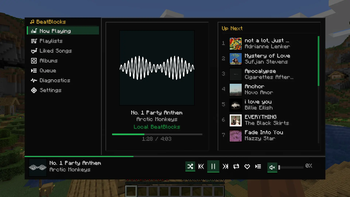
BeatBlocks Control is a client-side Fabric mod for Minecraft Java 1.21 – 1.21.11 that lets you control Spotify while you play — overlay, now-playing HUD, playlists, and global hotkeys. Everything runs through a local Spicetify bridge on your PC. No OAuth, no API keys, and no login inside the mod.
Features
- In-game music control — play, pause, skip, and browse your library without alt-tabbing
- Now-playing HUD — track, artist, and cached album art on screen
- Enhanced overlay — playlists, albums, liked songs, and queue
- Default overlay — settings, HUD scale, and UI mode selection
- Global hotkeys — configurable transport and overlay keys
- Diagnostics — bridge, extension, and heartbeat status in-game
- Privacy-first — the mod only talks to
127.0.0.1; credentials stay in Spotify
Requirements
In Minecraft
| Item | Details |
|---|---|
| Minecraft Java | One JAR per patch (1.21 through 1.21.11) |
| Fabric Loader | ≥ 0.16.10 |
| Fabric API | Match your MC version (see version page) |
On your PC
| Item | Details |
|---|---|
| Spotify desktop | Must stay open while playing |
| Spicetify | Installed and applied |
beatblocks-api.js |
Spicetify extension from the GitHub repo |
Quick setup
- Install Spicetify and apply it to Spotify
- Copy
beatblocks-api.jsinto your SpicetifyExtensionsfolder, then run:
spicetify config extensions beatblocks-api.js
spicetify apply
Restart Spotify after apply.
- Download the JAR for your exact Minecraft version and put it in
mods/with Fabric API - Launch Minecraft, start playback in Spotify, press Alt+I (default) to open the overlay
Full guide: GitHub README · Website
Default controls
Change under Options → Controls → BeatBlocks
| Action | Default key |
|---|---|
| Open overlay | Alt+I |
| Play / pause | K |
| Next track | L |
| Previous track | J |
You can also use /sp in chat to open the overlay.
How it works
Minecraft mod → localhost:50321 → beatblocks-api.js → Spicetify → SpotifyThe mod runs a small HTTP server on your machine. The Spicetify extension sends playback updates and receives commands. Nothing is sent to external servers except normal Spotify traffic.
Pick the right JAR
Use one JAR per Minecraft patch — do not use a 1.21.5 JAR on 1.21.11.
Examples:
- Minecraft 1.21 →
beatblocks-control-mc-1.21.jar+ Fabric API0.102.0+1.21 - Minecraft 1.21.5 →
beatblocks-control-mc-1.21.5.jar+ Fabric API0.128.2+1.21.5 - Minecraft 1.21.11 →
beatblocks-control-mc-1.21.11.jar+ Fabric API0.141.4+1.21.11
Configuration
File: .minecraft/config/beatblocks/beatblocks.json
| Setting | Default | Description |
|---|---|---|
bridgePort |
50321 |
Local HTTP port |
apiPollSeconds |
4 |
Playback poll interval |
hudScaleMultiplier |
1.0 |
HUD size |
coverPixels |
256 |
Max cover art size |
selectedMode |
DEFAULT |
DEFAULT or ENHANCED |
Roadmap
| Status | Plan |
|---|---|
| Now | Spicetify bridge — Spotify must be open with Spicetify + extension installed |
| Future | Spotify Web API support for simpler setup (planned) |
Links
- Website: https://blockbeats.vyasdevgna.online/
- Source & issues: https://github.com/vyas-devgna/beatblocks-control
- Releases: https://github.com/vyas-devgna/beatblocks-control/releases
License
MIT — free to use and modify. See LICENSE on GitHub.
请登录后举报
暂无评论,抢个沙发吧~