
JackItToMe (JEI/REI/EMI)
作者:rebot | 分类:模组
Minecraft 版本: 1.21.1
平台: neoforge
标签: storage utility
JackItToMe
A NeoForge 1.21.x mod that pulls items from whatever inventory you have open
into your own — either one item at a time with a keybind, or a whole recipe's
worth with a button on your recipe viewer's recipe screen.
Works with JEI, EMI, or REI — install whichever you already use.
Two ways to grab items
1. Hover-and-press: pull items
Hover the cursor over any item in any open screen and press G. One of
that item moves into your inventory, sourced from whatever container is open
behind the cursor.
Three keybinds control how much you pull — each one shows up in
Options → Controls → JackItToMe and can be rebound independently:
| Keybind (default) | Effect |
|---|---|
| G | One item |
| Shift+G | One full stack (up to 64) |
| Ctrl+G | As much as fits in your inventory |
Ctrl beats Shift if you hold both.
Autocraft escalation: if the hovered item isn't in stock but your open
storage network can craft it (AE2, Refined Storage, or Integrated Dynamics),
pressing G opens that system's native autocraft popup pre-filled with the
amount your modifier asked for (1 / 64 / a lot).
Works on:
- Vanilla container slots (chest, barrel, shulker, etc.)
- Items in your recipe viewer's item list and favorites/bookmarks
- Slots inside a recipe view — including the cycling "any planks" tag slots,
where all variants are considered and whichever you actually have is what
gets pulled
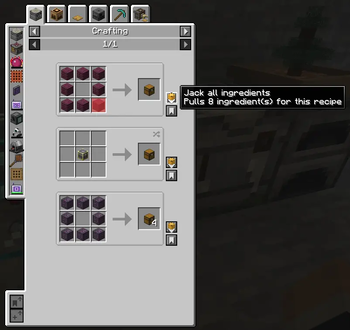
2. Per-recipe button: start crafting (and optionally pull what's ready)
While viewing any recipe, a chest-icon J button appears on the recipe.
Hover it to preview the state of each slot, then click to act on the recipe.
- Hover the button: each input slot is checked against your open storage,
refreshing every ¾ second while you stay on the button.- Red = missing, and no connected storage system can produce it.
- Green = missing, but your network can autocraft it.
- Clear = in stock.
- The tooltip also shows "Current stock can make: N" — how many of
the result your stock covers right now (autocraft potential not
counted).
- Click the button:
- If every ingredient is in stock: pulls them all (at recipe amounts)
into your inventory. - If any ingredient is missing: triggers autocraft popups (one after the
next) for the missing-but-craftable ones. Does not pull anything —
in-stock items stay in storage so you can review the popups without
committing.
- If every ingredient is in stock: pulls them all (at recipe amounts)
- Alt+Click: pulls every in-stock ingredient at recipe amounts and
triggers autocraft popups for the missing-but-craftable ones. (Alt is
the default — it's a rebindable keybind, see Configuring.) - Shift+Click: pulls the materials for a full stack of the output
— a book prints one per craft, so Shift grabs 64 crafts' worth: 192
paper + 64 leather. Always whole crafts, ratios preserved: with 64
paper but only 3 leather in stock you get 9 paper + 3 leather (three
crafts' worth), never a useless pile of paper. - Ctrl+Click: as many complete crafts as your storage (and inventory
space) supports. Ctrl beats Shift if you hold both. - Add Alt to Shift/Ctrl: same targets, but drop the whole-crafts
rule — every ingredient fills toward the target from whatever stock
exists, even when another ingredient is completely missing. "Grab
what you can, I'll sort out the rest."
Missing-but-craftable ingredients never limit Shift/Ctrl — their popups
open pre-filled with exactly the gap toward the requested amount.
The modifiers mean the same thing everywhere: Shift = a stack's worth,
Ctrl = as much as fits — on the hover keybind and on the recipe button
alike. Alt is the button's "pull what's in stock anyway" override for
when something is missing.
The full matrix
| Input | Hovering an item (keybind) | On the recipe button |
|---|---|---|
| G / plain click | Pull 1 of that item | Pull the recipe's amounts — but if anything is missing, only open autocraft popups (nothing pulled) |
| Shift | Pull one stack of it | Pull materials for a stack of the output — whole crafts only |
| Ctrl | Pull as much as fits | Pull as many whole crafts as stock allows |
| Alt | — | Pull in-stock recipe amounts even though something is missing |
| Alt+Shift | — | Stack-of-output target, but fill each ingredient from whatever stock exists (no whole-crafts rule) |
| Alt+Ctrl | — | Same, with the "as much as fits" target |
Everywhere: Ctrl beats Shift; anything missing-but-autocraftable opens
its native craft popup pre-filled with exactly the gap.
Recipe viewers
Install any one of these (or none). The mod adapts to whichever it finds:
| Viewer | Pull button | Hover tooltip | Red/green slot overlays |
|---|---|---|---|
| JEI | ✅ | ✅ | ✅ |
| REI | ✅ | ✅ | ✅ |
| EMI | ✅ | ✅ | — (counts shown in the tooltip instead) |
Without any viewer installed the mod still works for the G keybind on
vanilla container slots — you just won't get the recipe button or the ability
to pull from a viewer's item list.
Where items come from
Both modes pull from the menu open behind the cursor:
- Any vanilla container (chest, barrel, shulker, your own inventory)
- Applied Energistics 2 ME networks (any terminal-shaped menu)
- Refined Storage 2 grids (normal, crafting, pattern, wireless, portable)
- Integrated Dynamics networks via an Integrated Terminals storage
terminal (the cabled part or the portable one)
Without any of these the mod still works for vanilla containers; with any
installed, the corresponding source activates automatically — respecting that
storage system's own access rules.
Autocrafting works with all three storage systems. Missing-but-craftable
ingredients turn the recipe slots green, and the pull button opens the storage
system's native "how many to craft?" popup for each one — AE2's and Refined
Storage's amount dialogs, or the Integrated Terminals crafting screen (which
needs Integrated Crafting installed to have anything to craft).
Install
Drop the jar into your mods/ folder alongside:
- NeoForge 1.21.1 (≥ 21.1.181) — required
- A recipe viewer — JEI (≥ 19), EMI (≥ 1.1), or REI (≥ 16) —
recommended (needed for the recipe button and viewer-list pulling) - AE2 (≥ 19) — optional, enables the ME-network source
- Refined Storage 2 (≥ 2.0) — optional, enables the RS-grid source
- Integrated Terminals (≥ 1.7) — optional, enables pulling from an
Integrated Dynamics network's storage terminal (add Integrated Crafting
for autocrafting too)
Configuring
Rebind the pull keybinds from Options → Controls → JackItToMe:
Jack hovered item (G), Jack a full stack (Shift+G), Jack as much as
fits (Ctrl+G), and Pull in-stock override (hold Alt while clicking the
recipe button). Defaults changed from P in 0.7.0 — new installs only;
an existing rebind is kept. No other configuration needed.
Heads-up for AE2 users: AE2's guide (GuideMe) uses hold-G to open the
guide for the hovered item. A tap pulls, a hold opens the guide, so the two
coexist — rebind either one if the overlap bothers you.
Links
License
MIT
请登录后举报
请 登录 后赞助作者。
暂无评论,抢个沙发吧~