
Infinity Dungeons Stats
作者:rebot | 分类:模组
Minecraft 版本: 1.21 1.21.1 1.21.2 1.21.3 1.21.4 1.21.5 1.21.6 1.21.7 1.21.8
平台: bukkit paper purpur spigot
标签: utility
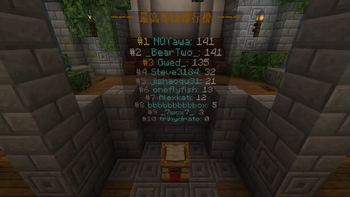
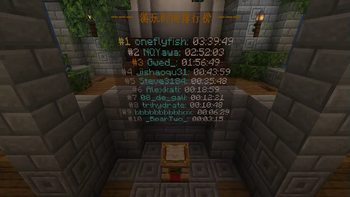
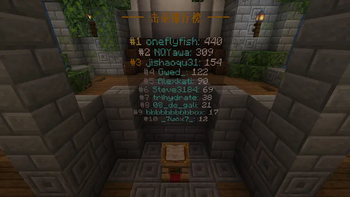

Infinity Dungeons Stats


A comprehensive statistics and leaderboard system for the Infinity Dungeons map. Track player high scores, monster kills, and total playtime with in-game leaderboards and a powerful RESTful API for developers.
This plugin is designed to bring a competitive edge to your Infinity Dungeons rogue-like server. It adds a robust statistics system to:
- Track Player Progress: Automatically records each player's highest dungeon level, total kills, and total playtime.
- Foster Competition: Display dynamic leaderboards in your world using floating text (holograms) to show off the top players.
- Engage Your Community: Players can check their own stats or compare themselves against the server's best.
- Provide Developer Tools: A built-in RESTful API allows you to pull stats for use on websites, Discord bots, or other custom integrations.
✨ Features
- Player Statistics Tracking: Monitors and saves crucial data for every player's run in the dungeon.
- Highest Dungeon Level Reached
- Total Monster Kills
- Total Playtime
- In-Game Leaderboards:
- Highly configurable floating text displays (holograms) for top kills, playtime, and max level.
- Choose between a single, rotating hologram or multiple static ones.
- Customize titles, colors, and formats.
- Player Commands:
/dun stats [player]- View your own or another player's statistics./dun killtop- Display the top players by monster kills in chat./dun playtimetop- Display the top players by playtime in chat./dun maxleveltop- Display the top players by max level in chat.
- RESTful API:
- An optional, built-in API server to expose player and server stats via simple HTTP requests. (Requires opening a port on your server).
- Lightweight & Efficient: Designed specifically for Infinity Dungeons to be as performant as possible.
⚙️ Configuration
The plugin is fully configurable via config.yml. You can enable/disable features, set hologram locations, and customize all messages.
# DungeonStats Plugin Configuration
database: "data.yml"
api-server:
  enabled: true
  port: 8080
log-checker:
  enabled: true
  interval-ticks: 100
holograms:
  enabled: false
  refresh-interval-seconds: 10
  # 'SINGLE': Use one text_display entity, rotating between different leaderboards.
  # 'MULTIPLE': Use a separate text_display entity for each leaderboard.
  display-mode: 'SINGLE'
  single-display:
    location: "world,0.5,100.5,0.5" # Format: "world_name,x,y,z"
    # How long (in seconds) to display each leaderboard before switching to the next.
    rotation-interval-seconds: 5
  multiple-displays:
    killtop:
      location: "world,5.5,101.5,0.5"
    playtimetop:
      location: "world,0.5,101.5,5.5"
    maxleveltop:
      location: "world,-4.5,101.5,0.5"
messages:
  title-kills: "&6&l--- Kills Leaderboard ---"
  title-playtime: "&6&l--- Playtime Leaderboard ---"
  title-maxlevel: "&6&l--- Max Level Leaderboard ---"
  # Available Placeholders: {rank}, {player_name}, {value}
  rank-entry: "#{rank} &b{player_name}: &f{value}"
  rank-color-1: "&e" # Gold for Rank 1
  rank-color-2: "&f" # Silver for Rank 2
  rank-color-3: "&6" # Bronze for Rank 3
  rank-color-default: "&7" # Default color for other ranks
  command-usage: "&cUsage: /dun <stats|killtop|playtimetop|maxleveltop>"
  command-player-not-found: "&cCould not find data for player {player_name}"
  command-no-data: "&7No data available yet"
  stats-title: "&6--- Stats for {player_name} ---"
  stats-line-maxlevel: "&eHighest Dungeon Level: &f{value}"
  stats-line-kills: "&eTotal Kills: &f{value}"
  stats-line-playtime: "&eTotal Playtime: &f{value}"
? RESTful API Documentation
If api-server.enabled is set to true, the plugin will host a simple API server on the configured port. This discloses game data to a remote server connection and must be firewalled appropriately if you do not want it to be public.
? Installation
- Download the latest version of the plugin.
- Place the
.jarfile into your server'spluginsfolder. - Restart your server.
- Configure the plugin by editing
plugins/RougeStats/config.yml. - Restart the server again to apply changes.
❗ Dependencies
- Required: Your server must be running the Infinity Dungeons map. This plugin is specifically designed to work with its mechanics.
- Holograms: This plugin uses built-in
text_displayentities and does not require a separate hologram plugin.
请登录后举报
暂无评论,抢个沙发吧~