
Melur Auto Fish
作者:rebot | 分类:模组
Minecraft 版本: 26.2
平台: fabric
标签: game-mechanics minigame utility
MelurAutoFish
Smart auto-fishing mod for the DeepWater plugin in Minecraft Fabric




MelurAutoFish is an advanced client-side Fabric mod designed specifically to automate the fishing process on servers utilizing the popular DeepWater plugin. Forget about tedious mini-game tracking! The mod handles all the mechanics for you, ensuring maximum efficiency.
✨ Key Features
- 🤖 DeepWater Mini-game Automation: The mod reads the mini-game state directly from the Action Bar in real-time. It automatically rotates the player's camera (Yaw) to track the fish and triggers the catch interaction at the perfect moment when the fish is within the green success zone.
- 📊 Interactive HUD: A stylish in-game overlay displaying the current status of the mod, session duration, remaining durability of the active fishing rod, and detailed catch statistics (caught fish, trash, and treasures).
- 🔄 Smart Fishing Rod Protection (Auto-Switch): No more broken rods with valuable enchantments like Mending or Lure! The mod monitors the durability of the fishing rod in your hand. As soon as it drops below a configurable threshold, the mod automatically searches your inventory or hotbar for a spare rod and swaps it. If you run out of fishing rods, the mod safely deactivates.
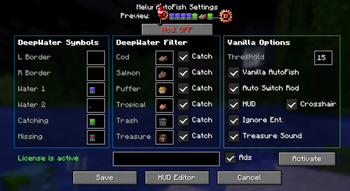
- 🛡️ Catch Filtering: Choose exactly what you want to catch in the settings. The mod supports independent toggles for:
- 🐟 Cod
- 🍣 Salmon
- 🐡 Pufferfish
- 🐠 Tropical Fish
- 🗑️ Trash
- ⭐ Treasures (Loot)
- 🔊 Sound Alerts: A celebratory level-up sound plays when catching treasures so you never miss a lucky catch!
The configuration file is saved at .minecraft/config/melurautofish.json. You can edit it manually or configure it in-game using ModMenu:
📥 Installation & Requirements
To use this mod, the following components are required:
- Minecraft (version 1.21+ and above)
- Fabric Loader
- Fabric API
- ModMenu (recommended for easy access to the configuration GUI)
Installation Steps:
- Download the latest version of the
.jarmod file from Modrinth. - Place the file inside your
.minecraft/modsdirectory. - Launch Minecraft using your Fabric profile.
- Open the settings via the mod menu (ModMenu, or edit the config file directly if ModMenu is not installed), enter your license key in the corresponding field, and click Activate.
- Press the
Okey in-game while holding a fishing rod to start auto-fishing!
请登录后举报
请 登录 后赞助作者。
暂无评论,抢个沙发吧~