
HEX Blocks
作者:rebot | 分类:模组
Minecraft 版本: 26.3-snapshot-1 26.3-snapshot-2
平台: datapack
标签: utility
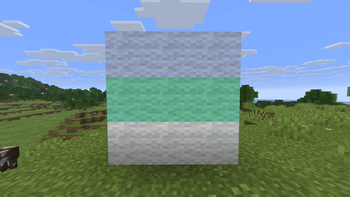
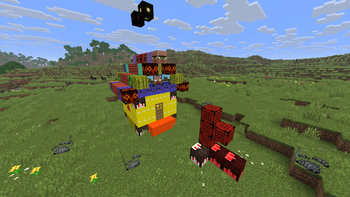
this is a copy of the README.txt
Hex Blocks by PALKIP
if you find bugs tell me on reddit, comments or dm
known bugs:
Culling not working properly on some blocks: glass, etc..
Placing and breaking sometimes flashes holes
how to use:
In the quick actions [G] you can configure it
choose an atlas, or a player using the name
For color you can write the minecraft chat codes or an hex code
Example of minecraft colors:
 red
red dark_red
 blue
blue light_purple
I have also added bedrock edition and custom colors:
 brown
brown amethyst
 pink
pink
Example of hex codes:
 #FF0000
 #00FF00
 #0000FF
 #FF00FF
 #87ebc3
 #FFFFFF or white resets the color to the default
Atlases are not too difficult to use
- first you select the atlas: blocks, items, etc.
- then based on what you selected you write the sprite, these are textures found in the minecraft jar
For example stone is:
atlas: blocks sprite: block/stone
You can likely just keep using it like this, remember to always write block/ before the texture
You will find that tnt does not exist, this is because tnt has 3 textures, tnt_side, tnt_top, tnt_bottom.
Same for many other blocks such as the crafting table, the crafter alone has 14 textures!
You can extract the Minecraft jar using the terminal:
jar xvf minecraft.jarThe file won't be named minecraft.jar, just write minecraft and [TAB] to autocomplete.
You need to open the terminal in a folder containing the minecraft.jar to do this
Useful locations:
- assets/minecraft/textures
- the names in here correspond with what you need for atlases
- assets/minecraft/atlases
- here you can take a closer look on your options, what comes before the name of the texture
Useful commands:
- /function hex_blocks:repair
- fixes culling and sometimes performance
- /function hex_blocks:hex_block/inventory/clear
- fills hex blocks inventory with white wool
- /function hex_blocks:hex_block/item/give
- give the player a hex block placer item
- /function hex_blocks:help
- displays in chat a simple tutorial
how the datapack works:
the placer summons 6 text displays and 1 marker, then culling is applied
the marker contains data about the custom hex block, so culling can be undone
right now hex blocks can only use 1 texture for all faces
if you have advanced questions, dm me
if you want to use this code on a custom map, other datapack, or any other project, message me on reddit
my reddit
https://www.reddit.com/user/PALKIP/
请登录后举报
暂无评论,抢个沙发吧~