
SScript
作者:rebot | 分类:模组
Minecraft 版本: 1.21.11
平台: fabric
标签: game-mechanics management minigame
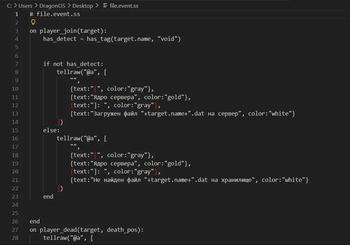
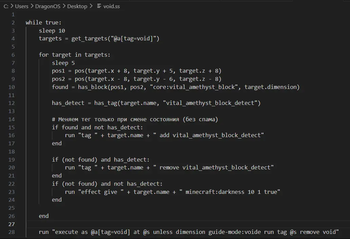
SScript — Server Scripting Language for Minecraft
SScript is a lightweight programming language for Minecraft server automation. Write scripts in Python/Lua-like syntax to execute commands, automate tasks, and control server behavior without touching Java code.
What It Does
Core Purpose: Execute automated commands and logic on your Minecraft server.
- ? Command Execution — Run commands programmatically (
/say,/give,/setblock, etc.) - ⚙️ Task Automation — Run initialization scripts, scheduled tasks, bulk operations
- ? Server Logic — React to player actions (join/leave, chat, block breaks, deaths, sleep)
- ? Simple Syntax — Python-like language anyone can learn
- ⚡ Non-blocking — Tasks run without freezing the server
Quick Start
1. Create a script in sscripts/boom.ss:
log "BOOM SPAWN!"

func boom():
    run "fill 10 50 10 -10 90 -10 air destroy"
    # boom! >:3
end

boom()
2. Create event handler in sscripts/handlers.event.ss:
on player_join(player):
    run "say " + player.name + " joined"
    run "execute at " + player.name + " run fill ~10 50 ~10 ~-10 90 ~-10 air"
end

on player_chat(player, message):
    log player.name + ": " + message
end
3. Load and run:
/sscript run boom.ss
/sscript debug on
/sscript debug off - no spam [Server]: ...
Done! Scripts execute without restart.
Language Features
- Variables & Types: Strings, numbers, booleans, lists, objects
- Control Flow:
if/elif/else,for,while,try/catch - Functions: Define with
funcordef, call sync or async - Events: React to player actions, server events
- Built-ins: 60+ functions for players, blocks, math, strings, files
- Async Support: Background tasks with
waitkeyword
Commands
Execute scripts and control execution:
/sscript run <file>                    # Execute script
/sscript run <file> function <name>    # Call specific function
/sscript monitor [all|<id>| ]            # View running tasks
/sscript stop [all|<id>|<file>]               # Stop running task
/sscript reload [all|<id>|<file>]             # Restart task
/sscript debug [on|off]                # Toggle debug output server
Documentation
? Full documentation with examples and API reference:
What Else?
Beyond command execution, SScript can:
- ? Store Data — Global variables persist across restarts (
globals.json) - ? HTTP Requests — Fetch data from APIs or send webhooks
- ? File I/O — Read/write files and JSON
- ? Player Data — Access health, gamemode, coordinates, NBT data
- ?️ Tag System — Organize players with custom tags
- ? Selectors — Query players dynamically (
@a[tag=admin],@a[distance=..100])
Performance
- ⚡ Tick-safe — Tasks automatically spread across server ticks to prevent lag
- ? Non-blocking — Event handlers run asynchronously (don't freeze gameplay)
- ? Limits — 500 max processes, 20 spawn/tick, 50 statements/tick
Requirements
- Java 21+
- Fabric Loader 0.14+
- Minecraft 1.21.11
Installation
- Download the mod JAR
- Put in
mods/folder - Start server
- Place scripts in
sscripts/
Example: Chat Logger
# sscripts/chat_logger.event.ss

func log_chat(player_name, message):
    file_mkdirs("sscripts/logs")
    line = "[" + player_name + "] " + message
    file_append("sscripts/logs/chat.log", line + "\n")
end

on player_chat(player, message):
    log_chat(player.name, message)
end
Links
AI generation Description D:
请登录后举报
请 登录 后赞助作者。
暂无评论,抢个沙发吧~