
Item Seller
作者:rebot | 分类:模组
Minecraft 版本: 1.21.10
平台: fabric
标签: economy
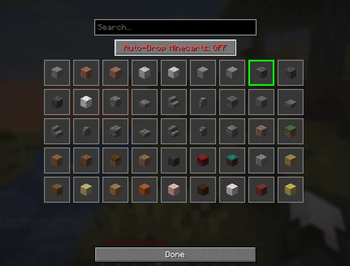
Item Seller for Minecraft 1.21.10
MAKE SURE THAT THIS MOD IS ALLOWED ON YOUR SERVER.
This mod was made with the usage of AI and only made for personal use expect bugs.
A client-side Fabric mod that automates selling a desired item by pressing a customizable hotkey (default: F6).
Features
- Press F6 (configurable) to automatically execute
/sellcommand once - Press F7 (configurable) to automatically execute
/sellcommand in a loop - Press F8 (configurable) to selected the desired item to sell
- Automatically moves the selected item from your inventory into the opened container
- Client-side only - works on servers that have the
/sellcommand - Customizable keybinding through Minecraft's controls menu
Requirements
- Minecraft 1.21.10
- Fabric Loader 0.16.9 or higher
- Fabric API 0.110.5+1.21.10 or higher
- Java 21
Installation
- Install Fabric Loader for Minecraft 1.21.10 from https://fabricmc.net/use/
- Download and install Fabric API from https://modrinth.com/mod/fabric-api
- Download and install this mod
- Place the JAR file into your
.minecraft/modsfolder - Launch Minecraft with the Fabric profile
Building from Source
Prerequisites
- Java Development Kit (JDK) 21 or higher
- Git (optional)
Build Steps
- Open a terminal/command prompt in the mod directory
- Run the build command:
./gradlew buildOn Windows:
gradlew.bat build - The compiled mod JAR will be in
build/libs/itemseller-1.0.0.jar
Usage
- Join a server that has the
/sellcommand enabled - Press F8 (or your custom keybinding) and select an item
- Press F7 (or your custom keybinding)
- The mod will:
- Execute
/sellcommand - Wait for the container to open
- Automatically move the selected item from your inventory to the container
- Press Esc and Loop
- Execute
Configuration
To change the keybinding:
- Open Minecraft
- Go to Options → Controls → Key Binds
- Scroll to the "Puuklys Item Seller" category
- Click on "Toggel Auto-Sell" and press your desired key
- Click "Done"
How It Works
- When you press the hotkey, the mod sends the
/sellcommand to the server - The mod waits up to 2 seconds for a container GUI to open
- Once the container opens, it scans your entire inventory for the desired item
- All found items are shift-clicked into the container automatically
Compatibility
- Client-side only (doesn't need to be installed on the server)
- Works with any server that has a
/sellcommand that opens a container - Compatible with most other Fabric mods
Troubleshooting
The mod doesn't move items:
- Make sure the
/sellcommand actually opens a container/GUI - Check that you have the desired item in your inventory
- Verify the server allows the
/sellcommand
Keybinding doesn't work:
- Check for keybinding conflicts in Controls settings
- Make sure the key isn't bound to another action
Build errors:
- Ensure you have JDK 21 or higher installed
- Check that you have internet connection (Gradle needs to download dependencies)
License
MIT License - Feel free to modify and distribute
Support
This mod was created for Minecraft 1.21.10 specifically. If you encounter issues, make sure:
- You're running the correct Minecraft version
- Fabric Loader and Fabric API are properly installed
- The server supports the
/sellcommand
请登录后举报
暂无评论,抢个沙发吧~