
TeleFabric
作者:rebot | 分类:模组
Minecraft 版本: 1.21.4
平台: fabric
标签: management social utility
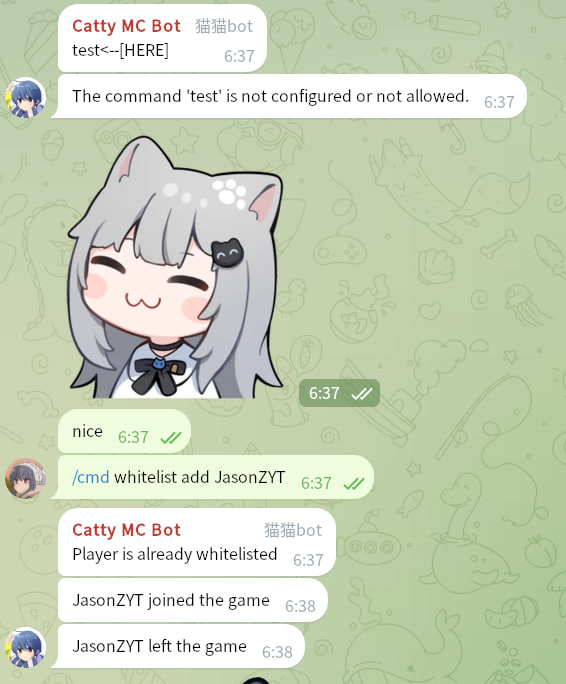
A Fabric mod that bridges your Minecraft server with a Telegram group.
Features
- Chat Bridging: Forward in-game chat to your Telegram group and relay messages from Telegram back to the Minecraft server.
- Remote Commands: Execute server commands (e.g.,
/list,/whitelist) directly from Telegram with a flexible permission system. - Player Notifications: Broadcast player join, leave, and death notifications to your Telegram chat.
Build
./gradlew buildSetup Guide
Follow these steps to get TeleFabric up and running.
1. Create a Telegram Bot
- Open Telegram and send a direct message to @BotFather.
- Send the
/newbotcommand and follow the on-screen instructions.- Note: Pay attention to the distinction between the bot's name and username. You will need the username later.
- Once the bot is created, copy the bot token provided by BotFather.
- Add your new bot to the Telegram group you want to link.
2. Install the Mod
- Download the latest
.jarfile from the Releases page. - Place the
.jarfile into your server'smodsdirectory (/path/to/server/mods/).
3. Initial Configuration
- Start your server once to generate the configuration file.
- Stop the server.
- Open and edit the new file at
/path/to/server/config/telefabric.yml. - Fill in the
bot_tokenandbot_usernamefields with the credentials you received from BotFather.
4. Get Your Chat & User IDs
- Start your server again. The bot should now be online.
- In the Telegram group where you added the bot, type the command
/getid. - The bot will reply with the Chat ID and your personal User ID. Copy these values.
- Important: Group Chat IDs start with a hyphen (
-). Don't forget to include it.
- Important: Group Chat IDs start with a hyphen (
5. Finalize Configuration
-
Stop the server and open
telefabric.ymlagain. -
Add the Chat ID(s) and admin User ID(s) to the appropriate fields.
# A list of chat IDs the bot will listen to and broadcast messages to. chats: [-100123456789, -1145141919810] # <-- Replace with your Chat ID(s) features: # ... bot_cmd_command: enabled: true commands: whitelist: # A list of user IDs allowed to execute this command from Telegram. allowed_users: [123456789] # <-- Replace with an admin's User ID permission: users # ... # ... -
Save the file and start your server. The bridge is now fully configured!
-
If you need to apply changes later without restarting the server, you can use the
/telefabric reloadcommand in the server console.
Troubleshooting
Incorrect Bot Settings
- Symptom: The bot responds to commands (like
/getid) in a direct message but ignores all commands in the group chat. - Solution: This is likely due to the bot's privacy settings.
- DM @BotFather and send the
/mybotscommand. - Select your bot from the list.
- Navigate to
Bot Settings->Group Privacy. - Ensure that group privacy is turned OFF. When disabled, the bot can receive all messages sent in the group.
- DM @BotFather and send the
Acknowledgements
This project was created in memory of a fellow developer.
While searching for a Fabric-Telegram bridge mod for Minecraft 1.21.4, I came across CuteNekoOwO/FabricTgBridge. I was deeply saddened to learn that its creator, MeowBot233, had passed away, and the project would remain on version 1.20 forever. ?️
Inspired by their work, I decided to create a new mod with similar functionality for modern versions of Minecraft. And so, TeleFabric was born.
Dependencies
This project relies on the following open-source libraries:
- Minecraft - Proprietary License
- Fabric - Apache License 2.0
- TelegramBots - MIT License
- SnakeYAML - Apache License 2.0
请登录后举报
暂无评论,抢个沙发吧~