
Maksagin_Studio Waypoints
作者:rebot | 分类:模组
Minecraft 版本: 1.16.5
平台: fabric
标签: technology utility worldgen

? Maksagin_Studio Waypoints
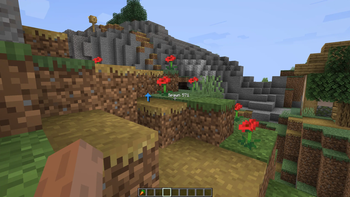
Maksagin_Studio Waypoints is a lightweight and beautiful waypoint system for Fabric 1.16.5. Create custom markers, navigate with a real-time HUD arrow, and manage your waypoints with an intuitive interface.
✨ Features
| Feature | Description |
|---|---|
| ? Waypoints | Create waypoints with custom names, coordinates, and colors |
| ? HUD Navigation | Real-time arrow direction and distance to your active waypoint |
| ? Waypoint List | View all waypoints with distance from your current position |
| ? 5 Colors | Red, Green, Blue, Yellow, Purple for easy categorization |
| ⚙️ Fully Configurable | Everything can be customized via config.yml |
| ? Persistent Storage | Waypoints saved between game sessions |
| ? Lightweight | Minimal performance impact, no dependencies |
? Controls
| Key | Action |
|---|---|
| RIGHT SHIFT | Open Main Menu |
| All keys are configurable |
⚙️ Settings
| Setting | Description |
|---|---|
| HUD Toggle | Enable/disable the navigation HUD |
| Arrow Glow | Toggle rainbow glow effect |
| Arrow Size | Adjust from 0.5 to 20.0 |
| Arrow Position | Custom X/Y coordinates |
| Key Bindings | Rebind all controls |
? Installation
- Download the latest
.jarfile - Place it in your
modsfolder - Launch Minecraft with Fabric 1.16.5
- Press
RIGHT SHIFTto open the menu - Create your first waypoint!
?️ Requirements
- Minecraft 1.16.5
- Fabric Loader 0.14.0+
- Fabric API (recommended but not required)
? Configuration
After first launch, edit config/maksagin_waypoints/config.json:
{
  "openMenuKey": "key.keyboard.right.shift",
  "hudEnabled": true,
  "hudX": 10,
  "hudY": 10,
  "arrowScale": 1.5,
  "arrowGlow": true
}请登录后举报
请 登录 后赞助作者。
暂无评论,抢个沙发吧~