
MyColorName
作者:rebot | 分类:模组
Minecraft 版本: 26.1 26.1.1 26.1.2 26.2
平台: paper
标签: social utility
MyColorName
A simple Paper plugin for Minecraft 1.21.x and 26.1.x that lets each player choose a nickname color through /mycolorname.
tabnicknames are recolored cleanlychatnicknames are recolored in chat messages/mycolornamewithout arguments opens a vanilla Minecraft dialog/mycolorname <color>applies a color directly/mycolorname help,/mycolorname list, and/mycolorname resetare available/mycolorname set <player> <color>lets admins change another player/mycolorname all <color>lets admins change every online player- in-game messages automatically switch between English and French depending on the player's client language
Installation
- Build the plugin with Gradle.
- Put the jar into your Paper 1.21.x or 26.1.x server's
plugins/folder. - Restart the server.
- Check that
plugins/MyColorName/config.ymlis created.Commands
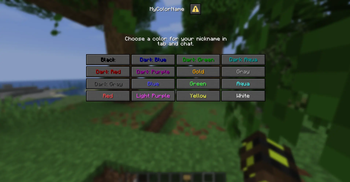
/mycolornameOpens the color selection dialog if the sender is a player.
/mycolorname <color>Changes your own nickname color.
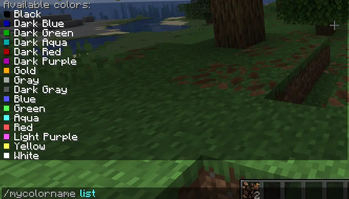
Examples:/mycolorname red /mycolorname dark_blue /mycolorname light_purple/mycolorname listShows the available colors.
/mycolorname resetResets your own nickname color.
/mycolorname set <player> <color>Lets an admin change another online player's color.
/mycolorname all <color>Lets an admin change the color of every online player.
/mycolorname helpShows the help message.
Permissions
All permissions below default to
true, except the admin permission which defaults toop.
mycolorname.use- open the dialogmycolorname.change- change your own color with/mycolorname <color>mycolorname.list- list the available colorsmycolorname.reset- reset your own colormycolorname.admin- change other players or all online playersConfiguration
File:
plugins/MyColorName/config.ymlallowed-colors: - black - dark_blue - dark_green - dark_aqua - dark_red - dark_purple - gold - gray - dark_gray - blue - green - aqua - red - light_purple - yellow - white respect-existing-list-name: trueallowed-colorsList of colors allowed in the dialog, command, and tab completion.
respect-existing-list-nametrue: if another plugin already set a custom tab name, MyColorName recolors it instead of replacing the textfalse: MyColorName starts from the player's raw Minecraft nameCompatibility
The plugin is designed to stay simple and non-intrusive:
- it depends on no third-party plugin
- it uses native Paper/Adventure APIs
- it recolors the current chat renderer instead of replacing the full format
- it restores tab nicknames on shutdown
That makes it compatible with plugins like EssentialsX in most cases.Vanilla dialog
The selection menu uses Minecraft dialogs supported by Paper on both 1.21.x and 26.1.x.
If the client or server cannot open it properly, the command falls back to the text help.
请登录后举报
请 登录 后赞助作者。
暂无评论,抢个沙发吧~