
AutoStopper
作者:rebot | 分类:模组
Minecraft 版本: 1.7.2 1.7.3 1.7.4 1.7.5 1.7.6 1.7.7 1.7.8 1.7.9 1.7.10 1.8 1.8.1 1.8.2 1.8.3 1.8.4 1.8.5 1.8.6 1.8.7 1.8.8 1.8.9 1.9 1.9.1 1.9.2 1.9.3 1.9.4 1.10 1.10.1 1.10.2 1.11 1.11.1 1.11.2 1.12 1.12.1 1.12.2 1.13 1.13.1 1.13.2 1.14 1.14.1 1.14.2 1.14.3 1.14.4 1.15 1.15.1 1.15.2 1.16 1.16.1 1.16.2 1.16.3 1.16.4 1.16.5 1.17 1.17.1 1.18 1.18.1 1.18.2 1.19 1.19.1 1.19.2 1.19.3 1.19.4 1.20 1.20.1 1.20.2 1.20.3 1.20.4 1.20.5 1.20.6 1.21 1.21.1 1.21.2 1.21.3 1.21.4 1.21.5 1.21.6 1.21.7 1.21.8 1.21.9 1.21.10 1.21.11 26.1 26.1.1 26.1.2 26.2
平台: velocity
标签: management optimization utility



Stop running empty Minecraft servers
Your players should not have to care whether a backend server is running, and you should not have
to keep every server online when nobody is using it.
AutoStopper gives a Velocity network both. It stops mapped Docker-based backend servers after
they have been empty for a while, then starts them automatically the next time a player connects.
Players use your network normally; AutoStopper handles the container lifecycle and waits until the
server is genuinely ready before sending them through.
Install it on Velocity, map the containers you want it to manage, and let quiet servers sleep.
Why use AutoStopper?
Save resources when your network is quiet
AutoStopper watches only the servers you explicitly map. Once a monitored server has no connected
players and passes its inactivity timeout, its container is stopped. Always-on hubs and lobbies can
remain completely unmonitored.
Wake servers when players need them
When a player connects to a sleeping backend, AutoStopper starts the mapped container and keeps the
request moving. Players do not need a client mod, a special account, or a replacement /server
command.
Wait for Minecraft, not just a running container
Running=true does not mean a Minecraft server is ready. AutoStopper can wait for a valid
Minecraft status response, Docker health, or either signal before connecting the player. Every
probe and Docker command has a bounded deadline.
Handle the rush back in
If several players arrive at once, they share one startup and readiness operation instead of
racing multiple container starts. Waiting players are connected when the backend becomes ready.
Fail clearly and recover safely
Failed automatic stops use capped retries without pretending the server stopped. Atomic reloads
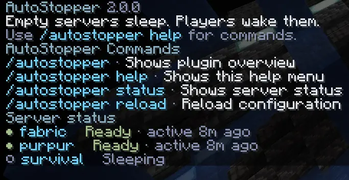
keep the previous configuration active if the replacement is invalid. /autostopper status shows
safe operational details and a suggested action while raw Docker output stays in operator logs.
What the player experiences
- The player selects a monitored server through normal Velocity routing.
- If its container is stopped, AutoStopper tells the player it is waking the server.
- AutoStopper starts one shared lifecycle operation and waits for real readiness.
- The player is connected as soon as the backend can answer Minecraft traffic.
- After everyone leaves and the inactivity period expires, the container sleeps again.
If the backend is already available, the connection proceeds normally. Servers omitted from
monitored_servers are never intercepted, started, or stopped by AutoStopper.
Tested support
One Java 21 bytecode AutoStopper JAR is tested on all three complete runtime lines below:
| Support line | Role | Proxy image | Java | Velocity |
|---|---|---|---|---|
| Legacy | Minimum/floor | itzg/mc-proxy:2026.8.0-java21 |
21 | 3.5.1 build 615 |
| Stable | Production | itzg/mc-proxy:2026.8.0-java25 |
25 | 4.0.0 build 6 |
| Preview | Snapshot validation | itzg/mc-proxy:2026.8.0-java25 |
25 | 4.1.0-SNAPSHOT build 16 |
Velocity 4.x requires at least Java 25; the preview line validates a PaperMC snapshot and is not a
production baseline. Keep the proxy image/JVM and Velocity build from one row together. The real
release-candidate stack is exercised with a Purpur 1.21.4 backend, actual protocol clients,
simultaneous joins, idle stop, restart, never-ready behavior, and failed-stop retry on the stable
line.
Quick start
- Choose the complete
Java 21 / Velocity 3.5.1 example
(minimum), Java 25 / Velocity 4.0 example
(recommended production), or Java 25 / Velocity 4.1 preview example. - Put the downloaded, unchanged JAR at
velocity_server/plugins/AutoStopper.jar. - Register each managed backend in Velocity's
[servers]table. - Start the stack once and edit the generated lowercase path
velocity_server/plugins/autostopper/config.yml. - Map only real Velocity server names to existing Docker containers, then restart Velocity or run
/autostopper reload. - Run
/autostopper statusand resolve any degraded mapping before opening the proxy to players.
Important Docker security warning: the tested installation mounts
/var/run/docker.sock
into Velocity. Access to that socket is effectively equivalent to root control of the Docker
host. Adding the proxy user to the socket group is not ordinary non-root isolation. Prefer a
dedicated host or VM, install only trusted plugins, and read the full
security guidance before
starting the stack.
Managed backend containers must already exist and use restart: "no", otherwise Docker may undo a
successful inactivity stop. Leave always-on hubs out of monitored_servers.
Sensible defaults, explicit control
- 5-minute inactivity timeout
- 10-second plugin shutdown deadline
- 3 automatic stop attempts with 60-to-300-second capped backoff
- Minecraft status readiness with a 120-second overall deadline
- no monitored containers until you explicitly add mappings
Every value is configurable, validated as one atomic snapshot, and documented in the
configuration reference.
Commands and permissions
| Command | Permission |
|---|---|
/autostopper or /as |
Public plugin information |
/autostopper help |
Public, permission-filtered help |
/autostopper status |
autostopper.command.status or autostopper.admin |
/autostopper reload |
autostopper.command.reload or autostopper.admin |
AutoStopper does not register or replace Velocity's /server command and exposes no manual start or
stop command.
Learn more
- Complete installation guide
- Configuration reference
- Troubleshooting
- 1.1.2 to 2.0.0 migration
- Changelog
- Report an issue
Ready to let empty servers sleep? Choose a pinned example, review the Docker security boundary,
and install the same validated JAR published here and on GitHub Releases.
请登录后举报
请 登录 后赞助作者。
暂无评论,抢个沙发吧~