
FancyHAT
作者:rebot | 分类:模组
Minecraft 版本: 1.19 1.19.1 1.19.2 1.19.3 1.19.4 1.20 1.20.1 1.20.2 1.20.3 1.20.4 1.20.5 1.20.6 1.21 1.21.1 1.21.2 1.21.3 1.21.4 1.21.5 1.21.6 1.21.7 1.21.8 1.21.9 1.21.10 1.21.11 26.1 26.1.1 26.1.2
平台: bukkit folia paper purpur spigot
标签: decoration equipment utility



? FancyHAT
The Ultimate Multi-Language Cosmetic Solution
FancyHat is not just another simple script. It's a high-performance, asynchronous plugin designed for modern Minecraft servers. Offer your players a stylish way to wear any item as a hat with zero impact on your TPS.
✨ Why FancyHAT?
- ? Native Multi-Language: Built-in support for 14 languages (EN, PL, DE, ES, FR, IT, PT, RU, ZH, NL, TR, JA, CS, UK).
- ? Dynamic Displays: Choose how to show messages: ActionBar, Titles, or classic Chat.
- ?️ Smart Inventory Guard: Sophisticated swapping logic. If the head slot is busy, the old item is safely moved to the inventory or dropped at the player's feet.
- ⚡ Asynchronous Engine: Update checks and network operations run on separate threads for a lag-free experience.
- ? HEX & RGB Ready: Full support for modern color formats (
&#rrggbb) for that premium feel.
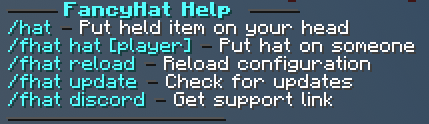
? Player Commands
| Command | Description |
|---|---|
/hat |
Equips the held item as a stylish hat. |
/fhat discord |
Displays the official support community link. |
?️ Admin Commands
| Command | Description |
|---|---|
/fhat hat [player] |
Forces a hat onto the specified player's head. |
/fhat reload |
Instantly reloads all configurations and 14+ language files. |
/fhat update |
Manually checks Modrinth for the latest releases. |
? Permissions
| Permission | Description | Default |
|---|---|---|
fancyhat.player.hat |
Use /hat and self-target /fhat hat. |
Everyone |
fancyhat.player.discord |
Access to the Discord command. | Everyone |
fancyhat.admin.hat |
Put hats on other players. | OP |
fancyhat.admin.reload |
Reload the plugin settings. | OP |
fancyhat.admin.update |
Check for updates and receive join alerts. | OP |
⚙️ Advanced Configuration
FancyHat gives you full control over sounds, blacklists, and languages.
View config.yml (Click to expand) ```yaml # ========================================== # # FANCYHAT # # Created by xFeneq (c) 2026 # # ========================================== # # The language file to use from the "/languages" folder. # Available languages: # - en-US - English (English) # - pl-PL - Polish (Polski) # - de-DE - German (Deutsch) # - es-ES - Spanish (Español) # - fr-FR - French (Français) # - uk-UA - Ukrainian (Українська) # - it-IT - Italian (Italiano) # - pt-BR - Portuguese (Português) # - ru-RU - Russian (Русский) # - zh-CN - Chinese (中文) # - nl-NL - Dutch (Nederlands) # - tr-TR - Turkish (Türkçe) # - ja-JP - Japanese (日本語) # - cs-CZ - Czech (Čeština) language: "en-US" # Plugin prefix used before messages. # Supports HEX colors (Birdflop format: rrggbb) -> Generator: https://www.birdflop.com/resources/rgb/ prefix: "ɣC1BꜰF3826ʜ C5432ᴀBA703Dᴛ D78C48» " # ========================================== # # HAT SETTINGS # # ========================================== # settings: # If true, current helmet will be moved back to player's inventory. smart-item-swap: true # If inventory is full, the old helmet will be dropped on the ground. drop-items-if-full: true # Automatically check for updates on Modrinth. update-checker: true # List of items that cannot be used as a hat. # You can find all valid Minecraft material names here: # https://hub.spigotmc.org/javadocs/spigot/org/bukkit/Material.html # Use exactly as written (e.g., "DIAMOND_BLOCK"). blacklist: - "BEDROCK" - "BARRIER" - "COMMAND_BLOCK" # ========================================== # # SOUND EFFECTS # # ========================================== # # Configure sounds for specific actions. Set name to "NONE" to disable. # Sound List: https://hub.spigotmc.org/javadocs/spigot/org/bukkit/Sound.html sounds: success: name: "ENTITY_PLAYER_LEVELUP" volume: 1.0 pitch: 1.0 error: name: "ENTITY_VILLAGER_NO" volume: 1.0 pitch: 1.0 # ========================================== # # COMMAND SETTINGS # # ========================================== # # Enable or disable specific commands and add custom aliases. # NOTE: Changes to aliases require a SERVER RESTART! # Example of adding an alias: aliases: ["head", "fh"] commands: hat: enabled: true aliases: [] fhat: enabled: true aliases: [] # ========================================== # # PLACEHOLDERS REFERENCE # # ========================================== # # Use these variables in your language files (e.g., en-US.yml): # ${player} - Name of the person who executed the command # ${target} - Name of the target player (for admin commands)请登录后举报
请 登录 后赞助作者。
暂无评论,抢个沙发吧~