
NPC Plugin
作者:rebot | 分类:模组
Minecraft 版本: 1.20.6 1.21 1.21.1 1.21.2 1.21.3 1.21.4 1.21.5 1.21.6 1.21.7 1.21.8 1.21.9 1.21.10 1.21.11 26.1 26.1.1 26.1.2 26.2
平台: spigot
标签: management technology utility

[](https://github.com/Eisi05/NpcApi-Spigot) [](https://github.com/Eisi05/NpcApi-Spigot/wiki) [](https://crowdin.com/project/npcplugin) [](https://discord.com/users/486889436022571008) If you have any suggestions, would like a feature to be added, or encounter any issues, you can use the [issue page](https://github.com/Eisi05/NpcApi-Spigot/issues) or contact me on Discord @eisi05
NpcPlugin
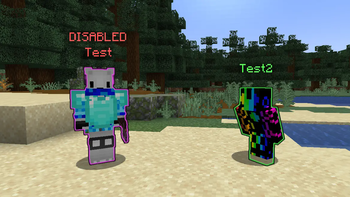
Create, customize, and manage player-like NPCs with an in-game editor GUI, click actions, AI goals, and a built-in path system.
⚠️ Important: If you're upgrading from a version earlier than 2.1.0, you must first update to a version between 2.1.0 and 2.4.2 before installing 3.3.x.
🌍 Translations & Localization:
If you want to add a new language to the project, please reach out to me so I can set it up on Crowdin for you! Or you can send me a translated .zip file directly
If you want to make a tutorial video about it, feel free to do so
Supported Versions
Spigot: 1.20.6 - 26.2
Paper: 1.21 - 26.2
Overview
- In-game editor: create and configure NPCs directly on your server.
- Click Actions: build action chains for left/right/both clicks.
- Path system: create and reuse paths (including visualization + testing).
Getting Started
/npc create/npc edit- Right-click an NPC to open its editor.
Links
- Plugin docs: https://github.com/Eisi05/NpcApi-Spigot/wiki/PLUGIN-Home
- API / Developer docs:
Highlights
- In-game NPC editor
- Toggle edit-mode and configure NPCs directly by interacting with them.
- Edit common properties like name, skin, equipment, glow, visibility, tab-list, pose, and more.
- Click Actions (Left / Right / Both)
- Build action chains that run when players click an NPC.
- Built-in action types include:
Command(run commands with placeholders + variables)Server(send players to a BungeeCord server)Wait(wait by time or by command trigger)Animation(play an animation)Path(make the NPC walk along a saved path)SetVariable(set local/instance/global numeric variables)Condition(run a sub-chain if an expression is true)Loop(repeat a sub-chain; while-loop or for-loop)Npc(apply NPC options per-player or globally as an action)Stop(stop the chain)
- Path system
- Create paths using points, visualize them, test them with a temporary NPC, and reuse them in NPC actions.
- AI Goals
- Configure NPC behavior with built-in goals: Walk to Location, Walk Path, Follow Entity, Attack Entity, Look Around, Wait, and Wander.
- Set target predicates using expressions for dynamic entity selection.
- Expression Parser
- Use mathematical expressions with variables, functions, and boolean logic.
- Support for local, instance, and global variables.
- Execute commands within expressions and use their results.
- Localization + PlaceholderAPI
- Ships with language files (default
en_US). - PlaceholderAPI is supported (soft-depend): placeholders can be used in plugin messages where applicable.
- Ships with language files (default
Guides
Getting Started (Installation + Quick Start) ### Installation 1. Download the jar and place it into your server’s `plugins/` folder. 2. Start the server once. 3. Configure (optional): - `plugins/NpcPlugin/config.yml` - `plugins/NpcPlugin/lang//*.json` 4. Restart or run `/npc reload`. ### Quick Start #### 1) Create an NPC - `/npc create` #### 2) Enable edit-mode - `/npc edit` While edit-mode is enabled: - **Interact with an NPC** to open its editor GUI. If the NPC is **not editable**, you’ll get a message like `This NPC is not editable!`. #### 3) Configure NPC options in the GUI The GUI lets you change things like: - Name - Skin (player name / UUID / local `.png` / URL / `.yml` file / PlaceholderAPI) - “Use Player Skin” (per-player skin) - Equipment slots - Visibility / enabled state - Tab list visibility - Hide nametag - Pose - Skin parts - Glowing + color - Look-at-player radius / interval - Scale - Teleport to NPC / teleport NPC to you - Delete NPC - Goals For detailed information on setting skins, see the [Skins guide](https://github.com/Eisi05/NpcApi-Spigot/wiki/PLUGIN-Skins). Click Actions ## Click Actions (Left / Right / Both) In the NPC GUI go to **Click Action**. You can configure actions separately for: - **Left click** - **Right click** - **Both** (combined) You can create an action chain by adding multiple actions. ### Action editing tips - **Remove an action**: middle-click an existing action. - **Add actions quickly**: shift-click an action type to append it. - **Reorder / insert**: pick up an action type onto your cursor and click a slot. ### Common action types #### `Command` Executes a command. - Input can be with or without leading `/` (the plugin stores it as `/`). - Placeholders supported: - `{player}` / `%player%` / `` - `{player_name}` / `%player_name%` / `` - Supports variables/expressions via the plugin action system. - There is optional syntax validation. Example: - `warp spawn` - `server hub` - `msg {player} Welcome!` #### `Server` (BungeeCord) Sends the player to another BungeeCord server. Example server name: - `hub` #### `Wait` Pauses the chain before continuing. You can switch between two modes in the editor: ##### Time mode - Left/Right click to adjust the time - Shift+Left/Shift+Right for bigger steps - Range is clamped (min `0.05s`, max `600s`) ##### Command mode Instead of waiting for time, the chain waits until an admin triggers it: - `Wait` stores a **name** (string) - The chain continues only after: - `/npc wait [values...]` If `[values...]` are provided, they are exposed to the next actions as local variables: - `-0`, `-1`, ... (numeric values; invalid numbers become `0.0`) This is useful to wait for external systems (minigames, scripted events, etc.). ##### Note (Path) The `Path` action also uses the same wait mechanism internally: the chain continues when the NPC finishes walking. #### `Path` Makes the NPC walk along a saved path. - You pick a path name (must exist; same world) + a speed (`0.01`–`1.0`). - Optional flags: - For all (everyone sees the NPC walking) - Change real location (updates the NPC's real location while walking) #### `Animation` Plays an animation on the NPC for the clicking player. - Left click: next animation - Right click: previous animation #### `SetVariable` Sets a numeric variable. - Type: - Local (stored per-player) - Instance (stored on the NPC) - Global (stored server-wide; persisted in `global-variables.yml`) - Name must match `^[a-zA-Z_][a-zA-Z0-9_-]*$` - Value is an expression If the value is missing, the action does nothing (admins get a warning). #### `Condition` Runs a **sub-chain** only if its expression is `true`. - You edit the sub-chain like a normal action list - The condition expression is edited via the "value" item #### `Loop` Repeats a sub-chain. There are two loop types: ##### While-loop - Repeats while the expression is `true` ##### For-loop - Repeats with an integer loop index - Configurable values: - Start (optional; default `0`) - End (required) - Step (optional; default `1`) You can change the loop type by **Shift-clicking** the action. #### `Npc` Opens a special editor that lets you apply NPC options *as an action*. This is mainly used to change how the NPC looks/behaves for: - Only the clicking player (per-player override) - Everyone (global) Two flags exist: - Change globally: applies the configured options to the NPC’s global options - Reset to default: removes per-player overrides and resets to the NPC’s defaults #### `Stop` Stops the current chain immediately (and stops nested chains too). #### Run-on-show In the action editor you can enable **Run on show**. If enabled, the chain triggers when the NPC is shown to a player (not only when clicked). Path System Guide ## Path System Guide Paths are shared and stored in: - `plugins/NpcPlugin/paths.yml` ### Create a path from points 1. Add points at your current location: - `/npc path point add` Or add at a specific index: - `/npc path point add ` 2. List points: - `/npc path point list [page]` 3. Visualize / toggle visualization of current points: - `/npc path visualize points` 4. Create the path: - `/npc path create [maxIterations] [allowDiagonalMovement]` After creation you can visualize it: - `/npc path visualize ` ### Record a path by walking 1. Start recording: - `/npc path record start` 2. Walk the route. 3. Stop recording: - `/npc path record stop` 4. Create the path: - `/npc path create ` ### Edit an existing path - `/npc path edit ` This loads the saved path’s waypoints into the point list so you can remove/add points and re-create it. ### List / delete / test paths - `/npc path list [page]` - `/npc path delete ` - `/npc path test [speed]` Goals Guide ## Goals Guide Goals give NPCs autonomous behavior. Configure them via the NPC editor GUI. ### Available Goals - **Walk to Location**: NPC walks to a specific location using pathfinding - **Walk Path**: NPC walks along a saved path - **Follow Entity**: NPC follows a target entity by UUID - **Attack Entity**: NPC attacks nearby matching entities - **Look Around**: NPC looks around randomly (idle behavior) - **Wait**: NPC waits for a specified duration - **Wander**: NPC wanders randomly within a radius ### Attack Entity Predicates Target entities using expressions with variables: - `$distance` - Distance to NPC - `$entity.x`, `$entity.y`, `$entity.z` - Entity position - `$entity.health` - Entity health - `$npc.x`, `$npc.y`, `$npc.z` - NPC position - `[if entity @s[type=zombie]]` - Command-based entity type check Example predicates: - `$distance 5` - Combined conditions For more details, see the [full Goals documentation](https://github.com/Eisi05/NpcApi-Spigot/wiki/PLUGIN-Goals). Expression Parser Guide ## Expression Parser Guide Use mathematical expressions in click actions, goal conditions, and variable calculations. ### Supported Elements **Operators**: `+`, `-`, `*`, `/`, `^` (power), `&&`, `||`, `!`, `==`, `!=`, ``, `=` **Math Functions**: `sin()`, `cos()`, `tan()`, `sqrt()`, `log()`, `exp()`, `ceil()`, `floor()`, `round()`, `trunc()`, `abs()` **Constants**: `PI`, `E` ### Variables - `$varName` - Auto-resolve (local → instance → global) - `$global.varName` - Server-wide variable - `$instance.varName` - NPC-specific variable - `$local.varName` - Player-specific variable **Special Variables**: - `$self.rightClick` / `$self.leftClick` - Click type (1 or 0) - `$self.sneaking`, `$self.flying`, `$self.op` - Player state - `$loop.index` - Loop iteration index ### Command Execution - `(/command)` - Execute command inside expression - `/command` - Standalone command execution Examples: - `2 + (/count players)` - Use command result in calculation - `$global.score + 1` - Increment variable - `($entity.health Commands ## Commands ### Core - `/npc create [options]` (options are defined in key-value pairs like `--name "Test"`) - `/npc copy ` - `/npc edit` (toggle edit-mode) - `/npc edit ` (edit specific NPC) - `/npc edit ` (edit specific NPC option, which are defined in key-value pairs like `--name "Test"`) - `/npc delete [force]` (delete specific NPC) - `/npc list` (opens NPC list GUI) - `/npc tp [location] [rotation]` - `/npc tphere ` - `/npc reload [npc]` - `/npc version` - `/npc update` (checks for a new plugin version) - `/npc cancel ` (cancels NPC click action) - `/npc cancel all` (cancels all NPC click actions) - `/npc load ` (loads NPC from storage) - `/npc load ` (loads NPC at specific location) - `/npc load ` (loads NPC at specific location with rotation) - `/npc click ` (executes NPC click action on self) - `/npc click ` (executes NPC click action on target) - `/npc move turn ` (rotates NPC by relative degrees) - `/npc move [steps] [speed]` (moves NPC using direction flags) - `/npc help` (shows help message) - `/npc issue` (shows issue tracker link) - `/npc wiki` (shows wiki link) - `/npc message ` (Can be used in command actions to send a message which also allows '&' color codes) - `/npc tag add ` (adds a tag to an NPC) - `/npc tag remove ` (removes a tag from an NPC) - `/npc tag list` (lists all tags of an NPC) - `/npc animation [targets]` (plays an animation on the specified targets) - `/npc languages reload` (reloads all language files from disk) - `/npc languages restore [language]`(restores default language files from resources, overwrites all 'official' language files) ### Config - `/npc config reload` - `/npc config debug [true|false]` - `/npc config avoid-command-check [true|false]` - `/npc config look-at-update-interval [ticks]` - `/npc config input-time [seconds]` - `/npc config auto-update [true|false]` - `/npc config placeholder-timer [ticks]` - `/npc config check-valid-path [true|false]` - `/npc config walking-viewer-distance [distance]` - `/npc config precise-sleeping-hitbox [true|false]` - `/npc config load-chunks-on-path [true|false]` - `/npc config pathfinding-factory [a_star|bounding_box] [gridStep]` - `/npc config name-display` - `/npc config list` ### Exceptions (startup load failures) - `/npc exceptions [page]` - `/npc exceptions show ` - `/npc exceptions delete ` ### Paths All path commands are under: - `/npc path ...` Main subcommands: - `point add [index] [location] [rotation]` - `point remove [index|location]` - `point list [page]` - `point clear` - `create [name] [pathfinder] [maxIterations] [allowDiagonalMovement]` - `delete ` - `list [page]` - `visualize [name]` - `visualize points` - `record start|stop` - `test [speed]` - `edit ` ## Movement All movement commands are under: - `/npc movement ...` Main subcommands: - `record start [player]` (starts recording movement) - `record stop [player] [overwrite]` (stops recording and saves) - `record stop [overwrite]` (stops recording and saves for self) - `record` (gives recording item) - `list [page]` (lists all movement recordings with pagination) - `details ` (shows detailed information about a recording) - `delete ` (deletes a movement recording) - `play [speed]` (plays a recording on self) - `play [speed]` (plays a recording on target) ## Execute Context Execution modifiers allowing dynamic target selection and context redirection for NPC subcommands: - `/npc execute as do ` (executes targeted NPC command as the selected NPC context) - `/npc execute at do ` (executes targeting location and orientation of selected NPC) - `/npc execute positioned as do ` (executes at the position of selected NPC) - `/npc execute rotated as do ` (executes with the rotation angles of selected NPC) --- ## NPC Selector System The target selector system (`NpcSelector`) parses entity target syntax matching standard Minecraft target selectors to query registered NPCs: * **Target Specifiers**: * `@a` – Matches all loaded/registered NPCs. * `@s` – Matches the self-referential NPC currently targeted inside an active `/npc execute` context. * `@n` / `@p` – Targets the single nearest NPC relative to the command source origin. * `@r` – Selects a random NPC candidate. * `` – Directly queries an NPC by display name or unique ID. * **Filter Arguments (`[...]`)**: * `tag=` / `tag=!` – Filters NPCs possessing (or missing) specific assigned tags. * `nbt={:}` – Evaluates target options against specific internal `NpcOption` states or custom stored data. * `distance=..` – Constrains candidates based on Euclidean distance boundaries from the execution origin. * `limit=` – Restricts maximum return results. ## Wait trigger Used with the `Wait` click action (command mode): - `/npc wait [values...]` ### Variables Manage server-wide global variables via commands: - `/npc variable list` - List all global variables - `/npc variable get ` - Get a variable's value - `/npc variable set ` - Set a variable (supports expressions) - `/npc variable delete ` - Delete a variable Variables can also be managed via the SetVariable click action and used in expressions throughout the plugin. Configuration ## Configuration (`config.yml`) - `look-at-update-interval`: - Time in ticks between “look at player” updates. - `avoid-command-check`: - If `true`, commands added to NPC actions will not be strictly validated. - `debug`: - Enables extra debug logging. - `input-time`: - Conversation timeout in seconds (if ` (e.g. "BOUNDING_BOX 0.5"). must be between 0.01 and 1.0. - BOUNDING_BOX is based on Theta* and provides more precise collision detection, e.g. for blocks that are solid but can still be walked through (like a shelf). - `pathfinding-passable-override`: - List of block types that should be considered passable for pathfinding even though they are normally solid (like a shelf). - _This is only editable via the config.yml file and not via the `/npc config` command!_ Troubleshooting ## Troubleshooting - **“This plugin does not support Paper servers!”** - You are running the **Spigot** build on a **Paper** server. Install the Paper build instead. - **Server action does nothing** - Ensure BungeeCord is set up and the server names match your proxy configuration. - **Can’t open the editor GUI** - Make sure you: - Have `npc.admin` - Enabled edit-mode via `/npc edit` - The NPC is marked as editable Skript Support To use this plugin’s events in Skript, you need [Skript-Reflect](https://github.com/SkriptLang/skript-reflect/releases) --- ### Basic usage ```vb import: de.eisi05.npc.api.events. on : # your code here ``` Replace `` with one of the events listed below. --- ### Available Events --- #### NpcHideEvent Triggered after an NPC is hidden from a player. **Available values:** * `event.getNpc()` → NPC * `event.getPlayer()` → Player --- #### NpcInteractEvent Triggered when a player interacts with an NPC. **Available values:** * `event.getNpc()` → NPC * `event.getPlayer()` → Player * `event.getAction()` → ClickActionType (LEFT / RIGHT) * `event.isCancelled()` → boolean --- #### NpcPostShowEvent Called after an NPC is fully visible to a player. **Note:** This event cannot be cancelled. **Available values:** * `event.getNpc()` → NPC * `event.getPlayer()` → Player * `event.wasViewer()` → boolean (true if the player already saw this NPC before) --- #### NpcPreShowEvent Called before an NPC is shown to a player. **Note:** This event can be cancelled. **Available values:** * `event.getNpc()` → NPC * `event.getPlayer()` → Player * `event.wasViewer()` → boolean * `event.isCancelled()` → boolean --- #### NpcStartWalkingEvent Called before an NPC starts walking along a path. **Available values:** * `event.getNpc()` → NPC * `event.getPath()` → Path * `event.getWalkSpeed()` → double * `event.isChangeRealLocation()` → boolean (whether real NPC location will update) * `event.isCancelled()` → boolean --- #### NpcStopWalkingEvent Called after an NPC stops walking. **Available values:** * `event.getNpc()` → NPC * `event.getWalkingResult()` → WalkingResult (SUCCESS / CANCELLED) * `event.changeRealLocation()` → boolean (whether final position should be applied) --- ### Example You can also directly access Java methods inside Skript like this: ```vb import: de.eisi05.npc.api.events.NpcInteractEvent on NpcInteractEvent: set {_player} to event.getPlayer() send "Triggered!" to {_player} ``` --- ### Additional Resources For more information about Skript-Reflect syntax and features, visit: https://tpgamesnl.gitbook.io/skript-reflect/basics bStats 请登录后举报
请 登录 后赞助作者。
暂无评论,抢个沙发吧~