
Server Backpacks!
作者:rebot | 分类:模组
价格:0 墨喵币
下载量:0
点赞:0
版本 1.6+26.2
本资源为搬运资源,原资源地址:
https://modrinth.com/mod/serverbacksnow
资源信息
Minecraft 版本: 26.2
平台: fabric
标签: adventure storage
资源介绍
#

**A server-sided mod that adds backpacks using [Polymer](https://github.com/Patbox/polymer) by [Patbox](https://modrinth.com/user/Patbox)**

Overview
Trinkets, commands, and config are only supported in version 1.3 and above.
GeyserMC (Bedrock) support is only for the latest Minecraft versions supported by GeyserMC.
Before updating, it's recommended to check the changelog for breaking changes.
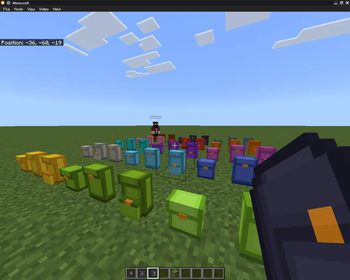
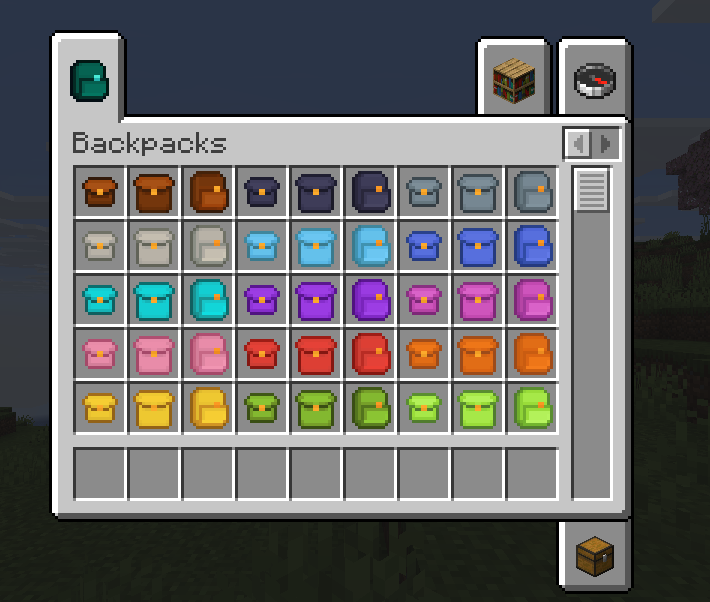
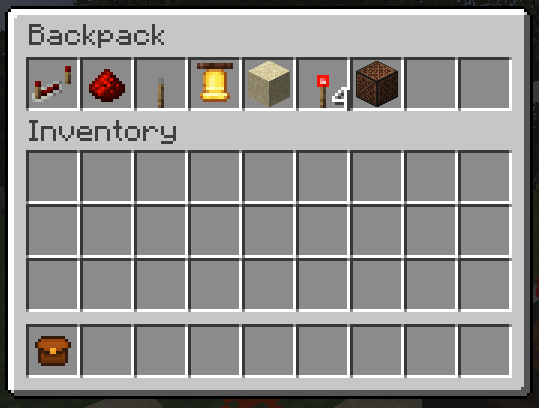
Additions ### This mod adds 6 items. - A small backpack, that has **9 slots**. - A medium backpack, that has **18 slots**. - A large backpack, that has **27 slots**. - A ender backpack, a backpack that lets you **access your ender chest from anywhere!** - A global backpack, that has **54 slots** and it's inventory can be shared by linking it with other global backpacks using an ender pearl by dropping 2 global backpacks on the ground plus an ender pearl! - A lava backpack, that when full the backpack will clear the first row and move the second row to the first row. Essentialy a trash backpack. # ### Modules - Currently, this mod adds: * Crafting Module * Stonecutter Module * Void Module * Vacuum Module * Jukebox Module * To apply them to the backpack: * Put the module and the backpack inside a smithing table. * To use them: - Crafting Module: Sneak and open the backpack normally in the air, then you can click on the crafting module to open a crafting ui. - Stonecutter Module: The same as the crafting module, but it shows the stonecutter ui. - Void Module: You can add to it's filter by putting it inside a crafting table and add the items you want to filter around it. The backpack will void any nearby items you specified in the filter. - Vacuum Module: The same as void module, but you can change it's mode to whitelist, blacklist or match backpack's content. - Jukebox Module: To use it, first you need to integrate it with a backpack, and go inside the backpack's upgrade container GUI. To put the music disc, click the Jukebox Module while your mouse cursor is holding the music disc. Slowly change the mode as you can take it out if you click too fast. # ### It also adds an enchantment! - Capacity, an enchantment that increases your backpack's storage by 9 additional slots per level! (Note: Can be applied on medium and large backpack only). Also, Regular backpacks are dyeable like bundles! ### 1.3 and above * Backpacks are like bundles. You can use the item form of a backpack to input item into it like a bundle. Backpacks only allows inserting item. * Backpacks. backpacks. You can right click a backpack in a inventory to open it. * Placeable backpacks. **Note: This below requires you have the Trinkets (Polymer Port) mod!** * You can put backpacks on a trinkets back slot. To open the backpack do /open. * You also place it! Just shift right click on the ground with an empty hand. Recipes 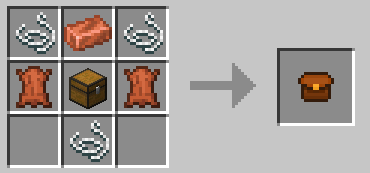 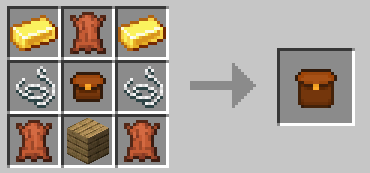 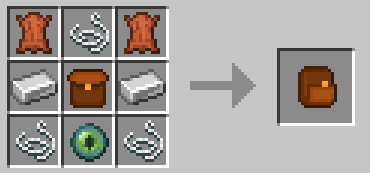 # 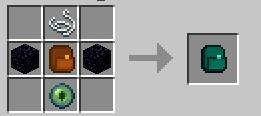 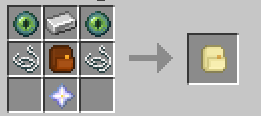  Commands * ### /backpacks: * `/backpack backup` Makes a backup. * `/backpacks list`: Lists created backpack instances. * `/backpacks open `: Specify an UUID to open a backpack instance. * ### /backpacks open config : * `/backpacks open config reset`: Resets the backpack's config. * `/backpacks open config reload`: Saves the backpack's config. * `/backpacks open config save`: Reloads the backpack's config. ## * ### /open : * Allows to open a backpack when it is equipped on the trinkets back slot. ## Configuration * `back_positions`: Adjusts the backpack’s position on the player’s back. * `back_yaw`: Controls horizontal rotation (left/right) of the backpack. * `back_pitch_when_sneaking`: Alters the tilt angle of the backpack when the player is sneaking. ## * `display_back`: Determines whether or not the backpack should be displayed on the back when equipped. * `breaks_with_flow` Determines whether or not the backpack should break when water flows to it. ## * `types_of_backpacks` : Add or remove an entry to remove or create a backpack. ## Adding Textures Write **/polymer generate** command. Resource pack will be located in your server folder as polymer-resourcepack.zip or you can enable [auto-host](https://polymer.pb4.eu/latest/user/resource-pack-hosting/) in polymer's config. Geyser Support Geyser is fully supported, but not when your wearing the backpacks. That is the only unsupported thing, but java players can fully see the backpacks on the back if you wear it.Example in game
Bugs
Please report
any bugs that might occur while using this mod.
Credits
- Octal for the orignal mod Server Backpacks as this is based on it.
- MOEJ-The-Good for the quality of life ideas.
- ndellagrotte for contributing the Lava Backpack.
下载与版本
评论(0)
请 登录 后发表评论。
举报此资源
请登录后举报
赞助作者
请 登录 后赞助作者。
暂无评论,抢个沙发吧~