
vScoreboard
作者:rebot | 分类:模组
Minecraft 版本: 1.21 1.21.1 1.21.2 1.21.3 1.21.4 1.21.5 1.21.6 1.21.7 1.21.8 1.21.9 1.21.10 1.21.11 26.1 26.1.1 26.1.2 26.2
平台: folia paper purpur
标签: adventure magic management
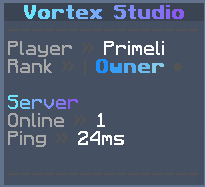

VScoreboard
A modern, lightweight and highly configurable scoreboard plugin for Paper and Folia servers.
VScoreboard provides conditional scoreboards, rotating pages, animations, MiniMessage formatting, sprites, an in-game editor and optional placeholder integrations — all inside one universal JAR.
Features
- Multiple prioritized scoreboards
- Conditional boards, pages and individual lines
- Rotating scoreboard pages
- Frame, scrolling and typewriter animations
- Smooth animated MiniMessage gradients
- Reusable progress bars
- Native scoreboard sprites
- Custom or hidden right-side score values
- Persistent per-player visibility
- Selectable scoreboard designs
- In-game editor with live previews
- Automatic configuration migration and backups
- Optional PlaceholderAPI integration
- Optional MiniPlaceholders integration
- Built-in server and player placeholders
- Paper and Folia scheduler support
- Scoreboard takeover protection
- Smart rendering and component caching
- Asynchronous Modrinth update checker
- Public Bukkit service API
- bStats integration
Supported Versions
One universal JAR supports:
- Minecraft 1.21 through 1.21.11
- Minecraft 26.1, 26.1.1, 26.1.2 and 26.2
- Paper
- Folia
- Paper-based forks such as Purpur
Java 21 is required for Minecraft 1.21.x.
Minecraft 26.x requires Java 25.
In-Game Editor
Open the editor with:
/vscoreboard editorYou can use it to:
- Create and delete scoreboards
- Create and delete pages
- Edit scoreboard titles
- Add, edit and remove lines
- Configure custom score values
- Show or hide right-side numbers
- Preview boards and pages instantly
Destructive actions require confirmation.
Every change is validated before saving. The editor writes files atomically and automatically retains timestamped backups.
Clean Configuration Layout
VScoreboard keeps its configuration organized:
config.yml— global settings, compatibility and integrationsscoreboards.yml— scoreboards, pages and linesanimations.yml— animations and progress barsmessages.yml— player-facing messagesplayers.yml— persistent player preferences
Older configurations are migrated automatically.
Custom boards, messages, animations, unknown settings and player preferences are preserved. A timestamped backup is created before every migration.
Example Scoreboard
scoreboards:
  default:
    title:
      text: '{animation:title}'
      refresh-ticks: 4

    display-condition: 'true'
    selectable: true

    # false hides every right-side number.
    # true shows classic descending numbers.
    # Omit this setting to show only configured score values.
    score-numbers: false

    pages:
      player:
        duration-seconds: 10
        condition: 'true'
        lines:
          - '<dark_gray>----------------'
          - '<gray>Player <dark_gray>» <white>%player_name%'

          - text: '<gray>Health <dark_gray>» <white>%vscoreboard_health%/%vscoreboard_max_health%'
            refresh-ticks: 10

          - text: '<red>⚠ Your health is low!'
            condition: '%vscoreboard_health%<8'
            refresh-ticks: 10

          - '<gray>World <dark_gray>» <white>%vscoreboard_world%'
          - '<dark_gray>----------------'

      server:
        duration-seconds: 8
        condition: 'true'
        lines:
          - '<dark_gray>----------------'

          - text: '<gray>Online'
            score: '<green>%vscoreboard_online%'

          - text: '<gray>Ping <dark_gray>» %vscoreboard_ping_color%%vscoreboard_ping%ms'
            refresh-ticks: 10

          - '<gray>Time <dark_gray>» <white>%vscoreboard_time%'
          - '<dark_gray>----------------'
Simple lines can remain plain strings. The expanded format is only required when using conditions, custom score values or individual refresh intervals.
Animations
Insert animations anywhere using:
{animation:name}Supported animation types:
framesscrolltypewriter
Example:
animations:
  welcome:
    type: scroll
    interval-ticks: 2
    text: 'Welcome to the server!'
    style: '<aqua>'
    width: 20
    spacer: '   '

  loading:
    type: typewriter
    interval-ticks: 3
    text: 'Loading...'
    style: '<green>'
    pause-ticks: 20
Reusable progress bars can be inserted with:
{bar:name}Score Values
Custom right-side values can be configured per line:
- text: '<gray>Coins'
  score: '<gold>%vault_eco_balance_formatted%'
Score numbers can also be controlled for an entire scoreboard:
score-numbers: falseThis hides every right-side number without deleting configured values.
score-numbers: trueThis shows classic descending numbers. Custom line values override generated numbers.
Omit the setting to display only explicitly configured score: values.
Conditions
Supported comparison operators:
==!=>=<=><
Supported logic:
&&for AND||for OR!for NOT- Parentheses for grouping
Examples:
%vscoreboard_ping%>=160
%vscoreboard_health%<8
%luckperms_in_group_admin%==yes || %luckperms_in_group_mod%==yes
!(%vscoreboard_world%==disabled_world)
Placeholders
PlaceholderAPI and MiniPlaceholders are optional.
VScoreboard continues working with its built-in placeholders when neither plugin is installed.
Built-in placeholders include:
%vscoreboard_ping%%vscoreboard_ping_color%%vscoreboard_ping_bar%%vscoreboard_tps%%vscoreboard_tps_color%%vscoreboard_tps_bar%%vscoreboard_mspt%%vscoreboard_health%%vscoreboard_max_health%%vscoreboard_online%%vscoreboard_max_players%%vscoreboard_time%%vscoreboard_date%%vscoreboard_world%%vscoreboard_board%%vscoreboard_page%
MiniPlaceholders tags are resolved as native Adventure components when MiniPlaceholders is installed.
Scoreboard Sprites
Sprites use Adventure's MiniMessage syntax:
<sprite:blocks:block/diamond_block>
<sprite:"minecraft:gui":"heart/full">
Native sprites are supported on Minecraft 1.21.9 and newer.
Older versions automatically display the configured fallback, allowing the same configuration to work across every supported version.
Commands
| Command | Description | Permission |
|---|---|---|
/vscoreboard toggle [player] |
Toggle scoreboard visibility | vortex.scoreboard.toggle |
/vscoreboard select <auto\|board> |
Select a permitted scoreboard | vortex.scoreboard.use |
/vscoreboard list |
List available scoreboards | vortex.scoreboard.use |
/vscoreboard editor [board] |
Open the in-game editor | vortex.scoreboard.editor |
/vscoreboard preview <board> [page] [player] |
Preview a scoreboard | vortex.scoreboard.admin |
/vscoreboard debug [player] |
Inspect selection and conditions | vortex.scoreboard.admin |
/vscoreboard timings [reset] |
Display performance statistics | vortex.scoreboard.admin |
/vscoreboard validate |
Validate all configuration files | vortex.scoreboard.admin |
/vscoreboard reload |
Validate and reload the plugin | vortex.scoreboard.reload |
/vscoreboard update |
Check Modrinth for updates | vortex.scoreboard.update |
/scoreboardtoggle |
Legacy visibility command | vortex.scoreboard.toggle |
/scoreboardreload |
Legacy reload command | vortex.scoreboard.reload |
Aliases include /vsb, /scoreboard, /sbtoggle and /togglescoreboard.
Performance
VScoreboard is designed to avoid unnecessary scoreboard work:
- Per-player smart update scheduling
- Cached Adventure components
- Cached text and condition results
- Independent refresh rates
- Diff-based packet updates
- Unchanged render cycles are skipped
- Rate-limited recovery after packet failures
- Folia entity scheduler support
- Asynchronous update checks
Live performance statistics are available through:
/vscoreboard timingsCompatibility Protection
VScoreboard automatically pauses its sidebar when another plugin replaces a player's Bukkit scoreboard.
Once the original scoreboard returns, VScoreboard resumes after the configured delay. This helps prevent conflicts with minigames, lobby systems and other scoreboard plugins.
Installation
- Download the universal VScoreboard JAR.
- Place it inside your server's
pluginsfolder. - Start or restart the server.
- Edit the generated configuration files or use
/vscoreboard editor. - Apply manual changes with
/vscoreboard reload.
PlaceholderAPI and MiniPlaceholders may be installed for additional placeholders but are not required.
Metrics
VScoreboard uses bStats to collect anonymous usage statistics.
Metrics can be disabled globally inside the bStats configuration folder.
请登录后举报
请 登录 后赞助作者。
暂无评论,抢个沙发吧~