
M0-CoreCord
作者:rebot | 分类:模组
Minecraft 版本: 1.21.8 1.21.9 1.21.10 1.21.11
平台: folia
标签: management utility
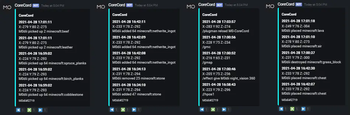
Discord integration for the famous Anti-Griefing plugin CoreProtect.
FEATURES
• Lookups for player issued commands;
• Lookups for player messages;
• Lookups for log ins and log outs;
• Lookups for player placed and destroyed blocks;
• Lookups for items taken and placed into containers;
• Lookups for dropped and picked up items;
• Block whitelist using b: for a:block lookups;
• PlaceholderAPI support for certain messages;
• Customizable Discord BOT prefix;
• MySQL & SQLite support;
• Customizable date format;
• Customizable discord message output;
• Customizable allowed roles to use the commands;
• Customizable messages, embed;
• Output results into a log file;
• Action logging via webhooks;
ABOUT
DISCORD COMMAND USAGE
co!lookup u:username a:command t:time
co!lookup user:username action:command time:time
Time variable can be defined as:
unseparated: time:2h30m, t:1m16s, etc.
comma separated: time:1d,30m t:2h,30m,10s, etc.
Currently only supports one user lookup at a time.
ADDITIONAL FEATURES
LOOKUP COMMAND FILTER
You can filter issued commands and other results using f: or filter: flag:
Usage: co!lookup u:M0dii a:command f:gmc,gmsp t:24h
REVERSE RESULTS
You can reverse the lookup results using -r or -reverse at the end of command:
Usage: co!lookup u:M0dii a:command t:24h -reverse
You can reload the configuration with:
co!reload - in discord.
/corecord reload - in game.
You can check plugin and server version with:
co!version - in discord.
/corecord version - in game.
LOG FILE
You can upload results into a log file instead of an embed using -f or -file flag:
Usage: co!lookup u:M0dii a:command t:24h -f
FEATURES TO BE IMPLEMENTED:
Block excludes (e:)
Radius rollbacks from specific XYZ coordinates;
Player interactions (button clicks, etc.);
Mob kills;
Sign messages;
Rollbacks;
To create a discord bot head to Discord Developer Portal at https://discord.com/developers, log in with your account and create a new application.
After, go to its settings menu and add a bot user, here you will also find the token that has to be put in the config.
From there you can go to OAUTH section and invite your bot to your discord server.
For more information and more detailed process, go to the wiki page on github:
Discord BOT · M0diis/M0-CoreCord Wiki
CONFIGURATION
Configuration is pretty simple and easy to understand.
For more detailed explanation, visit Github wiki page:
Configuration · M0diis/M0-CoreCord Wiki (github.com)
## MySQL Configuration
# Make sure the values are the exact same
# as in your CoreProtect config.
# By default table prefix is co_
# You can also use SQLite, but I strongly recommend
# using MySQL instead.
use-mysql: true
mysql-host: "host-name"
mysql-port: 3306
mysql-database: "database-name"
mysql-username: "database-user"
# Leave '' if password not required
mysql-password: "user-password"
## Discord BOT Token
# https://discord.com/developers/applications
discord-bot-token: "your-token"
command-prefix: "co!"
## Embed configuration
# Embed page buttons use unicode symbols
# Leave them as it is if you don't know what you're doing
# Do not use high values for rows in one page
# Date format uses Java SimpleDataFormat
# https://docs.oracle.com/javase/7/docs/api/java/text/SimpleDateFormat.html
date-format: "yyyy-MM-dd HH:mm:ss"
# Whether to delete the embed when close button pressed
# If false, it will only hide the buttons.
delete-on-close: false
embed-page-left: '⬅️'
embed-page-right: '➡️'
embed-close: '❌'
rows-in-page: 5
# Whether to always show number of results in embed description
# without need to #count
always-show-count: true
# Role IDs that are allowed to use the commands
# You have to have developer mode enabled on discord
# To get the ID right click on the role and copy
allowed-roles:
  - 'role-one-id'
  - 'role-two-id'
## Debugging
# Only enable if you need to find out what's wrong
# Sends a lot of extra messages to the console
debug: false

webhook-loggers:
  1:
    url: 'webhook-url-goes-here'
      actions:
      - '+block' # Place a block (+block, place)
      - '-block' # Break a block (-block, break)
     # - '+item' # Item pickup (+item, pickup, pickupitem)
     # - '-item' # Item drop (-item, drop, dropitem)
     # - '-session' # Player join (-session, quit, playerquit)
     # - '+session' # Player quit (+session, join, playerjoin)
     # - 'container' # Open a container
     # - 'chat' # Message send
     # - 'command' # Command execution
     # - 'kill' # Monster/animal kill (kill, mobkill)
Please leave a positive review if the plugin works as intended, if you have an issue contact me on discord provided or open an issue on github.
METRICS
M0-CoreCord collects anonymous server statistics through bStats, an open-source statistics service for Minecraft software.
If you'd like to disable metrics collection via bStats, you can edit the /plugins/bStats/config.yml file.
请登录后举报
请 登录 后赞助作者。
暂无评论,抢个沙发吧~