
Coordinate Manager
作者:rebot | 分类:模组
价格:0 墨喵币
下载量:0
点赞:0
版本 1.1.8
本资源为搬运资源,原资源地址:
https://modrinth.com/mod/coordinate-manager
资源信息
Minecraft 版本: 26.2
平台: fabric
标签: utility
资源介绍
Coordinate Manager
A Fabric-based Minecraft mod for capturing, organizing, and managing coordinates.
Features
- Capture Modes:
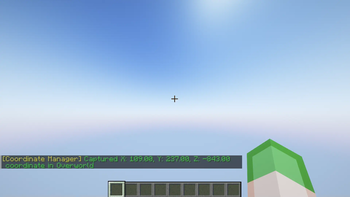
- Instant: Save coordinate immediately without prompts.
- Pop-up: Show a dialog to set a name and adjust coordinate values before saving.
- Capture Cooldown: Prevent spam by setting a cooldown (below
250msdisables it). - Coordinate Thumbnail: Save a thumbnail of your current view when capturing a coordinate (disabled by default).
- Precise Coordinates: Saves coordinate values as decimals for accuracy (disabled by default).
- Auto-Copy on Capture: Automatically copies the saved coordinates to the clipboard when capturing a coordinate (disabled by default).
- System-Aware Copy: Formats copied coordinates according to the system's locale settings (disabled by default).
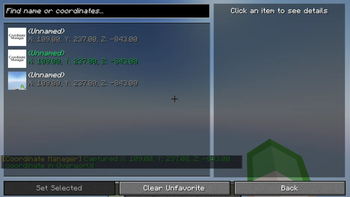
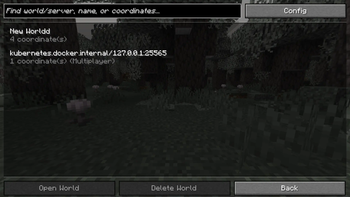
- Coordinate History Screen: View, copy, edit, and manage saved coordinates in-game.
- Copy Coordinates: Copy any coordinate entry to clipboard for easy sharing.
- Set Favorited Coordinates: Protect favorited coordinates from accidental deletion.
- Search Functionality: Find saved coordinates by name or coordinate values.
- Bulk Actions:
- Favorite: Toggle favorite status for multiple entries.
- Delete: Remove multiple selected coordinates at once.
- Delete Options:
- Delete Individual Coordinates: Remove specific entries.
- Clear World/Server Coordinates: Delete all unfavorited coordinates from the current world or server.
Keybindings
Customizable via the in-game controls menu.
- Capture Coordinate:
[F9]Save the current position. - Open History:
[F10]Open coordinate history screen.
Configuration
Configurable via Cloth Config API with Mod Menu.
| Setting | Description | Default |
|---|---|---|
| Capture Mode | Determines whether coordinates are saved instantly or with a pop-up for editing. | Instant |
| Enable Thumbnail | Captures a thumbnail when saving a coordinate. | Disabled |
| Auto-Copy on Capture | Automatically copies the saved coordinates to the clipboard upon capture. | Disabled |
| System-Aware Copy | Formats copied coordinates according to the system's locale settings. | Disabled |
| Capture Cooldown | Adds a delay between captures to prevent spam (set below 250ms to disable). | 250ms |
| Precise Coordinate | Saves coordinates with decimal accuracy for better precision. | Disabled |
下载与版本
评论(0)
请 登录 后发表评论。
举报此资源
请登录后举报
赞助作者
请 登录 后赞助作者。
暂无评论,抢个沙发吧~