
Zqil's Discord Status
作者:rebot | 分类:模组
Minecraft 版本: 1.21.6
平台: fabric
标签: management social utility
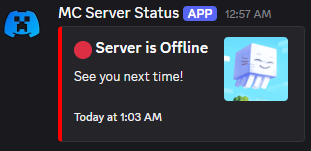


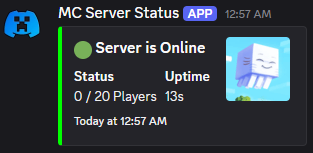
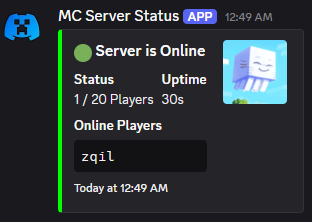
An over-engineered Discord status bot for your Minecraft server.
Note: It's server-side only.
Features:
-
Obsessively Configurable: Almost every piece of text and styling in the Discord embed can be changed in the config file.
-
Real-Time Updates: The status message updates automatically when players join or leave.
-
Dynamic Bot Activity: The bot's "Playing" status can show the current player count, with custom messages for when the server is empty or full.
-
Data-Rich Fields: Optionally display TPS, server uptime, IP address, and a clean, formatted list of online players.
-
Smart & Reliable:
-
If the status message is accidentally deleted, the bot will automatically create a new one.
-
Includes connection retries in case Discord has a momentary hiccup during server startup.
-
Survives a Ctrl+C, making sure to send a status update as its last breath. WILL NOT SURVIVE A TERMINAL CLOSE!
-
-
Easy Management: A simple in-game command (/discordstatus update) lets you reload the config on the fly without restarting the server.
-
Server Icon Support: Automatically use your server-icon.png as the thumbnail for the embed.
Setup Guide:
-
Create a Discord Bot: Go to the Discord Developer Portal, create a new Application, and add a Bot to it. You'll need its Token.
-
Invite Your Bot: In the "OAuth2" -> "URL Generator" section, select the
botscope, then grant itSend Messages,Manage Messages, andRead Message Historypermissions. Copy the generated URL and use it to invite the bot to your server. -
Get Your Channel ID: Right-click the channel where you want the status message to live and click "Copy Channel ID". (You may need to enable Developer Mode in your Discord settings).
-
Install & Configure:
- Drop the mod's
.jarfile into your server'smodsfolder. - Start the server once to generate the default config file. It will print an error and stop, which is normal.
- Open
config/discord_status/discord_status.json. - Paste your Bot Token and Channel ID into the
botTokenandchannelIdfields. - Restart the server. The bot will connect and post its first message!
- Drop the mod's
请登录后举报
请 登录 后赞助作者。
暂无评论,抢个沙发吧~