
Sp0k's Hud+
作者:rebot | 分类:模组
Minecraft 版本: 26.2
平台: fabric
标签: utility

Sp0k's HUD+
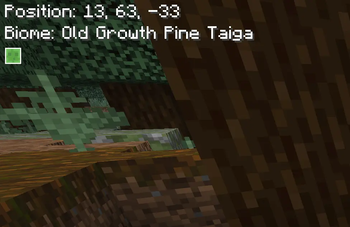
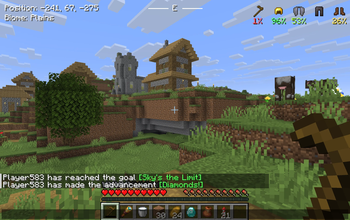
Sp0k's HUD+ is a lightweight client-side Fabric mod that adds useful player information to the Minecraft HUD without opening the debug screen.
It is designed to keep important gameplay information visible in a clean, minimal, and configurable way.

Features
- Displays the player's current block position
- Displays the biome the player is standing in
- Formats biome names into readable text
- Example:
old_growth_birch_forest->Old Growth Birch Forest
- Example:
- Shows the player's cardinal direction at the top-center of the screen
- Optional direction guide lines beside the cardinal direction
- Displays equipped armor icons on the top-right of the screen
- Displays the currently held damageable tool alongside equipment
- Shows armor and tool durability
- Supports durability display modes:
- Percentage
- Remaining hits
- Uses color-coded durability text:
- Green for high durability
- Yellow for medium durability
- Orange/red for low durability
- Supports HUD UI scaling:
- Small
- Medium
- Large
- Medium is the default size and keeps the original HUD scale
- Allows HUD offset customization with
hudXandhudY - Hides the custom HUD when the vanilla F3 debug screen is open
- Moves the equipment HUD down when active status effects are visible to avoid overlap
Configuration
Sp0k's HUD+ includes an in-game configuration screen when Mod Menu is installed.
The configuration screen is organized into submenus:
Main Options
- UI Size: Small, Medium, or Large
- HUD X position slider
- HUD Y position slider
- Location Information submenu
- Direction submenu
- Equipment HUD submenu
- Display HUD when F3 is open
Location Information
- Toggle the full location information display
- Toggle position display
- Toggle biome display
- Toggle the slime chunk indicator
Direction
- Toggle the full direction display
- Toggle direction guide lines
Equipment HUD
- Toggle the full equipment display
- Toggle armor display
- Toggle tools display
- Switch durability display between percentage and remaining hits
The config file is generated automatically at:
.minecraft/config/spokhud.jsonRequirements
- Minecraft
- Fabric Loader
- Fabric API
Optional Dependencies
- Mod Menu
- Required only for the in-game configuration screen
- The HUD itself works without Mod Menu
Installation
- Install Fabric Loader for your Minecraft.
- Install the matching Fabric API version.
- Optional: install Mod Menu if you want to configure the HUD in-game.
- Download the latest
.jarrelease of Sp0k's HUD+. - Place the
.jarfile in your Minecraftmodsfolder. - Launch Minecraft with the Fabric profile.
License
Distributed under the CC0-1.0 license. See LICENSE for more information.
请登录后举报
暂无评论,抢个沙发吧~