
RegionMusic
作者:rebot | 分类:模组
Minecraft 版本: 1.21 1.21.1 1.21.2 1.21.3 1.21.4 1.21.5 1.21.6 1.21.7 1.21.8 1.21.9 1.21.10 1.21.11
平台: paper purpur
标签: utility
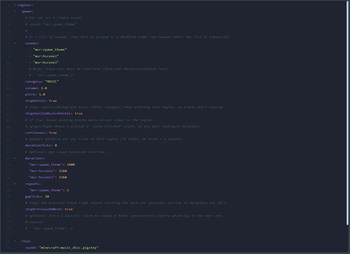
RegionMusic
A Paper/Purpur plugin that plays configured music when a player enters WorldGuard regions (regions are typically created/managed using WorldEdit + WorldGuard).
Requirements
- Server: Paper/Purpur (
api-versioninplugin.yml:1.21) - Java: 21
- WorldGuard: 7.x (the plugin declares
depend: [WorldGuard]) - A client resource pack (if you use custom sounds like
namespace:key)
Installation
- Put the plugin jar into
plugins/. - Make sure WorldGuard is installed and loads before RegionMusic.
- Start the server once, edit
plugins/RegionMusic/config.yml, then restart the server.
Region Selection (Important)
If multiple WorldGuard regions apply at the player's location, the plugin selects the best region like this:
- Only regions that have a config section
regions.<regionId>inconfig.ymlare considered. - The region with the highest WorldGuard
prioritywins. - If priorities are equal, the choice is stabilized by region
id(alphabetical order).
Music is played for that selected region.
Configuration
File: plugins/RegionMusic/config.yml
Minimal setup (1 track per region):
regions:
  spawn:
    sound: "msr:spawn_theme"
    category: "MUSIC"
    volume: 1.0
    pitch: 1.0
    stopOnExit: true
Multiple Tracks (Shuffled, No Repeats Until Exhausted)
You can define a playlist via sounds:. Tracks are played in a shuffled order without repeats until the list is exhausted, then the list is reshuffled.
regions:
  spawn:
    sounds:
      - "msr:spawn_theme"
      - "msr:hscene2"
      - "msr:hscene3"
    category: "MUSIC"
    volume: 1.0
    pitch: 1.0
    stopOnExit: true
Continuous Playback (continuous)
Paper/Spigot does not provide a “sound finished” event, so to automatically play the next track you must configure durations.
regions:
  spawn:
    sounds:
      - "msr:spawn_theme"
      - "msr:hscene2"
    category: "MUSIC"

    continuous: true
    durations:
      "msr:spawn_theme": 2400 # ticks (20 ticks = 1 second)
      "msr:hscene2": 1360
    gapTicks: 0
    stopPreviousOnNext: true
Supported duration options:
durationTicks: default duration for any track in this region (ticks).durationSeconds: same, but in seconds.durations:: a mapsoundKey -> ticks(overrides the default per track).
If durations are inaccurate:
- Duration longer than the real track: you will get silence until the next track starts.
- Duration shorter than the real track: the next track starts early; with
stopPreviousOnNext: truethe previous track will be stopped (audible cut).
Repeat A Track N Times (repeats)
You can force a given track to repeat N times consecutively before advancing to the next one:
regions:
  spawn:
    sounds:
      - "msr:spawn_theme"
      - "msr:hscene2"
    continuous: true
    durations:
      "msr:spawn_theme": 2400
      "msr:hscene2": 1360
    repeats:
      "msr:hscene2": 3
Values < 1 are treated as 1.
Stop Vanilla Music On Enter
To prevent region music from overlapping vanilla background music, you can stop the MUSIC category on enter:
regions:
  spawn:
    stopVanillaMusicOnEnter: true
Notes:
- Vanilla background music is client-side; the plugin does a best-effort stop of
SoundCategory.MUSIC. - The region track is started on the next tick after stopping
MUSICto avoid rare client packet-order races.
Full Per-Region Options
sound: string- a single track (legacy).sounds: [string]- a list of tracks (recommended).category: string- Bukkit category (MUSIC,RECORDS, ...), default:MUSIC.volume: number- default:1.0.pitch: number- default:1.0.stopOnExit: boolean- stop the currently playing track when leaving all configured regions, default:true.stopVanillaMusicOnEnter: boolean- stopSoundCategory.MUSICwhen entering, default:true.continuous: boolean- keep playing the playlist while the player stays in the region, default:false.durationTicks: int/durationSeconds: number- default duration forcontinuous.durations: { "<soundKey>": <ticks> }- per-track durations (ticks).gapTicks: int- silence gap between tracks, default:0.stopPreviousOnNext: boolean- stop the previous track right before starting the next one, default:true.repeats: { "<soundKey>": <count> }- repeat a specific track N times consecutively.
Resource Pack (Custom Sounds)
If you use custom sounds like msr:spawn_theme, clients must have a resource pack enabled that contains:
assets/msr/sounds.json(or another namespace instead ofmsr)assets/msr/sounds/<name>.ogg
Important:
.oggmust be Ogg Vorbis (not an MP3 renamed to.ogg).soundKeymust be lowercase (MinecraftResourceLocationrule).
Quick client-side test:
/playsound msr:spawn_theme music @s ~ ~ ~ 1 1If you get silence or an “unknown soundEvent” error, the issue is in the resource pack / key, not the plugin.
请登录后举报
暂无评论,抢个沙发吧~