
svrUptime
作者:rebot | 分类:模组
Minecraft 版本: 26.2
平台: fabric neoforge
标签: management utility
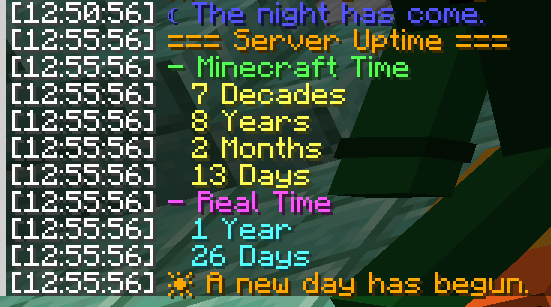
Two clean chat broadcasts a day — let everyone see exactly how long your world has been running.









svrUptime keeps a quiet running tally of how long your world has existed and announces it at the two natural turning points of the Minecraft day — dawn and dusk. No dashboards, no scoreboard clutter: just a clean chat readout when the sun comes up, a short flavor line when night falls, and an /uptime command for anyone curious in between. It runs entirely server-side, so vanilla clients can connect and see every message, and it works just as well in single-player. "Day 4,217" hits differently than a blank morning sky.
✨ Features
- 🌅 Two daily broadcasts, on the in-game clock. A full uptime report at dawn (start of each Minecraft day, ~06:00) and a short flavor line at dusk (~18:00, tick 12000) — each fires exactly once per day.
- 🕰️ Dual time views. Every report shows uptime two ways: Minecraft Time (in-game days rolled up into a months → years → decades → … → millennia calendar) and Real Time (actual elapsed play time, days → decades).
- ⌨️
/uptimeon demand. Anyone can query the current uptime at any moment and choose how large a unit to roll up to — from days all the way to millennia. - 🎨 Configurable morning & evening messages. Set your own dawn and dusk text — standard Minecraft
§color codes supported — in a plain JSON file. - 🎚️ Independent toggles. Turn the uptime broadcast, the morning message, and the evening message on or off separately — live, in-game, no restart.
- ♻️ Live reload. Edit the config and apply it instantly with an admin command.
- 🧩 Server-side & universal. One jar runs on Fabric and NeoForge; vanilla clients need nothing, and it works in single-player too.
⌨️ Commands
Everything hangs off /uptime, with /ut as a shorthand alias for all of it. query and help are open to everyone; the admin branch requires gamemaster / operator permission.
| Command | Access | What it does |
|---|---|---|
/uptime query |
Everyone | Show the full uptime report (rolled all the way up to millennia) |
/uptime query <unit> |
Everyone | Same report, capped at a chosen largest unit — days, months, years, decades, centuries, millennia |
/uptime help |
Everyone | List available commands (admin lines shown only to admins) |
/uptime admin broadcast enable\|disable |
Admin | Toggle the daily uptime report |
/uptime admin morning enable\|disable |
Admin | Toggle the dawn (morning) message |
/uptime admin evening enable\|disable |
Admin | Toggle the dusk (evening) message |
/uptime admin status |
Admin | Show current toggles, total world ticks, and real days elapsed |
/uptime admin reload |
Admin | Re-read svruptime.json from disk |
/ut is a full redirect — anywhere you'd type /uptime, /ut works identically (/ut query years, /ut admin status, …).
⚙️ Configuration
The config lives at config/svruptime.json, is created on first launch with the defaults below, and hot-reloads with /uptime admin reload. Both message strings accept standard Minecraft § color/format codes, and the three *Enabled flags are the same switches flipped by /uptime admin … — in-game changes are written straight back to the file, so command state and the file never drift apart.
{
  "broadcastEnabled": true,      // send the full uptime report at dawn
  "morningMessageEnabled": true, // send the morning message at dawn
  "eveningMessageEnabled": true, // send the evening message at dusk
  "morningMessage": "§6☀ A new day has begun.",
  "eveningMessage": "§9☾ The night has come."
}
🧪 Compatibility
| Loaders | Fabric and NeoForge — one jar runs on both |
| Minecraft | 26.2.x · 26.1 / 26.1.1 / 26.1.2 · 1.21.11 · 1.21 – 1.21.10 |
| Fabric API | Required on Fabric · not needed on NeoForge |
| Side | Server-side — vanilla clients supported, single-player too |
| Extra libraries | None |
Enjoying it? Hop in the Discord · ⭐ the repo · explore the rest of Lunixia's Minecraft QOL Mods
⛏️ Small, focused mods that cut out the boring stuff.
请登录后举报
请 登录 后赞助作者。
暂无评论,抢个沙发吧~