
Advanced PvP Toggle
作者:rebot | 分类:模组
Minecraft 版本: 1.21.1
平台: neoforge
标签: game-mechanics management utility
PvP Toggle
Controlled player-versus-player combat for NeoForge servers.
PvP Toggle is a lightweight Minecraft mod that gives players control over their PvP status without adding unnecessary complexity. Players can enable or disable PvP, manage exceptions for individual players, and immediately see who can be attacked through compact nametag icons.
The mod is designed for Minecraft 1.21.1 with NeoForge. All core functionality is server-controlled and remains available through commands. The graphical BrassUI management menu is entirely optional.
Features
- Enable or disable PvP with simple commands.
- Configurable delay before PvP protection becomes active.
- Block or allow PvP with individual players.
- Small nametag icons showing whether another player can be attacked.
- Optional protection against knockback-only attacks and player pushing.
- Administrative commands for forcing player PvP states.
- Configurable feedback when a protected interaction is blocked.
- Persistent PvP data stored separately for each world or server.
- Simple Voice Chat integration that prevents nametag icons from overlapping.
- Optional BrassUI management menu with no required server-side UI dependency.
- Compatibility with legacy PvP Toggle clients using the original icon protocol.
Optional PvP Management Menu
Run /pvp menu to open the optional BrassUI management screen.
The menu:
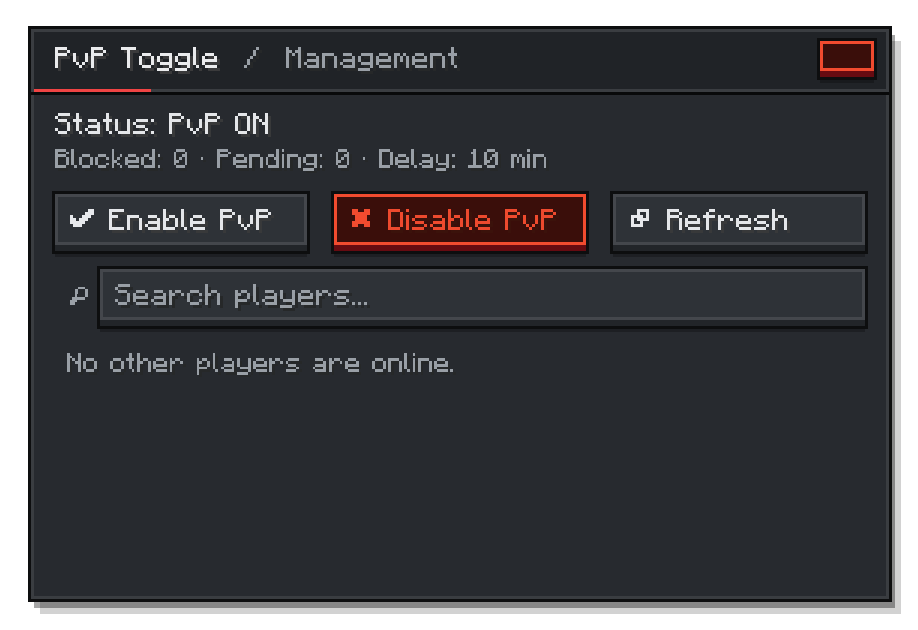
For the UI a compatible KotlinForForge installation are required only on clients that want to use this menu. If they are missing, /pvp menu displays an availability message while every regular PvP command continues to work.
Icons
PvP Toggle renders small icons beside player nametags:
 PvP On — The player can be attacked.
 PvP Off — PvP against the player is blocked.
Player Commands
| Command | Description |
|---|---|
/pvp on |
Enables PvP immediately. |
/pvp off |
Disables PvP after the configured delay. |
/pvp block <player> |
Blocks PvP between you and another player. |
/pvp unblock <player> |
Allows PvP with a previously blocked player again. |
/pvp status |
Shows your current PvP status. |
/pvp menu |
Opens the optional BrassUI management menu. |
/pvp help |
Lists the available PvP commands. |
Admin Commands
Administrative commands require permission level 2.
| Command | Description |
|---|---|
/pvpadmin forceon <player> |
Forces PvP on for a player. |
/pvpadmin forceoff <player> |
Forces PvP off for a player. |
/pvpadmin reload |
Reloads the stored PvP data. |
Configuration
PvP Toggle creates a server-side configuration for controlling protection behavior.
| Option | Description | Default |
|---|---|---|
one-sided-toggle |
Only protects the player from incoming PvP when /pvp off is active. |
false |
take-effect-time |
Delay in minutes before /pvp off becomes active. |
10 |
cancel-pending-off-on-attack |
Cancels pending protection when the player attacks another player. | true |
send-action-messages |
Sends feedback when PvP damage, knockback, or pushing is blocked. | false |
block-knockback |
Blocks knockback-only weapons and effects during protected interactions. | true |
block-player-pushing |
Prevents protected players from being physically pushed by other players. | true |
Installation
Server
- Install NeoForge for Minecraft 1.21.1.
- Place PvP Toggle in the server's
modsdirectory. - Start the server once to generate the configuration.
KotlinForForge is not required on the server.
Client
Install PvP Toggle on the client to display nametag icons.
To use the graphical management menu, additionally install:
- BrassUI (Automatically included in the Mod)
- A compatible KotlinForForge version
Clients without PvP Toggle or without the optional UI dependencies may still connect because the network channels are optional. Legacy clients using protocol version 1 retain icon support.
Simple Voice Chat Support
When Simple Voice Chat nametag icons are visible, PvP Toggle automatically moves its icons to prevent overlap. The PvP icons return to their normal position when voice chat icons are hidden. Simple Voice Chat remains optional.
License
PvP Toggle is licensed under the MIT License. You may use, modify, and redistribute the software under the terms of that license.
Credits
- Development and design by DerErneuerer
- Created for Brassworks SMP
Links
请登录后举报
暂无评论,抢个沙发吧~