
QuickMate
作者:rebot | 分类:模组
价格:0 墨喵币
下载量:0
点赞:0
版本 1.0.0
本资源为搬运资源,原资源地址:
https://modrinth.com/mod/quickmate
资源信息
Minecraft 版本: 1.21.8
平台: neoforge
标签: utility
资源介绍
QuickMate



A powerful Minecraft Fabric chain mining mod providing intelligent scanning and batch destruction features
✨ Features
? Intelligent Scanning System
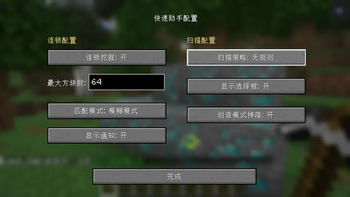
- Multiple Scanning Strategies: Supports irregular, horizontal line, vertical line, staircase, 3x3 tunnel, and various other scanning modes.
- Precise/Fuzzy Matching: Choose to destroy only identical blocks or similar block types.
- Real-time Preview: Highlights the range of blocks to be destroyed with selection boxes.
- Configurable Maximum Count: Limits the maximum number of blocks for a single chain destruction (1-2048).
⛏️ Chain Destruction
- Server-Side Authority: All scanning and destruction logic is executed server-side to prevent cheating.
- Automatic Batch Destruction: After destroying one block, automatically destroys all matching adjacent blocks.
- Game Mode Adaptation:
- Survival Mode: Generates drops normally.
- Creative Mode: Option to generate drops or not.
- Efficient Performance: Utilizes concurrent data structures, supporting multiple players simultaneously.
? User-Friendly
- Key Bindings: Toggle chain mining on/off with a single keystroke.
- Configuration Interface: Beautiful graphical configuration interface.
- Multi-language Support: Supports both Chinese and English.
- Real-time Notifications: Optional function activation/deactivation prompts.
? Installation
Prerequisites
- Minecraft 1.21.8
- Fabric Loader
- Fabric API
- [NeoForge API]()
Installation Steps
- Download the latest version of QuickMate
.jarfile. - Place the file into the
.minecraft/modsfolder. - Launch the game to start using it.
? Usage
Basic Operations
- Open Configuration Interface: Press the default key (can be modified in control settings).
- Enable Chain Mining: Toggle the status via the configuration interface or key binding.
- Aim at Target Block: Look at the block you want to mine.
- Start Mining: Break the block normally; the chain function will automatically take effect.
下载太慢?试试 墨喵加速站,支持 Modrinth 和外网直链高速下载! 用的人越多,下载的越快!
下载与版本
评论(0)
请 登录 后发表评论。
举报此资源
请登录后举报
暂无评论,抢个沙发吧~