
Tree Log Highlight
作者:rebot | 分类:模组
Minecraft 版本: 1.21.6 1.21.7 1.21.8
平台: fabric
标签: utility






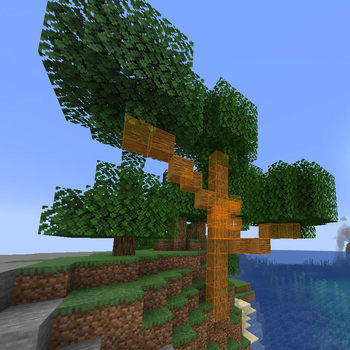
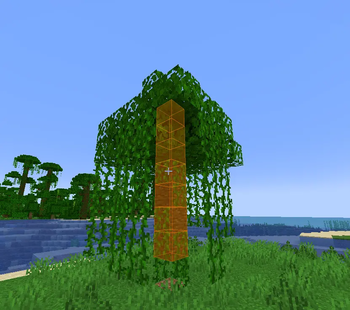
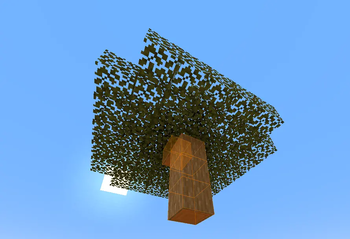
Tree Log Highlight
Tree Log Highlight is a client-side Fabric mod for Minecraft that enhances your tree-felling experience by visually highlighting all connected log blocks of a tree when you interact with one of its logs. This helps you easily identify and harvest entire trees, including those from other mods.
Features
- Dynamic Wood Type Detection: The mod automatically discovers and adds new wood types (both vanilla and modded) to its configuration as you encounter them in-game. Simply click on a log block, and its type will be registered.
- Configurable Per Wood Type: Each discovered wood type can be individually enabled or disabled through the in-game configuration menu, giving you granular control over which trees are highlighted.
- Discovery Order in Config: Wood types appear in the configuration menu in the exact order they were first discovered, with the oldest discoveries at the top and the newest at the bottom.
- Visual Customization:
- Render Modes: Choose between highlighting the
OUTLINEof logs, filling theFULLblock, or displayingBOTH. - Colors: Fully customizable main, outline, fill, and text colors. You can also sync all colors to a single main color.
- Opacity: Adjust the transparency of the fill highlight.
- Show Through Walls: Option to render highlights even when logs are obstructed by other blocks.
- Pulsing Effect: Enable a subtle pulsing animation for highlights, with adjustable speed and intensity.
- Render Modes: Choose between highlighting the
- HUD Elements:
- Logs Remaining Counter: An optional on-screen display showing how many highlighted logs are left in the current tree.
- Status Messages: Brief messages appear on-screen when you toggle the mod's enabled state.
- Performance Optimized: Utilizes batch rendering to efficiently draw all highlighted logs in a single pass, ensuring smooth performance even with large trees.
- Mod Compatibility: Designed to work seamlessly with modded trees (e.g., from Biomes O' Plenty) by leveraging standard Minecraft block tags (
#minecraft:logsand#minecraft:leaves). - Keybind Toggle: Easily enable or disable the mod's highlighting functionality with a configurable keybind (default:
H). - Robustness: Includes fixes for rendering stability and ensures configuration changes are saved and loaded correctly.
- Large Tree Support: Increased internal scan limits to accurately highlight even very large modded trees.
How to Use
- Install: Ensure you have Fabric Loader, Mod Menu, and Cloth Config installed. Place the
TreeLogHighlightmod.jarfile into yourmodsfolder. - Activate: In-game, simply left-click (or start breaking) any log block. The mod will then highlight all connected logs of that tree.
- Toggle: Press the
Hkey (default) to quickly enable or disable the highlighting feature. - Configure: Access the mod's settings through the Mod Menu (usually by pressing
Esc->Mods->TreeLogHighlight->Config). Here you can customize colors, render modes, HUD options, and enable/disable highlighting for specific wood types you've discovered. - Discover New Wood Types: As you encounter new types of trees (vanilla or modded) and interact with their logs, they will automatically be added to the "Wood Types" section of the config, enabled by default.
请登录后举报
请 登录 后赞助作者。
暂无评论,抢个沙发吧~