
EatStats
作者:rebot | 分类:模组
Minecraft 版本: 1.20.1
平台: fabric
标签: food game-mechanics utility


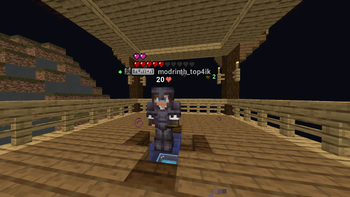
? EatStats: Professional PvP Tracker
EatStats is a high-performance client-side mod for Fabric, designed specifically for competitive PvP players. It tracks your opponents' golden apple consumption and totem usage in real-time, displaying precise statistics directly next to their nameplates.
? Key Features:
-
Precise Tracking : Separate counters for Golden Apples (Gapples) and Enchanted Golden Apples (Charms).
-
Totem Pop Counter : Instantly captures and displays every totem pop from enemies in your vicinity.
-
PvP-Oriented Reset : Apple counters automatically reset to zero the moment you deal damage to the target.
-
Smart Detection : Tracks all players within a 40-block radius, even if they are behind you or out of your direct line of sight.
-
Professional HUD : Clean, flat design without intrusive shadows or bulky boxes, blending perfectly with the vanilla interface.
? Advanced Configuration (Key: "O"):
Fine-tune the HUD to your liking with our advanced settings menu (requires Cloth Config ):
-
XYZ Precision Sliders : Move the HUD along three axes with instant live preview .
-
Transparent Menu : The config background is translucent, allowing you to see the HUD move in real-time while adjusting sliders.
-
Dynamic Scaling : Resize icons and text from 0.5x to 1.5x for optimal visibility.
-
Flexible Positioning : Choose to display stats to the Right, Above, or Under the player's name.
? Visual Excellence:
-
Clean Colors : Uses soft Mint Green ( #98FF98 ) for apples and Pastel Red ( #FF6B6B ) for totems—no "eye-bleeding" neon palettes.
-
No Rendering Bugs : Fixed common issues like double-shadow ghosting and black boxes around enchanted items.
-
Depth Priority : The HUD stays on top of player models, ensuring you never lose track of vital information during intense fights.
? Requirements:
-
Minecraft : 1.20.1
-
Fabric Loader
-
Fabric API
-
Cloth Config API (Mandatory for the settings menu)
-
Mod Menu (Recommended for easy access to configuration)
⌨️ Controls:
-
O (default) — Open the Configuration & Calibration menu.
请登录后举报
暂无评论,抢个沙发吧~