
Twitch Integration
作者:rebot | 分类:模组
Minecraft 版本: 1.21.5
平台: paper purpur spigot
标签: game-mechanics social utility



Twitch Integration - Plugin for minecraft adding integration of Twitch chat and Minecraft!
❗Important❗ The plugin is made fully in Russian, other languages in the plugin is not provided!
English:
Main
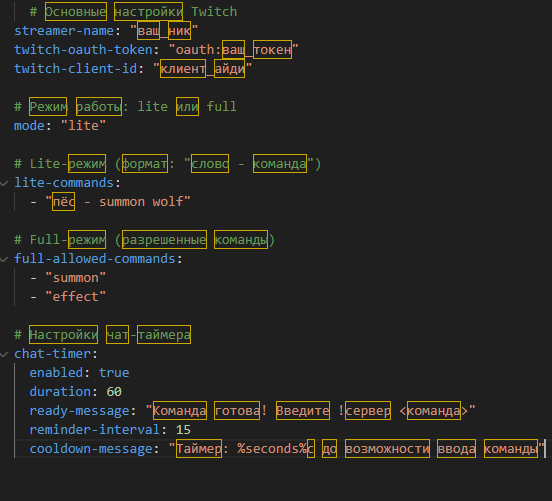
The plugin is pretty easy to use. First you need to look into the plugin's config. There will be 3 lines in it:
streamer-name: "ваш_ник"
twitch-oauth-token: "oauth:ваш_токен"
twitch-client-id: "клиент_айди"
In the streamer-name line, replace “ваш_ник” with your username on Twitch. In the twitch-oauth-token line, you must replace “oauth:ваш_токен” with your bot token. A little later I will tell you how to get the bot-token. (You should end up with “oauth:?????” ????? is the token you'll get.) In the twitch-client-id line you should replace “клиент_айди” with your id. You can see your id in the same place where you can get the bot token.
Receive bot-token and id.
Important! You must not show your id and bot-token to anyone.
Go to twitchtokengenerator.com to get the token and id.
In the screen I am here to get a... select Bot Chat Token and authorize through Twitch. Once authorized, you will see Generated Tokens. The Generated Tokens will have an Access Token, Refresh Token, and Client id. Access Token will be your bot token. Client id will be your id. After that, replace the values in the config with what you have now. After the main setup, reload the plugin using the /twitchreload command.
Full and Lite modes
Full and Lite modes can be selected in the plugin config. Lite mode adds the option to add a word-command. That is, if you write “!сервер (word-command you specify in the config)” on Twitch, the command will be sent. Full mode adds the option to choose which commands Twitch users can use. For example summon, etc.
Important! In Full and Lite modes, when sending a message in Twitch chat and configuring commands, you don't need to write / at the beginning of the command!
Timer
Timer - This is the easiest thing in the plugin's config. The enabled line is responsible for whether the timer is enabled or not. If it is enabled, Twitch users will only be able to send messages when the timer expires. If it is disabled, then Twitch users will be able to send commands without a timeout. The last thing that can be touched in the timer config is reminder-interval. This line is responsible for how many seconds it will take for a message to appear telling you how much time is left before the timer expires. Everything else in the timer config is pretty self-explanatory!
Command for Twitch Chat
To send a command using Twitch Chat you need to write !сервер before the command. Example: "!сервер (command without /).
Thank you for your attention! Bye!
Russian:
Основное
Плагин довольно прост в использовании. Для начала, вам нужно заглянуть в конфиг плагина. В нём будут 3 строчки:
streamer-name: "ваш_ник"
twitch-oauth-token: "oauth:ваш_токен"
twitch-client-id: "клиент_айди"
В строчке streamer-name замените "ваш_ник" на ваш юзернейм на твиче. В строчке twitch-oauth-token вы должны заменить "oauth:ваш_токен" на свой бот-токен. Чуть позже я скажу вам, как получить бот-токен. (В итоге должно получиться "oauth:?????" ????? это токен который вы получите.) В строке twitch-client-id вы дожны заменить "клиент_айди" на ваш айди. Айди вы сможете посмотреть там же, где и получать бот-токен.
Получение бот-токена и айди.
Важно! Вы никому не должны показывать свой айди и бот-токен!
Для получения токена и айди перейдите на сайт twitchtokengenerator.com.
В окошке I am here to get a... выберите Bot Chat Token и авторизируйтесь через Твич. После авторизации вы увидите Generated Tokens. В Generated Tokens будут: Access Token, Refresh Token и Client id. Access Token будет вашим бот-токеном. Client id будет вашим id. После этого замените в конфиге значения на то, что вы сейчас получили. После основной настройки перезагрузите плагин с помощью команды /twitchreload.
Full и Lite режимы
Full и Lite режимы можно выбрать в конфиге плагина. Lite режим добавляет возможность добавления слово-команду. То есть если на твиче написать "!сервер (слово-команду, которую вы укажете в конфиге)" то команда отправиться. Full режим добавляет возможность выбрать какие команды смогут использовать пользователи Twitch. Например summon и тд.
Важно! В Full и Lite режимах при отправке сообщения в чате Twitch и настройке конфига в командах не надо писать / в начале команды!
Таймер
Таймер - Это самое простое в конфиге плагина. Строка enabled отвечает за то, что включен ли таймер. Если он включен, то Твич пользователи смогут отправлять сообщения только когда таймер закончится. Если он отключен, то Твич пользователи смогут отправлять команды без промежутка. Последнее что можно затронуть в конфиге таймера - это reminder-interval. Эта строка отвечает за то, через сколько секунд появиться сообщение о том, сколько осталось до окончания таймера. Всё остальное в конфиге таймера довольно понятно!
Команда для твич чата
Для отправления команды через Твич Чат нужно написать перед командой !сервер. Пример: "!сервер (команда без /).
Спасибо за внимание! Пока!
请登录后举报
暂无评论,抢个沙发吧~