
CraftersLogin
作者:rebot | 分类:模组
Minecraft 版本: 1.13 1.13.1 1.13.2 1.14 1.14.1 1.14.2 1.14.3 1.14.4 1.15 1.15.1 1.15.2 1.16 1.16.1 1.16.2 1.16.3 1.16.4 1.16.5 1.17 1.17.1 1.18 1.18.1 1.18.2 1.19 1.19.1 1.19.2 1.19.3 1.19.4 1.20 1.20.1 1.20.2 1.20.3 1.20.4 1.20.5 1.20.6 1.21
平台: bungeecord paper spigot velocity waterfall
标签: management utility
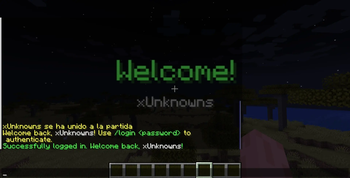
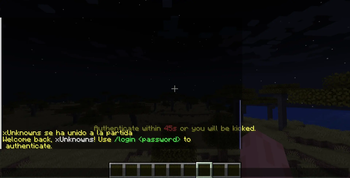
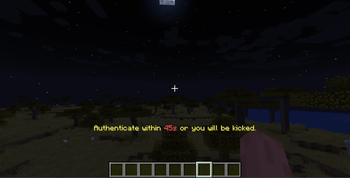
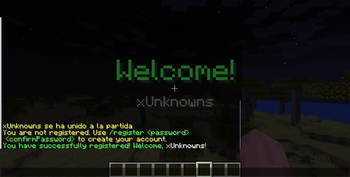
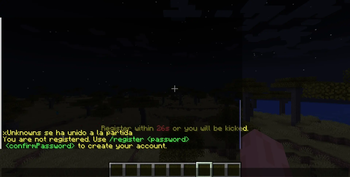
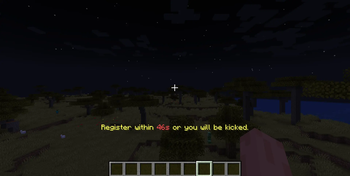

The Ultimate Authentication System for Minecraft Networks
Paper & Spigot 1.13 – 1.21.x · Java 17+ · Requires ProtocolLib 5.x
What is CraftersLogin?
CraftersLogin is a professional, production-grade authentication plugin for Minecraft servers. It covers the full authentication lifecycle — from first registration to premium auto-login, 2FA for staff, and cross-proxy session synchronization — all inside a single JAR.
Whether you run a solo cracked survival server or a large network with BungeeCord/Velocity, CraftersLogin adapts automatically, requires zero configuration to detect your proxy setup, and scales from a lightweight H2 local database to a full MySQL + Redis cluster.
★ Core Features
🔐 Authentication Modes
CraftersLogin provides two distinct authentication interfaces, selectable via authentication.type in config.yml:
- CHAT — Classic mode. Players type
/login <password>or/register <password> <confirm>in chat. Works with all clients, no dependencies required. - SIGN — A native Minecraft Sign editor opens when the player runs
/loginor/register. Powered by ProtocolLib — the sign is never actually placed in the world. The player types their full alphanumeric password using the keyboard and clicks Done. This completely bypasses chat, making chat-logger hacked clients useless. On registration, the sign opens twice for password confirmation.
🌐 Smart Proxy Auto-Detection
The plugin automatically detects whether it is running as Standalone, behind BungeeCord/Waterfall, or behind Velocity — by silently reading paper-global.yml and spigot.yml at startup. No manual proxy configuration is needed. The plugin adapts its networking and session behavior on its own.
- Velocity (3.x+) — Full support with dedicated plugin-channel communication.
- BungeeCord / Waterfall — Full support via
BungeeCordandbungeecord:mainchannels. - Standalone — Works out of the box with no proxy configuration.
⛏️ Bedrock / GeyserMC Support
CraftersLogin detects GeyserMC using silent Reflection instead of a hard floodgate-api dependency. Bedrock players are detected and handled without any dependency conflicts or NoClassDefFoundError errors.
🏠 Spawn Management System
A dedicated spawn management system with five independent spawn types:
| Type | When it triggers |
|---|---|
auth |
When an unauthenticated player joins |
register |
When a new unregistered player joins |
join |
After any player successfully logs in |
firstjoin |
After a player's very first successful registration |
respawn |
When a player respawns after death |
Spawn points are saved in spawns.yml and managed via /cl spawn set <type>.
📧 Self-Service Password Recovery
Players can recover their accounts without staff intervention:
/recovery set <email>— Link a recovery email to your account./recovery request— Request a 6-digit PIN sent to your email via SMTP./recovery confirm <pin> <newpassword>— Verify the PIN and set a new password.
Powered by an embedded JavaMail / SMTP mailer. Compatible with Gmail, Outlook, and any custom SMTP server.
🔄 Cross-Server Session Synchronization
Players authenticated on one backend server stay authenticated when switching to another — no re-login required.
- MEMORY — Default. Fast, zero-dependency, works for single-proxy setups.
- REDIS — Session state persisted in Redis using
SETEXwith configurable TTL. Required for high-availability multi-proxy networks. Automatically falls back to MEMORY if Redis is unavailable.
🗄️ Database Import — Migration from Other Plugins
The /cl import <plugin> <jdbc-url> command streams accounts directly from another plugin's database into CraftersLogin:
- AuthMe — Full account import from SQLite or MySQL.
- nLogin — Full account import from SQLite or MySQL.
- BCrypt passwords migrate 1:1 with no re-hashing required.
- SHA-based passwords import safely and are flagged for automatic upgrade upon the player's next login.
👻 Player Isolation During Authentication
Until a player authenticates, they are fully sandboxed from the rest of the server:
- Chat and most commands are blocked.
- Movement is restricted.
- The player is invisible to all authenticated players.
- The player's inventory is cleared and securely stored. It is fully restored upon login.
All isolation features are individually configurable in config.yml.
📊 PlaceholderAPI Integration
Full PAPI expansion registered under %crafterslogin_*%. Exposes registration status, last IP, login count, 2FA status, session data and more to scoreboards, chat plugins, and any PAPI-compatible plugin.
🤝 CraftersStaff Synergy Bridge
When CraftersStaff is installed alongside CraftersLogin, the two plugins automatically coordinate during the authentication flow. A staff member's Staff Mode and Vanish states are suspended until login is complete, then transparently restored — without any staff member having to manually toggle their tools.
🛡️ Security Systems
BCrypt Password Hashing
All passwords are stored using BCrypt with 12 rounds by default — an industry standard designed to be computationally expensive and resistant to GPU-based cracking.
Password Complexity Rules
- Minimum length (default 8 characters).
- Requires at least one number.
- Requires at least one special character.
- Prevents using the player's username as a password.
Have I Been Pwned (HIBP) Integration
When enabled, every new password is checked against the Have I Been Pwned database of over 800 million compromised passwords. Only the first 5 characters of the SHA-1 hash are sent (k-Anonymity) — the full password never leaves your server.
Graduated Brute Force Protection
3 failed attempts— Staff members withcrafterslogin.notifyreceive an alert in chat.5 failed attempts— The IP is temporarily banned for a configurable number of minutes.10 failed attempts— The IP is permanently banned (configurable).
Captcha Verification
An item-based CAPTCHA (no external URLs, no images) can be triggered:
- Adaptive mode — Only presented to suspicious IPs (new IPs or IPs with recent failures).
- Universal mode — Every unauthenticated player must pass the CAPTCHA on every join.
Anti-Alt Account System
Limits the number of accounts that can be registered from the same IP address. Configure whitelisted-ips to exempt cybercafes, shared networks, or university connections.
Staff Secret Answer Challenge
Staff members (players with crafterslogin.staff.security) are required to set a secret answer on first login. If they connect from a new or different IP, they must answer this challenge before regaining access — a highly effective anti-account-theft layer that requires no phone or external app.
GeoIP Country Blocking for Staff
Staff accounts can be restricted to only connect from a configured list of allowed countries. Uses any user-supplied GeoIP API endpoint — no external service is hard-coded.
TOTP Two-Factor Authentication for Staff
An optional TOTP-based 2FA system for staff using Google Authenticator or Authy:
/2fa start— Generate a QR code / secret key to enroll./2fa confirm <code>— Verify and activate 2FA./2fa verify <code>— Enter the code on login./2fa requestremove— Request removal, which sends an alert to online admins.
Designed to be non-mandatory to reduce friction for your staff team.
AFK Session Timeout for Staff
Staff sessions expire after a configurable period of inactivity. When the timeout triggers, the player is logged out and must re-authenticate. This limits exposure if a staff member leaves their computer unattended.
📜 Commands
Player Commands
| Command | Description |
|---|---|
/register <password> <confirm> |
Create a new account |
/login <password> |
Log in to your account |
/changepassword <old> <new> <confirm> |
Change your account password |
/unregister <password> |
Delete your account from the server |
/premium |
Enable automatic Mojang/Microsoft account verification |
/offline |
Revert to password authentication (cracked mode) |
/recovery set <email> |
Link a recovery email to your account |
/recovery request |
Request a 6-digit recovery PIN via email |
/recovery confirm <pin> <newpassword> |
Verify PIN and set a new password |
/2fa start |
Begin 2FA enrollment (staff only) |
/2fa confirm <code> |
Activate 2FA with the code from your authenticator |
/2fa verify <code> |
Enter 2FA code on login |
/2fa requestremove |
Request 2FA removal (notifies admins) |
/securityanswer <answer> |
Answer the IP-change staff security challenge |
/setsecurityanswer <answer> |
Set your staff security secret answer |
Admin Commands — /crafterslogin or /cl
| Command | Description | Permission |
|---|---|---|
/cl reload |
Reload all configuration files | crafterslogin.admin.reload |
/cl version |
Display current plugin version | crafterslogin.admin.version |
/cl info <player> |
View account details for a player | crafterslogin.admin.info |
/cl accounts |
Show total registered accounts | crafterslogin.admin.accounts |
/cl forcelogin <player> |
Force a player to be authenticated | crafterslogin.admin.forcelogin |
/cl forcelogout <player> |
Force a player out of their session | crafterslogin.admin.forcelogout |
/cl changepass <player> <newpass> |
Change a player's password as admin | crafterslogin.admin.changepass |
/cl unregister <player> |
Unregister a player's account | crafterslogin.admin.unregister |
/cl delete <player> |
Permanently delete an account from the database | crafterslogin.admin.delete |
/cl dupeip <player> |
View all accounts sharing the same IP | crafterslogin.admin.dupeip |
/cl purge <days> |
Remove accounts inactive for X days | crafterslogin.admin.purge |
/cl spawn set <type> |
Set a spawn point (auth/register/join/firstjoin/respawn) | crafterslogin.admin.spawns |
/cl spawn unset <type> |
Remove a configured spawn point | crafterslogin.admin.spawns |
/cl spawn teleport <type> |
Teleport to a configured spawn point | crafterslogin.admin.spawns |
/cl spawn list |
List all configured spawn points | crafterslogin.admin.spawns |
/cl import <plugin> <jdbc> |
Import accounts from AuthMe or nLogin | crafterslogin.admin |
/cl migratedb |
Migrate data between database engines | crafterslogin.admin.migratedb |
/cl 2fa approve <player> |
Approve a staff member's 2FA removal request | crafterslogin.admin.2fa |
🔑 Permissions
crafterslogin.admin              — Full access to all /cl subcommands (OP by default)
  ├── crafterslogin.admin.reload
  ├── crafterslogin.admin.version
  ├── crafterslogin.admin.info
  ├── crafterslogin.admin.accounts
  ├── crafterslogin.admin.forcelogin
  ├── crafterslogin.admin.forcelogout
  ├── crafterslogin.admin.changepass
  ├── crafterslogin.admin.unregister
  ├── crafterslogin.admin.delete
  ├── crafterslogin.admin.dupeip
  ├── crafterslogin.admin.purge
  ├── crafterslogin.admin.spawns
  ├── crafterslogin.admin.migratedb
  └── crafterslogin.admin.2fa

crafterslogin.staff.security     — Enables IP challenge, 2FA, GeoIP restrictions (OP)
crafterslogin.2fa                — Allows the player to use the /2fa system (OP)
crafterslogin.notify             — Receives brute-force alerts and update notifications (OP)
crafterslogin.bypass             — Skips all authentication entirely (false by default)
crafterslogin.bypass.ip-limit    — Bypasses the max-accounts-per-IP limit (OP)
crafterslogin.help               — View the /cl help menu (all players)
⚙️ Configuration Reference
Database
database:
  type: "H2"   # H2 | MYSQL | MARIADB | SQLITE
  host: "127.0.0.1"
  port: 3306
  database: "crafterslogin"
  username: "root"
  password: ""
Authentication Mode
authentication:
  type: "CHAT"   # CHAT | SIGN
Security
security:
  anti-alts:
    enabled: true
    max-accounts-per-ip: 3
    whitelisted-ips:
      - "127.0.0.1"
  password-complexity:
    enabled: true
    min-length: 8
    require-number: true
    require-special-char: true
    prevent-username-as-password: true
  hibp:
    enabled: true
    prevent-pwned-passwords: true
  brute-force:
    enabled: true
    max-attempts-before-warning: 3
    minutes-ban-after-5-fails: 5
    perm-ban-after-10-fails: true
  captcha:
    enabled: true
    require-for-all-unauthenticated: false
Spawns
spawns:
  force-auth-spawn: true
  use-multiverse-core: true
  isolate-inventories-until-login: true
  hide-players-while-unauthenticated: true
Network Sessions
network-sessions:
  enabled: true
  remember-during-proxy-connection: true
  fallback-timeout-minutes: 60
  storage: "MEMORY"   # MEMORY | REDIS
  redis:
    host: "127.0.0.1"
    port: 6379
    password: ""
    database: 0
Staff Security
staff-security:
  enabled: true
  force-secret-answer: true
  check-ip-change: true
  afk-timeout:
    enabled: true
    minutes: 10
  geoip:
    enabled: true
    api-url: "http://ip-api.com/json/%ip%"
    allowed-countries: []
    strict-ip-lock: false
Password Recovery (Email)
recovery:
  email:
    enabled: true
    host: "smtp.gmail.com"
    port: 587
    username: "your-email@gmail.com"
    password: "your-app-password"
    sender-email: "noreply@yourserver.com"
    sender-name: "CraftersLogin Security"
    use-tls: true
📦 Installation
Standalone Server
- Download
CraftersLogin-3.0.jarfrom Modrinth, SpigotMC, or the official Discord. - Place it in your server's
plugins/folder. - Install ProtocolLib 5.x in
plugins/as well. - Restart the server. All configuration files are generated automatically.
- Edit
plugins/CraftersLogin/config.ymland configure your database and settings. - Set spawn points with
/cl spawn set <type>. - Run
/cl reloadafter any configuration change — no restart needed.
Proxy Network (BungeeCord / Velocity)
- Place
CraftersLogin-3.0.jaron every backend server (not on the proxy itself). - Configure a shared MySQL database on all backend servers so accounts are synchronized.
- Set
network-sessions.storage: REDISif you want cross-proxy session persistence. - The plugin automatically detects your proxy type — no additional proxy-side plugin is needed.
Migrating from AuthMe / nLogin
- Run
/cl import authme jdbc:mysql://host/database(ornlogin). - The command streams all accounts into CraftersLogin. BCrypt passwords transfer perfectly, SHA passwords are flagged for upgrade.
🖥️ Compatibility
| Category | Supported |
|---|---|
| Server software | Paper, Spigot (1.13 – 1.21.x) |
| Proxy software | Velocity 3.x, BungeeCord, Waterfall |
| Java | 17 minimum (Java 21 recommended) |
| Bedrock | GeyserMC (via silent Reflection) |
| Required | ProtocolLib 5.x |
| Optional | PlaceholderAPI, CraftersFastAuth, CraftersStaff |
| Databases | H2 (embedded), MySQL, MariaDB, SQLite |
| Session storage | Memory (default), Redis |
© 2026 Crafters Development — All rights reserved.
Redistribution or modification of this software without express written permission is prohibited.
Protected under Chilean Intellectual Property Law 17.336.
Developed by xUnknowns · craftersdevelopment.pages.dev
请登录后举报
请 登录 后赞助作者。
暂无评论,抢个沙发吧~