
TeamViewRelay
作者:rebot | 分类:模组
Minecraft 版本: 1.20.2 1.20.3 1.20.4 1.20.5 1.20.6 1.21 1.21.1 1.21.2 1.21.3 1.21.4 1.21.5 1.21.6 1.21.7 1.21.8 1.21.9 1.21.10 1.21.11 26.1 26.1.1 26.1.2 26.2
平台: neoforge
标签: social utility
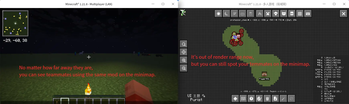
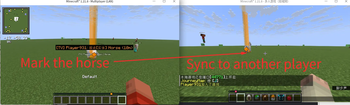
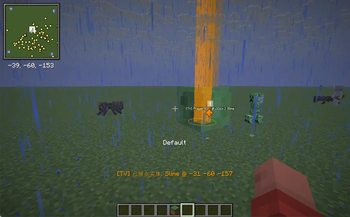
A vision & ping sharing system for Minecraft team coordinated operations. Currently developed and validated primarily on Minecraft 1.21.8 Fabric.
1. Core Features
- Team Player Data Sync: Synchronize player positions, entity information, and shared waypoints
- Quick Pinging: One-click ping via hotkey / double middle mouse click; support middle-click cancellation, timeout cleanup, and quantity limits
- Optional Xaero Integration:
- Bidirectional shared waypoint sync with Xaero Minimap
- Remote player tracking sync with Xaero World Map
- Optional JourneyMap Integration:
- Share waypoints and display remote players on the map
- Room Isolation: Separate lobbies via
roomCodeto avoid cross-interference
Recommended optional installations:
- Mod Menu (direct config access from mod list)
- Xaero Minimap (waypoint sync linkage)
- Xaero World Map (remote player tracking linkage)
- JourneyMap (remote player tracking linkage)
2 In-Game Initial Configuration
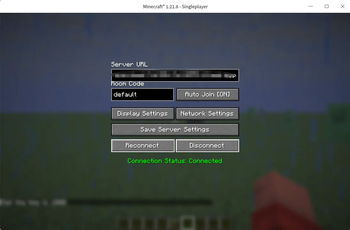
- Press the default hotkey O to open the configuration panel after entering the game.
- Default server address:
ws://127.0.0.1:8765/mc-client(modify to your backend address) - Select a room ID (default:
default; only players in the same room can see each other) - Click Save Server Settings, then click Connect.
3 Basic Controls
- O: Open configuration panel (bound by default)
- Connection Toggle Hotkey: Unbound by default — set manually in control settings
- Quick Ping Hotkey: Unbound by default — set manually in control settings
Pinging and synchronization functions only take effect when rendering is enabled AND network connection is established.
4. Display Functions
- Remote player bounding boxes
- Tracer lines
- Friendly / Neutral / Enemy color coding system
- Switchable ping render styles: beacon / ring / pin
5. Ping Mechanism
- Quick Ping: Press the dedicated ping hotkey, or enable double middle-click pinging
- Cancel Ping: Single middle-click to remove your own pings near the crosshair
- Auto Removal: Entity pings auto-cancel locally when the target entity death is confirmed
- Quantity Limit: Old pings are automatically cleared when a player exceeds the maximum ping count
6. Configuration Entries
- Main Config: Server URL, room ID, connect / disconnect controls
- Display Settings: Render distance, box/tracer toggles, tracer origin, color & ping sub-settings
- Network Settings: Upload frequency, entity upload toggle, shared waypoint upload, system proxy
- Ping Settings: Ping visibility, middle mouse interactions, persistent pings, visual styles & shape parameters
Config file path: config/MC-Teamviewer.json (standard Fabric config directory)
Version Naming Rules
This project adopts a dual versioning scheme, e.g. v0.2.1-proto0.3.0:
- Application version:
0.2.1— indicates core feature iterations and program updates - Network protocol version:
0.3.0— defines the communication protocol standard for cross-program networking
Normal connection and team collaboration require consistent or fully matching network protocol versions across all connected clients and backend services.
Install
In addition to installing this mod in the game, you also need to set up a central server to provide a server URL for synchronizing every player's data. The link is as follows:
https://github.com/MC-TeamViewer/Minecraft-TeamViewer-Backend
请登录后举报
请 登录 后赞助作者。
暂无评论,抢个沙发吧~