
Little Whale AI
作者:rebot | 分类:模组
Minecraft 版本: 1.21.8
平台: fabric
标签: social technology utility
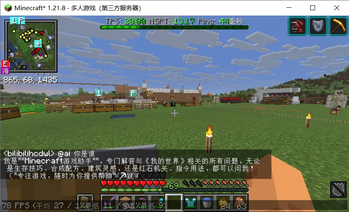
A lightweight, fully asynchronous Fabric mod that brings a friendly AI player named Little Whale into your Minecraft server. Powered by any OpenAI-compatible API, it can chat with players in private or public, understand context, and speak their language.
✨ Features
- 3 Chat Modes – Switch between private, public, or mixed mode:
- Private (mode 1): Players use
@ai <message>to talk to the AI. Only the sender sees the reply. - Public (mode 2): Every public chat message is treated as conversation with the AI. The AI replies publicly to everyone. Context is globally shared.
- Mixed (mode 3):
@aitriggers private conversation, while normal chat triggers public AI replies. Private and public contexts are kept separate.
- Private (mode 1): Players use
- Player-aware AI – In public/mixed modes, the AI sees who said what via
[PlayerName]: messageformat. It can address players by name naturally. - Multilingual – The AI automatically replies in the same language the player used (Chinese, English, etc.).
- Plain Text Only – The AI is instructed never to use Markdown, code blocks, or special formatting, keeping output clean for the in-game chat.
- Safe & Non‑blocking – All HTTP requests run on background threads; the server main thread is never blocked.
- Context Management – Auto-clears conversation history after a configurable interval or manually via commands.
- Fully Configurable – Change the API endpoint, model, temperature, system prompt, prefix, and more through
config/aichat.json. - Admin Commands – Powerful
/aichatcommands to clear contexts, reload config, and view status.
? Installation
- Install Fabric for Minecraft 1.21.8.
- Download the mod
.jarfile and place it into themods/folder. - Launch the server or client. A default configuration file will be generated at
config/aichat.json. - Edit
config/aichat.jsonand fill in yourapiKeyand (optionally)apiUrl. Save the file. - Run
/aichat reload(requires OP) or restart the server.
⚙️ Configuration (config/aichat.json)
| Key | Type | Default | Description |
|---|---|---|---|
apiUrl |
String | https://open.bigmodel.cn/api/paas/v4/chat/completions |
API endpoint (OpenAI-compatible) |
apiKey |
String | "" |
Your API key |
systemPrompt |
String | (multilingual, anti-prefix, plain‑text prompt) | System prompt that defines AI behavior |
modelName |
String | "general" |
Model name to send to the API |
temperature |
Double | 0.7 |
Creativity of responses (0.0–2.0) |
autoClearContext |
Boolean | true |
Enable automatic context clearing |
contextExpireSeconds |
Integer | 300 |
Seconds between auto‑clears |
prefix |
String | "<LittleWhale> " |
Prefix added to every AI reply (supports color codes) |
mode |
Integer | 2 |
Chat mode: 1 = private, 2 = public, 3 = mixed |
? Usage
Chat Triggers
- Private / Mixed: Start your message with
@ai. Example:@ai How do I craft a furnace? - Clear private context:
@ai clear(works in private/mixed mode) - Public mode: Just talk in chat – every message triggers a public AI reply.
Admin Commands (requires OP, permission level 2)
| Command | Description |
|---|---|
/aichat clear |
Clear your own private context (mode 1/3) |
/aichat clear <player> |
Clear the private context of a specific player |
/aichat clearglobal |
Clear the global public conversation context |
/aichat clearall |
Clear all contexts (private + global) |
/aichat reload |
Reload the configuration without restarting |
/aichat info |
Display current settings (API, model, mode, etc.) |
请登录后举报
暂无评论,抢个沙发吧~