
Skylume ☆ Hypixel Skyblock
作者:rebot | 分类:模组
Minecraft 版本: 26.1 26.1.1 26.1.2
平台: fabric
标签: utility

✦ SkyLume ✦
A modern quality-of-life mod for Hypixel SkyBlock.
SkyLume is a client-side Fabric mod focused on useful SkyBlock tools, responsive interfaces and extensive customization without automating gameplay.
📖 Features
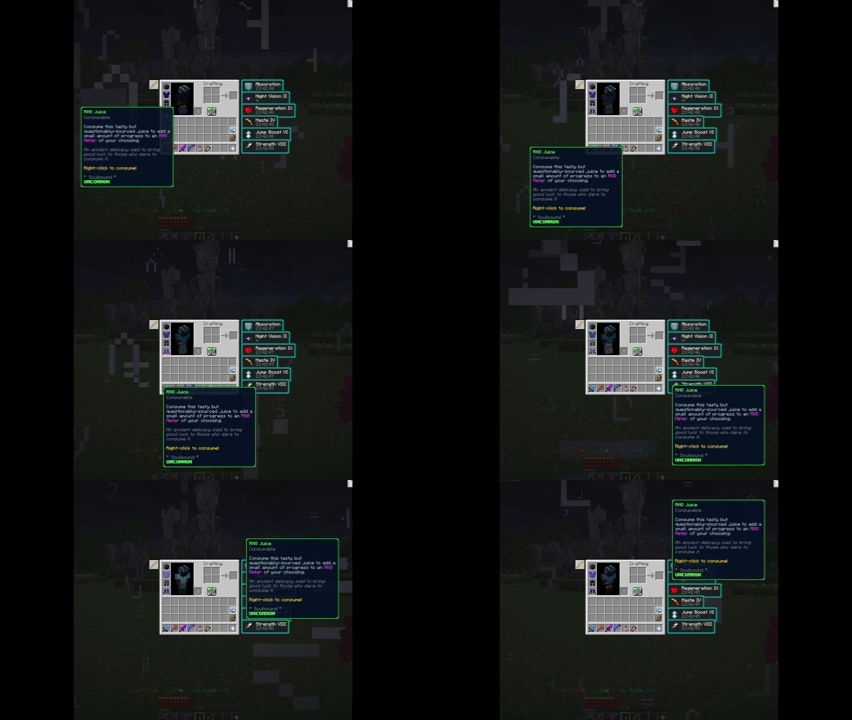
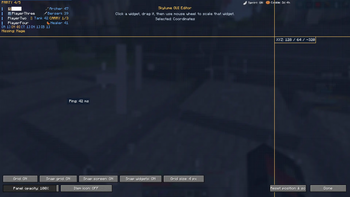
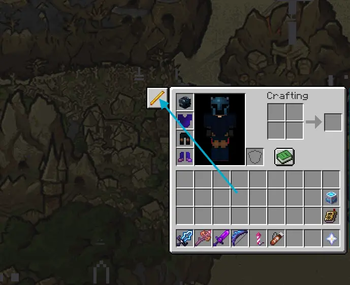
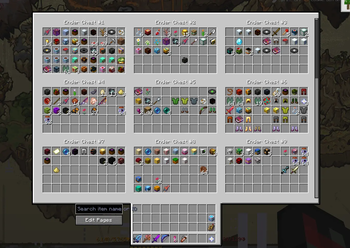
📦 Storage Search and Overview A fast and interactive interface for browsing your SkyBlock Storage. - View saved Ender Chest and Backpack pages in one interface - Search indexed items by name or SkyBlock item ID - Open a matching Storage page directly from the overview - Interact with items through the real server-side Storage container - Automatically refresh saved previews and the search index when items move - Preserve search state, scroll position and selected pages - Dim non-matching items with a configurable highlight colour - Use Edit Pages without leaving the Storage workflow - Return directly to the Storage overlay from Edit Pages - Open the Farming or Hunting Toolkit directly from Storage - Return directly to the Storage overlay from Toolkit screens - Preserve full SkyBlock item lore and compatible price additions - Compatible with supported inventory shortcuts and REI screen exclusion Only pages opened by the player are indexed. SkyLume does not attempt to access unloaded Storage data. 📍 Waypoints and Routes Create, organize and follow local SkyBlock waypoints. - Create a temporary waypoint with `/sl w here` - Create a waypoint with `/sl w [name]` - Coordinates can also use comma-separated formats - Add `perm` to save a permanent waypoint - Create waypoints from your current position or crosshair using keybinds - Click explicitly formatted coordinates in chat to save them - Configure colour, beam thickness, beacon, tracer and through-wall rendering - Organize waypoints into expandable nested groups - Build sequential routes from multiple waypoints - Toggle individual waypoints, complete groups or complete routes - Reset or restart a route from the Waypoint Manager - Disabled route points are skipped without breaking route progression - Advance routes automatically by reaching their configured radius - Filter visibility by island or zone - Search, edit, hide, restore and delete saved waypoints - Import and export local waypoint data - Deduplicate shared waypoint messages - Use local history and undo controls SkyLume only shares waypoints through explicit player actions. ⚡ Inventory Buttons Create programmable buttons around supported inventory screens. - Choose a button name, item icon, tooltip and command - Select icons through a visual Minecraft item picker - Drag buttons around the inventory - Resize buttons with the mouse wheel in placement mode - Organize buttons using the dedicated Quick Access editor - Execute only when the player explicitly clicks the button Open the editor from SkyLume settings or with `/sl quick-access`. 💬 Chat Quality of Life Client-side chat tools inspired by established chat mods. - Copy the chat message currently under the mouse cursor - Configurable mouse-button selection for copying - Preserve readable characters and Minecraft formatting correctly - Show movable local feedback after copying or performing other actions - Search messages using an explicit search button - Reset chat search automatically when chat closes - Compact repeated messages with configurable counter formats - Choose parentheses, brackets or custom compactor formatting - Configure compactor prefix, suffix and colour - Keep an extended configurable chat history for the current session - Highlight player names or custom phrases - Create multiple local highlight rules - Filter matching messages through editable local rules - Show configurable local toast notifications - Preserve original hover and click events where possible No chat messages are sent automatically. 🖱️ Movable Tooltips Make long SkyBlock item descriptions easier to read. - Move an entire tooltip vertically or horizontally - Configure movement speed and movement keys - Use smooth interpolated movement - Allow clipped tooltips to move beyond the screen boundary - Automatically avoid screens where tooltip movement would interfere with normal scrolling This feature moves the complete tooltip rather than altering or truncating its contents. 🎛️ HUD and Interface Editor Arrange SkyLume HUD elements through a dedicated editor. - Drag each element independently - Scale elements individually - Snap to a configurable grid - Snap to screen edges - Snap to other SkyLume widgets - Use alignment guides - Configure panel opacity from 0–100% - Add optional icons to supported widgets - Preserve positions when a widget is disabled - Preview supported widgets while editing Available elements include: - Booster Cookie duration - Sprint status - Coordinates - Ping - TPS - Local clock - Party HUD - Carry HUD - Local feedback Open the editor with `/sl gui`. 📊 Ping, TPS and Status Displays Compact status information with stable readings. - Smoothed server ping - Smoothed TPS estimation - Configurable good, medium and poor status colours - Reduced visual jumping through delayed interpolation - Whole-number TPS display - Booster Cookie duration caching between sessions - Sprinting and toggle-sprint status - Local clock with seconds - 12-hour and 24-hour clock formats ⌨️ Command Keys and Aliases Create shortcuts for frequently used commands. - Bind commands to configurable Minecraft keybinds - Detect conflicts with existing Minecraft and mod keybinds - Create aliases such as `/dh` → `/warp dungeon_hub` - Show aliases as chat command suggestions - Organize entries into expandable nested groups - Keep Command Keys and command aliases in separate editors - Use included Hypixel SkyBlock presets - Enable or disable individual entries or complete groups - Create, edit and remove custom groups - Restore the default presets when needed Included preset groups cover common SkyBlock destinations and Dungeon commands. Open the editors with `/sl commands` and `/sl aliases`. 👥 Party Tools A compact collection of party-management tools. - Track party members, leader and moderators from chat events - Manually refresh using one `/party list` command - Configure planned Dungeon classes - Display confirmed live Dungeon classes when available - Show missing and duplicate classes - Compact or detailed Party HUD - Preview the Party HUD while editing - Sort members by rank, class or join order - Copy names, whisper or perform explicit party actions - Optional confirmation before kick or transfer actions Server commands are sent only after an explicit user action. 📣 Party Commands Support familiar party-chat shortcuts used by Dungeon groups. - Party transfer requests - Floor and Master Mode join requests - Downtime requests compatible with common Dungeon-mod formatting - Optional downtime reason text - Local notifications for supported party requests - Configurable permissions and responses SkyLume reacts only to messages received by the client and does not perform combat or movement actions. ⚔️ Slayer Carry Tools — Work in Progress Functional local tools for organizing Slayer carry sessions. - Create and manage carry orders - Track customers, queue position and active orders - Configure Slayer type, tier, amount and price - Calculate payment status using integer coin values - Record completion progress - Pause, resume, cancel, refund and complete orders - Undo the latest completion - Store local carry history - Use configurable reply templates - Display an optional compact Carry HUD - Detect possible completions from passive client-visible evidence Uncertain detections require confirmation. SkyLume never attacks, starts quests, accepts trades or changes customers automatically. ⚙️ Modern Settings Menu A compact settings menu following the familiar layout of major SkyBlock mods. - Expandable main categories - Collapsible feature groups - Search across every category and setting - Toggle switches - Draggable sliders - Dropdown choices - Colour settings - Text inputs - Keybind controls - Tooltips and descriptions - Reset and undo controls - Automatic JSON persistence - Config backup and recovery Open the settings menu with: - `/skylume` - `/skylume config` - `/sl` - Mod Menu’s Configure button The config frontend is embedded inside SkyLume. No separate config-library installation is required. 🧰 Additional Tools SkyLume also includes: - Calculator - Coordinate copying with clean integer coordinates - Configurable sprint assistance and sprint-status display - Quick Access tools - Party reply templates - Storage palette and search-highlight settings - Cursor-placement assistance for repeated menu workflows - Developer preview tools for testing supported HUD and party states📌 Development Status
- Storage Search and Overview: Available
- Waypoints and Routes: Available
- Inventory Buttons: Available
- Chat QoL: Available
- HUD and Interface Editor: Available
- Command Keys and Aliases: Available
- Party Tools: Available and under continued refinement
- Slayer Carry Tools: Work in progress and functional
The current focus is stability, compatibility and polishing existing features.
📥 Installation
- Install Fabric Loader for the supported Minecraft version.
- Install Fabric API.
- Place the SkyLume
.jarin the profile’smodsfolder. - Start Minecraft and open SkyLume with
/skylumeor/sl.
Required dependency
- Fabric API
Optional dependency
- Mod Menu — adds a convenient Configure button
SkyLume embeds its config frontend. No separate YACL or MoulConfig installation is required.
🐞 Bug Reports and Feature Requests
Found a problem or have an idea?
Use the official SkyLume issue tracker:
Report a bug or request a feature
Please include your SkyLume version, Minecraft version, installed mods and clear reproduction steps when reporting a bug.
Do not use the repository to redistribute SkyLume or submit source-code copies. It is provided for support, bug reports and feature requests.
请登录后举报
请 登录 后赞助作者。
暂无评论,抢个沙发吧~