
Healthy Eye (Chat Mod)
作者:rebot | 分类:模组
Minecraft 版本: 1.21 1.21.1 1.21.2 1.21.3 1.21.4 1.21.5 1.21.6 1.21.7 1.21.8
平台: forge
标签: game-mechanics social utility
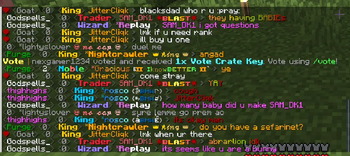
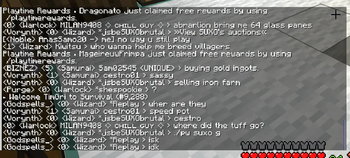
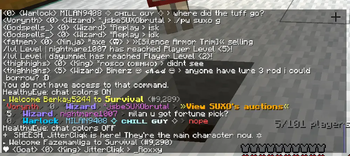
Healthy Eye — Readable Chat for Minecraft (Forge)
Summary — What it is
Healthy Eye is a tiny, client-only Forge mod that removes all colors and styling from in-game chat so messages are clean, high-contrast, and easy to read. It works on any server; only you see the change.
Minecraft: 1.21.8 (1.21.x build for them)
Loader: Forge 58+
Scope: Client-only (no server install)
Why use it
Accessibility & comfort: Color spam, gradients, and rainbow text become plain text.
Focus: System messages and team chat are easier to scan during combat or events.
No server requirements: Works everywhere since it only changes how your client renders chat.
Zero setup: No configs. One command to toggle.
How to control it
The mod starts enabled each time you launch the game (colors are stripped by default).
Toggle on/off at any time with the command below.
The setting is not persisted between launches (keeps things simple and lightweight).
Commands & usage
Command Effect
/toggleChatColor Toggles stripping of chat formatting. Shows a confirmation message (OFF means colors are being stripped).
Notes
Affects both player chat and system chat messages.
Does not change titles, boss bars, scoreboards, sign text, or item tooltips.
Purely client-side: it doesn’t modify packets or send anything to the server.
How to install
Install Forge 58+ for Minecraft 1.21.8.
Download the Healthy Eye jar that matches your MC version.
Place the jar in your mods folder:
Windows: %APPDATA%.minecraft\mods
Linux: ~/.minecraft/mods
macOS: ~/Library/Application Support/minecraft/mods
Launch Minecraft with the Forge profile.
Join any world/server and use /toggleChatColor if you want to switch the behavior.
Uninstall: Close the game, remove the jar from mods, relaunch.
FAQ
Q: Is it allowed on servers?
A: Yes. It’s client-only and only alters rendering on your side. It does not give gameplay advantages or send modified packets.
Q: Does it improve FPS?
A: It’s designed for readability, not performance. Overhead is negligible.
Q: Will this break other chat mods?
A: It’s compatible with most. If another mod fully replaces the chat UI or intentionally relies on color codes, load order/configuration may affect which result you see.
Q: Can I keep it disabled by default?
A: Currently the default is enabled every launch. Use /toggleChatColor after starting the game if you prefer colored chat that session.
Q: Does it remove emojis or text content?
A: No. It only strips formatting (colors/styles). The actual message text is preserved.
Q: Server needs to install it too?
A: No—client-only. Safe to join any vanilla or modded server.
Known limitations
-Only affects chat messages (player & system). It does not touch titles, action bar, boss bars, scoreboards, or GUIs.
-Some chat-overhaul mods may override the effect.
Support & licensing
License: All Rights Reserved.
Issues/feedback: include your Forge/Minecraft versions and a mod list when reporting conflicts.
请登录后举报
暂无评论,抢个沙发吧~