
Where Am I?
作者:rebot | 分类:模组
Minecraft 版本: 1.21.11
平台: fabric
标签: adventure utility worldgen
🌍 WHERE AM I?
Never lose track of your surroundings — elegant, color-coded biome notifications as you explore.



🌟 Overview
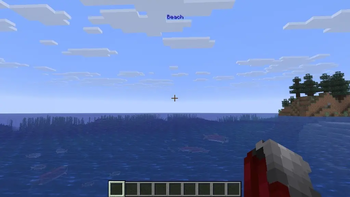
Where Am I? is a simple, lightweight client-side mod that seamlessly displays the name of the biome you are currently exploring.
No more opening debug screens ($F_3$) or guessing whether you are standing in a Plains or a Savanna. The mod delivers clean, non-intrusive title notifications at the top of your screen as you travel across the world — perfect for RPG-style exploration and Vanilla+ modpacks!
✨ Key Features
- 🌲 Smart Biome Detection: Displays the biome name instantly when entering a new area while intelligently preventing notification spam at small biome borders.
- 🎨 Dynamic Color-Coding: Biome names are color-coded based on climate and type:
- 🟩 Green: Temperate biomes (Forests, Plains, Swamps)
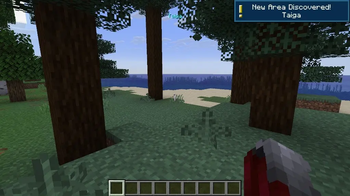
- 🟦 Blue: Cold & Frozen biomes (Taiga, Snowy Slopes, Frozen Ocean)
- 🟨 Yellow/Orange: Hot & Dry biomes (Deserts, Savannas, Badlands)
- 🟪 Purple: Special & Rare biomes (Mushroom Fields, End Highlands)
- 🏆 Exploration Milestones: Receive custom toast notifications as you discover 10, 20, 30, 40, and 50 biomes, and unlock a special achievement toast when you explore them all!
- 🔥 Dimension Entrance Alerts: Unique entrance themes for The Nether (Red) and The End (Purple).
- 🌐 Full Internationalization: Fully localized in 20+ languages for a seamless global experience!
- ⚡ Ultra-Lightweight & Client-Side: Runs 100% on the client. Works flawlessly on multiplayer servers and Vanilla Realms without server-side installation!
🎮 Commands
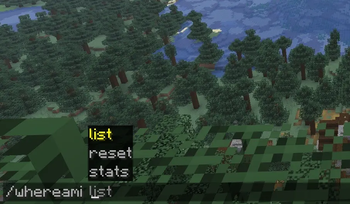
Take full control of your exploration progress with built-in commands:
/whereami stats— View your exploration progress and discovered biomes count./whereami list— See a list of biomes you have already visited./whereami reset— Reset your personal biome discovery data.
🧭 How It Works
- Background Tracking: The mod continuously tracks your current environment seamlessly.
- Smooth Animations: Upon entering a new biome, its color-coded title smoothly fades in at the top of your screen.
- Clean HUD: It stays visible for a few seconds before gently fading out, keeping your screen uncluttered.
🛠️ Installation & Requirements
- ⚙️ Loader: Fabric Loader
- 📌 Minecraft Version: Works across multiple 1.21.11 versions
- 🧩 Dependencies: Fabric API
- Download the latest
.jarfile from the Versions tab. - Place the file into your
.minecraft/modsdirectory. - Launch your game and explore the world!
💬 Community & Support
Have a suggestion, found a bug, or want to report an issue? Join our official community!
- 💬 Discord: Join Craftify Discord Server
🔗 Check Out My Other Lightweight Mods!
Enhance your vanilla Minecraft experience with my collection of minimalist, client-side utilities:
| Mod | Description |
|---|---|
| ⏳ Playtime Toast | Track your current world playtime instantly with a single keypress. |
| 🛡️ Clean Durability | Minimalist item durability tooltips & break warning toast alerts. |
| 📏 Height Meter | Clean HUD height meter with full altimeter scale & compact hotbar modes. |
请登录后举报
请 登录 后赞助作者。
暂无评论,抢个沙发吧~