
SimpleTrigger
作者:rebot | 分类:模组
Minecraft 版本: 1.8 1.8.1 1.8.2 1.8.3 1.8.4 1.8.5 1.8.6 1.8.7 1.8.8 1.8.9 1.9 1.9.1 1.9.2 1.9.3 1.9.4 1.10 1.10.1 1.10.2 1.11 1.11.1 1.11.2 1.12 1.12.1 1.12.2 1.13 1.13.1 1.13.2 1.14 1.14.1 1.14.2 1.14.3 1.14.4 1.15 1.15.1 1.15.2 1.16 1.16.1 1.16.2 1.16.3 1.16.4 1.16.5 1.17 1.17.1 1.18 1.18.1 1.18.2 1.19 1.19.1 1.19.2 1.19.3 1.19.4 1.20 1.20.1 1.20.2 1.20.3 1.20.4 1.20.5 1.20.6 1.21 1.21.1 1.21.2 1.21.3 1.21.4 1.21.5 1.21.6 1.21.7 1.21.8 1.21.9 1.21.10 1.21.11
平台: paper
标签: game-mechanics management utility
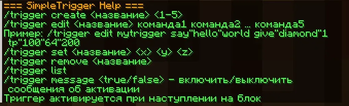
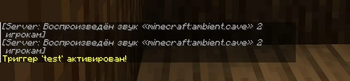
SimpleTrigger (v1.1.1) is a plugin for Minecraft servers (Paper) that adds an interactive trigger system. It allows you to turn any block or the area around it into an “active zone”: when a player enters it, predefined commands are executed automatically.
Key features
- Create triggers that can execute up to 5 commands.
- Place a trigger on a specific block or in an area around it using coordinates and radius.
- Execute commands on behalf of a player or the server (using the
!prefix). - Use the
%player%variable to insert the player’s name. - Configure everything directly in‑game — no need to edit configuration files.
- Choose the trigger type:
- Point trigger — activates when a player steps on a specific block.
- Zone trigger — creates a spherical zone with a specified radius: commands are executed when a player is inside it.
- Set the trigger to activate once or repeatedly (note: repeating triggers are currently not working correctly).
- Compatible with Minecraft Java Edition versions 1.8–1.21.
Use cases
- Teleport players to key locations.
- Reward players with items after they complete tasks.
- Apply status effects (speed, jump boost, etc.) within a specific zone.
- Send welcome messages to new players when they enter a zone.
- Create secret passages and traps based on block activation.
- Organize effect zones (e.g., speed boost, slowdown, invisibility).
- Implement automatic events in a specific map area (welcome banners, mini‑games).
How it works
- Create a trigger:
/trigger create [name] [max commands] [is zone trigger true/false] [is repeating true/false]
[name]— the trigger’s name.[max commands]— maximum number of commands to execute (up to 5).[is zone trigger]— settruefor a zone trigger (sphere with a given radius) orfalsefor a point trigger (single block).[is repeating]—truefor repeated activation,falsefor one‑time activation. Important: repeating triggers are currently not working correctly.
- Add commands:
- For a point trigger:
/trigger edit [name] [command 1] [command 2] ... - For a zone trigger, you must specify the sphere radius (in blocks):
/trigger edit [name] [zone radius as a number] [command 1] [command 2] ...Important: if your command contains spaces, replace them with the
"symbol — the plugin recognizes it as a space.
- Configure the trigger for a block:
/trigger set [name] <x> <y> <z>Coordinates
<x> <y> <z>define:
- the central point for a point trigger;
- the center of the sphere for a zone trigger.
- You’re done! When a player:
- steps on the block — a point trigger activates;
- enters the sphere of the specified radius — a zone trigger activates.
Commands will be executed automatically.
A simple, lightweight, and feature‑rich tool to bring your server to life — no complex settings required.
请登录后举报
请 登录 后赞助作者。
暂无评论,抢个沙发吧~