
Online Bank
作者:rebot | 分类:模组
Minecraft 版本: 1.21.5
平台: datapack
标签: economy game-mechanics management

Found bug / order datapack / other - Discord.
This datapack was intended to add "online" bank to simplify the use of server's currency.
Usage explanation:
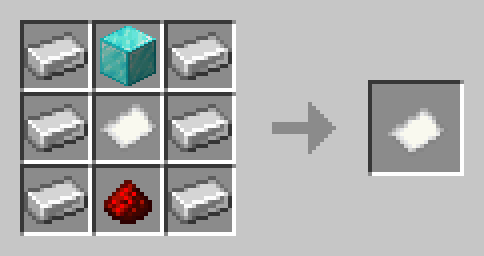
The player will need to craft a Bank Card and consume it to "register" a Bank Account, if the player already has an Account, he will not be able to consume it. After which the player will be able to use these commands:
- /trigger ob.balance - see your balance
- /trigger ob.replenish - replenish your account with 1 item in inventory
- /trigger ob.withdraw - withdraw 1 currency item from your account
- /trigger ob.replenish set - replenish your account with items in inventory
- /trigger ob.withdraw set - withdraw currency item from your account
This datapack has many settings, you can choose any item as currency.
There are the following settings: **cardAnywhere (default: true)** Allows players to use their Bank Account anywhere **makeAccountAnywhere (default: true)** Allows players to register Bank Account anywhere **balanceTab (default: false)** Shows the player's balance in the tab **allowCredits (default: false)** Allows players to withdraw from their account even at 0 **deathTaxPercent (default: 0)** Percentage of the account that is removed upon death **bankAreaDistance (default: 15)** Bank Area working distance (in blocks) **giveKillerPercent (default: false) WIP** Instead of removing the percentage from the account upon death, it transfers to the killerAll commands and how to configure:
How to set currency (default: diamond) Take the item that will become the currency and write the following command: **/function online_bank:apply_currency** How to change settings By writing the following command: **/function online_bank:settings** menu will open in the chat, hovering the cursor over gamerules will show their description and tips, clicking on them will change them. There is also a button to set default settings. How to give yourself a set currency **/function online_bank:give_currency** How to install Bank Area For gamerules cardAnywhere, makeAccountAnywhere and bankAreaDistance, you need Bank Area. By typing the command: **/function online_bank:give_bank_area** You will get a Bank Area spawn egg by placing it in a certain location (Example: build a bank and place it in the center), players will be able to use their Bank Account there within a set radius. How to remove datapack By writing the command: **/function online_bank:remove_datapack** Will be removed everything possible from the datapack created. How to give currency to someone's account **/scoreboard players set ob.playerBalance **请登录后举报
请 登录 后赞助作者。
暂无评论,抢个沙发吧~