
Glyphs
作者:rebot | 分类:模组
Minecraft 版本: 1.20 1.20.1 1.20.2 1.20.3 1.20.4 1.20.5 1.20.6 1.21 1.21.1 1.21.2 1.21.3 1.21.4 1.21.5 1.21.6 1.21.7 1.21.8 1.21.9 1.21.10
平台: bukkit paper purpur spigot
标签: decoration game-mechanics utility
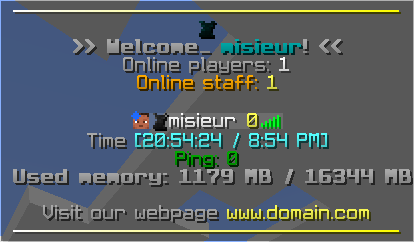
Glyphs,
A Lightweight Spigot plugin to create glyphs using a resource pack by Misieur
How to create new glyphs
To create new glyphs, you first want to find the glyphs.yml file in the plugin folder and open it.
You can create new glyphs by adding a new entry and adding the required fields.
Here is an example of a glyph configuration:
example_glyph:
  image_path: "font/example_image" # the .png is not required
  height: 8
  ascent: 7
Then you can put your image in the textures folder with the same path as specified in the image_path field.
You can now use the /glyphs reload command to rebuild the resource pack.
How to use glyphs in-game
You first need to make sure your players have the resource pack installed on their clients.
Once this is done, there are multiple ways to use glyphs in your server.
The way this plugin works is that instead of using static Unicode characters, it uses translations, this makes, so the client knows which glyph is which character instead of mapping them server side.
Using minecraft commands
You can use the /tellraw command to send glyphs to players.
Here is an example of how to send a glyph using the tellraw command:
/tellraw @p {"translate":"glyph.example_glyph"}Using the minimessage format
For plugins that support the minimessage format, you can use the following syntax to display glyphs:
(no fallback)
<tr:glyph.example_glyph>(with fallback)
<tr_or:glyph.example_glyph:'Emoji Not Found'>Support
Additional information
Ranks
To display glyph ranks using the TAB plugin, you have to create a luckperms group and edit the plugins/TAB/groups.yml file to add the following configuration:
group_name:
  tabprefix: "<tr:glyph.glyph_name>"
Offsets
To use text offsets, you can use offsets.number with any number between from and to from the config.yml file (-1023 to 1024 by default).
Examples:
/tellraw @p {"translate":"offsets.51"}<tr:offsets.-40>请登录后举报
暂无评论,抢个沙发吧~