
ApoCinematicCore
作者:rebot | 分类:模组
Minecraft 版本: 1.8.9 1.9 1.9.1 1.9.2 1.9.3 1.9.4 1.10 1.10.1 1.10.2 1.11 1.11.1 1.11.2 1.13 1.13.1 1.13.2 1.14 1.14.1 1.14.2 1.14.3 1.14.4 1.15 1.15.1 1.15.2 1.16 1.16.1 1.16.2 1.16.3 1.16.4 1.16.5 1.17 1.17.1 1.18 1.18.1 1.18.2 1.19 1.19.1 1.19.2 1.19.3 1.19.4 1.20 1.20.1 1.20.2 1.20.3 1.20.4 1.20.5 1.20.6 1.21 1.21.1 1.21.2 1.21.3 1.21.4 1.21.5 1.21.6 1.21.7 1.21.8 1.21.9 1.21.10 1.21.11 26.1 26.1.1 26.1.2
平台: paper purpur
标签: social technology utility
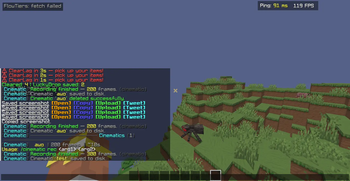


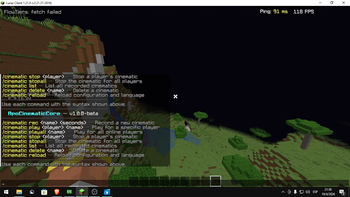
🎥 ApoCinematicCore 1.0.2-beta
The professional-grade cinematic engine for high-end Minecraft networks.
ApoCinematicCore is a high-performance suite designed to transform your server into a cinematic stage. Unlike traditional recording mods, this plugin captures high-fidelity trajectory data directly on the server, allowing for ultra-smooth native playback for trailers, intros, and global scripted events.
[!NOTE]
Inspired by the discontinued version of Cinematic Core by AleIV.




✨ Features
- 🎨 Catmull-Rom Interpolation — Professional-grade camera paths simulating a smooth experience by eliminating jitter.
- 📍 Point-Based Recording — New system to record specific keyframes with custom timing for surgical precision.
- 📱 Bedrock Optimized — Dedicated stabilization engine for Geyser & Floodgate users on mobile and consoles.
- 🧪 Advanced State Cleanup (v1.0.2) — Enhanced restoration engine that wipes all cinematic effects (
Slow Falling,Night Vision) and resets spectator targets instantly upon finish. - 🎭 Immersive Mode — Automatic HUD hiding (F1), blindness fades, and night vision for atmosphere.
- ⚡ Extreme Optimization — Adaptive TPS scaling that reduces smoothing if the server drops below 18.0 TPS.
- 🌍 Dual-Lang Support — Native support for both English (en_US) and Spanish (es_ES) out of the box.
🎮 Commands & Usage
| Command | Description |
|---|---|
/cinematic rec <name> <time> |
Starts a continuous recording for the specified duration. |
/cinematic rec <name> <point> <time> |
Records a specific keyframe point with custom timing. |
/cinematic play <name> [player] |
Plays a cinematic for yourself or a specific player. |
/cinematic playall <name> |
Broadcasts a global cinematic event to all online players. |
/cinematic stop [player] |
(Improved) Stops playback and fully restores player physics/effects. |
/cinematic list |
Displays all stored cinematic files. |
/cinematic delete <name> |
Permanently removes a cinematic file. |
/cinematic ignore |
Toggles whether you receive global (playall) cinematics. |
/cinematic reload |
Hot-reloads configuration and language files. |
⚙️ Configuration (config.yml)
# ============================================================
#   ApoCinematicCore — Main Configuration
#   Version: 1.0.2  |  Author: ApoloCR
# ============================================================

language: "en_US" # Options: en_US, es_ES

recording:
  fps: 20
  max_duration: 300
  countdown: 3

playback:
  # Smoothness level: 1 = Vanilla, 3 = 60fps feel (Recommended)
  sub_tick_smoothing: 3
  # Auto-reduce smoothing if TPS is below this value
  tps_threshold: 18.0
  interpolation_enabled: true
  interpolation_steps: 1
  multi_viewer: true
  fade_effect: true
  cinematic_mode: true # F1 mode (Java) + Night Vision
  hide_other_players: false
  block_commands: true
  # Stabilizes camera micro-vibrations (Auto-cleaned in v1.0.2)
  no_fall_effect: true
  fov_reset_on_start: true

bedrock:
  extra_interpolation: true
  extra_frames: 2

storage:
  auto_save: true
  auto_load: true
folder: "cinematics"请登录后举报
请 登录 后赞助作者。
暂无评论,抢个沙发吧~