TinyBones🦴
作者:rebot | 分类:资源包
Minecraft 版本: 1.0
平台: minecraft
标签: blocks entities vanilla-like
🦴 TinyBones
✨ A clean, flat, cartoony pack that's genuinely tiny under the hood
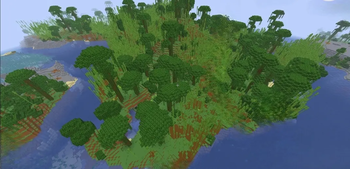
TinyBones strips Minecraft down to pure, readable colour — no pixel noise, no muddy gradients, just crisp flat shapes that pop from across the map. 🎨
But looking clean is only half of it. Under the surface, 74% of every block runs at 4×4 or 8×8 instead of 16×16, which shrinks the block atlas from 1024×1024 down to 512×512. Same complete coverage, a fraction of the memory. 🚀
🎯 Built for: low-end laptops 💻 · integrated graphics 🖥️ · heavy modpacks 📦 · huge render distances 🌍 · and anyone who just likes the clean look 😎
🌟 Highlights
| 🧱 Complete | Every single vanilla texture restyled — nothing left untouched |
| 📉 Mixed resolution | Most blocks at 4×4 or 8×8, detail kept where it matters |
| 🗜️ Block atlas | 1024×1024 → 512×512 (−63% pixels) |
| 💾 VRAM | ~4 MB less than a standard 16× pack |
| 📦 Download | Under 2 MB |
| 🎞️ Animations | Every animated texture optimised |
| ⚙️ Requirements | Zero — no OptiFine, no mods, no shaders |
| ✅ Sodium-safe | Every sprite is a clean power of two |
🎨 What it looks like
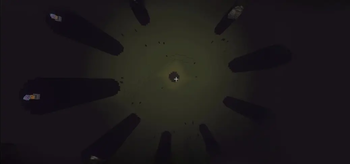
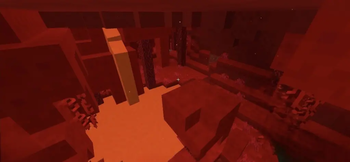
🌈 Flat, vibrant colour. Blocks are reduced to a handful of clean tones. No dithering, no noise — just readable shapes.
⛏️ Ores that actually pop. Gem speckles are brightened while the surrounding rock is darkened, so diamonds practically glow at you from a cave wall. 💎
🪨 Stone that isn't all the same. Diorite, granite, tuff, basalt and deepslate get nudged apart so you can finally tell them apart at a glance.
🌿 Lush foliage. Leaves, grass, vines and crops got livelier greens — they were the dullest part of the flattened palette.
🗡️ Crisp item icons. Every item gets a sharpened dark rim so it reads clearly against any inventory slot.
🌅 Hand-built sky & menu
The vanilla menu panorama is a 1024×1024 photographic cave scene — beautiful, but it weighs 2.47 MB on its own and clashes completely with a flat art style. 🕳️
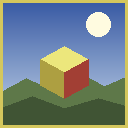
TinyBones replaces it with a fully generated 256×256 skybox that matches the pack — and it's 74× smaller: 🌄
- ☀️ A sun with a soft warm glow
- ☁️ Two cloud layers — chunky cumulus plus high wispy cirrus
- 🏞️ Rolling hills with a treeline on the horizon
- 🌫️ Atmospheric haze where land meets sky
- 🌡️ Clouds tinted warmer the closer they sit to the sun
The six faces are generated by true ray-direction projection, so the panorama rotates with zero visible seams at the corners. 🎯
Also included: a redrawn sun, all 8 moon phases 🌑🌒🌓🌔🌕🌖🌗🌘 with craters, new clouds, and a darker starfield End sky. 🌌
🎛️ Menu panels are flat black in vanilla, which reads as grey fog once a panorama sits behind it. They're now dark navy with a soft vignette and gold separator lines — still perfectly readable, just far nicer. ✨
⚡ Performance
I'd rather give you real numbers than marketing fluff. 📊
✅ Where you genuinely gain
- 📉 Block atlas: −63% pixels
- 💾 ~4 MB less VRAM for the block + item atlases
- 🍃 Solid leaves = no overdraw. Leaves averaged 22% transparent holes. With cutout rendering, the GPU has to draw whatever sits behind every hole — a dense forest gets drawn over itself several times. Every leaf texture is now fully opaque: no alpha testing, no overdraw, and the chunk mesher can cull hidden faces. This is what vanilla's Fast graphics does, baked right in. 🌲
- 🖼️ Menu panorama 2.47 MB → 34 KB, and 1024×1024 → 256×256 per face
- 🎐 Conduit wind halved — it was the single biggest animated upload in the pack
- 🫧 Fullscreen overlays (vignette, nausea, pumpkin blur) 256 → 64 — these redraw over your entire screen every frame
- ✨ Enchant glint 128 → 32 — an extra blended pass on every enchanted item
⚠️ Where you honestly won't
🤷 If you already run 300 FPS on a gaming desktop, you will not notice a difference. Standard 16× packs are already basically free — there's very little to beat.
📌 Mobs, GUI and particles are roughly 20 MB of VRAM and are not reduced. Mob skins stay at full resolution on purpose (see below), so the ~4 MB saving is around 17% of total texture memory, not 60% of the whole game.
🔍 The real trade-off: because the smallest blocks are 4×4, the atlas mipmap level caps at 2 instead of 4. Very distant blocks can shimmer slightly. Set Mipmap Levels: 2 in Video Settings for the smoothest result. 🎚️
🍂 Solid leaves mean you won't see sky through the canopy any more — exactly like Fast graphics. It's a deliberate style + speed choice.
TL;DR: 💡 Big win on weak hardware, tight VRAM and packed modpacks. On a strong GPU it's mostly about the look.
🧠 How resolutions were chosen
Every single block was tested by an automated pipeline before being shrunk: 🔬
- 📐 Error measurement — the real pixel error after downscaling is computed
- 👻 Coverage test — thin shapes (rails, plants, bars, cobwebs) must not vanish
- 🧩 Structure test — if brick mortar or plank grain would collapse into a flat blob, the block is bumped back up a level
- 🔒 Hard protections — ores, block faces and redstone indicators always stay 16×16
🔄 Tried, tested, reverted
🔥 Furnace, smoker, dispenser and crafting table fronts went back to 16×16 — at 8×8 the furnace's lit opening disappeared, and you need to see whether your furnace is actually running.
👀 64×64 mob skins are NOT downscaled. Halving them erased eyes and facial features — creepers and zombies became shapeless blobs. One skin is roughly 16 KB of VRAM, so the saving was never worth it.
📦 Complete coverage
TinyBones is never a partial pack. Every build restyles the full vanilla texture set for that release — blocks, items, mobs, GUI, particles, paintings, trims, status effects, maps, and the environment.
Newer drops are covered too, including the sulfur and cinnabar block families, animated potent sulfur, sulfur spikes, and the Sulfur Cube mob — with the exact file names taken from the real client, so nothing silently falls back to a default texture. 🆕
💿 Installation
- ⬇️ Download the
.zip— do not unzip it! - 📂 Drop it into your resourcepacks folder:
- 🪟 Windows:
%appdata%\.minecraft\resourcepacks - 🐧 Linux:
~/.minecraft/resourcepacks - 🍎 macOS:
~/Library/Application Support/minecraft/resourcepacks
- 🪟 Windows:
- 🎮 In game: Options → Resource Packs → move TinyBones to the right → Done
🎚️ Recommended settings
| Setting | Value |
|---|---|
| 🖼️ Graphics | Fast |
| 🔍 Mipmap Levels | 2 |
| ☁️ Clouds | OFF |
| ✨ Particles | Decreased |
| 💡 Smooth Lighting | OFF or Minimum |
💡 Pro tip: recent Minecraft releases ship an experimental Vulkan renderer — it's often faster than OpenGL, so it's well worth a try! 🧪
❓ FAQ
🤔 Will this actually boost my FPS? Depends entirely on your hardware. On a low-end laptop, integrated graphics, or a VRAM-starved modpack — yes, noticeably, especially in forests. On a gaming desktop already pushing 300+ FPS — barely, if at all. I won't pretend otherwise. 🤷 🧩 Do I need OptiFine, Sodium or any mods? Nope! 🎉 Pure vanilla, zero dependencies. It works great alongside Sodium and Iris if you use them — every sprite is a clean power of two, so mipmapping never breaks. 🌫️ Why do distant blocks shimmer a bit? That's the mipmap trade-off from the 4×4 blocks. Set **Mipmap Levels to 2** in Video Settings and it'll look much smoother. 🎚️ 🍃 Why can't I see through leaves any more? Intentional! Solid leaves eliminate overdraw, which is one of the biggest performance wins in this pack. It matches vanilla's *Fast* graphics look. 🌲 🌄 Why replace the menu panorama? The vanilla one is a photographic cave scene at 1024×1024 — it looks great, but it doesn't match a flat art style at all, and it's 2.47 MB by itself. The replacement is generated to match the pack and is 74× smaller. 🎨 🎮 Is it safe on servers and Realms? Absolutely. ✅ Resource packs are client-side only and change nothing about gameplay. 🔢 Which Minecraft versions are supported? Check the **Files** tab — each download lists the exact versions it targets. Every build declares a wide compatible range, so it usually works on neighbouring releases without the "incompatible pack" warning too. 👍 🎨 Are these hand-drawn textures? No, and I want to be upfront about it. 🙋 These are algorithmically restyled versions of the original Minecraft textures — colour flattening, palette reduction, and resolution reduction. The sky, panorama and menu panels are generated from scratch. The original block and item artwork belongs to Mojang.💛 Credits & License
🧑🎨 Created by MontSnacek
🆓 Free forever. Use it, edit it, bundle it into modpacks — a credit is appreciated but never required.
⚠️ These textures are derivative works based on the original Minecraft assets, not original artwork. All rights in the source art remain with Mojang AB / Microsoft. Because of that, this pack must always stay free — never behind a paywall or ad-link.
🚫 NOT AN OFFICIAL MINECRAFT PRODUCT.
NOT APPROVED BY OR ASSOCIATED WITH MOJANG OR MICROSOFT.
Minecraft is a trademark of Mojang AB / Microsoft. 🦴
请登录后举报
请 登录 后赞助作者。
暂无评论,抢个沙发吧~