
enderchest to obsidian Farm
作者:rebot | 分类:模组
Minecraft 版本: 1.21.11 26.1 26.1.1 26.1.2
平台: fabric
标签: economy management utility
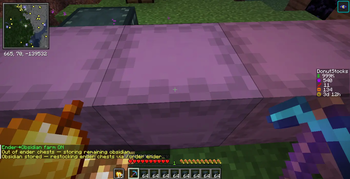
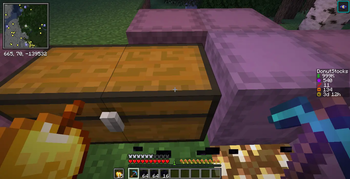
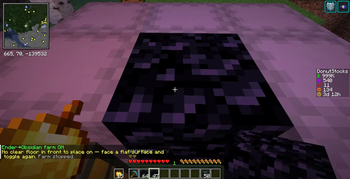
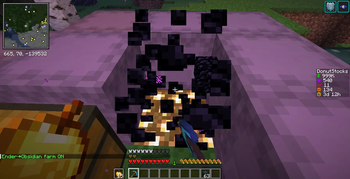
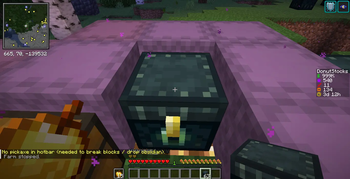
Disclaimer This Might Be pached On DonutSMP
EnderChest → Obsidian Farm
EnderChest → Obsidian Farm is an automation mod that turns the repetitive process of
placing and breaking Ender Chests into a hands-free obsidian farm. It's built for players who
need large amounts of obsidian — for bases, vaults, traps, crystal PvP, or server economies —
and it automates the whole loop while staying fully configurable.
⚠️ This is a client-side automation/macro mod. On many multiplayer servers, automating actions
like this is against the rules and may be detected as cheating. Use it on singleplayer or
servers where it's allowed.
Core Functionality
The mod runs a continuous cycle:
- Places an Ender Chest on the ground in front of you.
- Breaks it with your diamond pickaxe.
- Collects the dropped obsidian.
- Repeats automatically.
If an Ender Chest is already sitting in the spot, it breaks that one instead of failing — so you
can pre-place chests and let it run.
Automation Features
- Automatic placement – places Ender Chests on a valid floor spot in the direction you were
facing when you started. - Automatic breaking – mines chests with the diamond pickaxe in your hotbar (falls back to any
pickaxe). - Obsidian storage – when your inventory fills, it dumps obsidian into nearby shulker boxes,
moving on to the next shulker when one fills up. - Ender Chest refilling – pulls fresh Ender Chests out of a nearby chest when your hotbar
runs low. - Smooth rotation – eases your view toward each target (placement spot, chest, shulker) instead
of snapping, for more natural movement. - All game modes – progressive mining in Survival/Adventure, instant breaking in Creative,
idles in Spectator. - Works through GUIs – keeps running even while an inventory or menu screen is open.
- Auto-recovery – validates each step and stops cleanly (with a chat message) on dead ends
instead of getting stuck.
Safety
- Interference detection – pauses the farm when another player comes within a configurable
radius (any game mode, including spectators), and resumes when they leave. - Auto-leave – optionally disconnects from the server instantly when a player is detected.
- Auto-reconnect – optionally rejoins the server after a disconnect (e.g. a spam kick) once the
configured delay passes, then resumes farming. - Anti-spam cooldown – a configurable delay between auction-house listings to avoid command-spam
kicks.
Server / Economy Integration
For economy SMP servers, the farm can run a full hands-free supply chain:
- Auto-restock – when out of Ender Chests, runs your server's order command (e.g.
/order enderchest), navigates the GUI, collects the chests, banks the spares, and resumes. - Auto-sell – lists obsidian on the auction house with
/ah sell <price>, automatically
clicking the "Confirm Listing" button, and pulling obsidian back out of the shulkers to sell.
Price is per item (the listing price isprice × stack size). It reads chat to detect when
the AH is full ("too many listed items") and when listings sell ("bought your …"), listing more as
slots free up. Trigger it any time with/enderfarm sell now.
Containers behind walls are ignored — the farm only opens shulkers and chests it has a clear line
of sight to.
Performance
- Lightweight — negligible FPS impact.
- Adjustable action delays and rotation speed for server compatibility.
- Configurable interaction range and detection distance.
Setup
Stand on a flat platform facing where chests should be placed, with — within ~4.5 blocks — a
diamond pickaxe and Ender Chest in your hotbar, a shulker box for obsidian, and (optionally)
a chest stocked with Ender Chests for refilling. Press the toggle key.
All settings persist to config/enderfarm.json.
Keybind
- O (default) – toggle the farm. Rebindable in Options → Controls → Ender Obsidian Farm.
Commands
Run /enderfarm to see current status.
| Command | Description |
|---|---|
/enderfarm on · off · toggle |
Start / stop / toggle the farm |
/enderfarm smooth on · off |
Smooth rotation vs. instant snap |
/enderfarm smooth <0.01–1.0> |
Rotation ease factor (lower = slower/smoother) |
/enderfarm maxstep <1–90> |
Max degrees turned per tick |
/enderfarm tolerance <0.1–10> |
How precisely it must aim before acting |
/enderfarm detect on · off · <radius> |
Pause when a player is nearby |
/enderfarm leave on · off |
Disconnect instantly when a player is detected |
/enderfarm reconnect on · off · <seconds> |
Rejoin the server after a disconnect (e.g. spam kick) |
/enderfarm order on · off |
Auto-restock Ender Chests when out |
/enderfarm order <command> |
The order command (default order enderchest) |
/enderfarm order openslot · enderslot · confirmslot <n> |
Order-GUI button slots |
/enderfarm sell on · off |
Auto-sell obsidian on the auction house when out of chests |
/enderfarm sell now |
Start selling immediately (inventory + shulkers) |
/enderfarm sell price <n> |
Listing price per item (× stack size) |
/enderfarm sell command <text> |
The sell command (default ah sell) |
/enderfarm sell confirmslot <n> |
"Confirm Listing" button slot (default 15) |
/enderfarm sell delay <ticks> |
Cooldown between listings (anti-spam; default 40 = 2s) |
/enderfarm slots |
Print the open GUI's slot layout |
/enderfarm debug on · off |
Auto-print any GUI's slots when it opens |
Use Cases
- Supplying crystal PvP kits
- Stocking server shops
- Generating wealth on economy SMP servers
- Reducing repetitive grinding
Requirements
- Minecraft 1.21.11
- Fabric Loader 0.19.3+
- Fabric API
请登录后举报
请 登录 后赞助作者。
暂无评论,抢个沙发吧~