
YourStageSkybox
作者:rebot | 分类:模组
Minecraft 版本: 1.12.2
平台: forge
标签: library
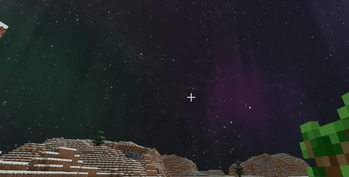
YourStageSkybox
Minecraft Forge Mod — Provides APIs and commands for map creators to import skybox textures via resource packs and switch them instantly, enabling real-time scene atmosphere changes.
Supported Versions
| Directory | MC Version | Forge | Status |
|---|---|---|---|
1.12.2/ |
1.12.2 | 14.23.5.2847 | ✅ Stable |
1.16.5/ |
1.16.5 | 36.2.39 | ✅ Compilable |
1.20.1/ |
1.20.1 | 47.2.0 | ✅ Compilable |
1.21.1/ |
1.21.1 | 52.1.15 | ⚠️ In Progress |
Installation
- Place the version-matched JAR file into Minecraft’s
mods/directory. - Place skybox resource packs into the
resourcepacks/directory. - Launch the game and enable the skybox resource pack in the Resource Packs menu.
Creating a Skybox Resource Pack
File Structure
Your Resource Pack/
├── pack.mcmeta
└── assets/
    └── yourstageskybox/
        └── textures/
            └── skyboxes/
                ├── Skybox_Name1/
                │   ├── panorama_0.png   ← North (-Z)
                │   ├── panorama_1.png   ← East (+X)
                │   ├── panorama_2.png   ← South (+Z)
                │   ├── panorama_3.png   ← West (-X)
                │   ├── panorama_4.png   ← Top (+Y)
                │   └── panorama_5.png   ← Bottom (-Y)
                └── Skybox_Name2/
                    └── ...
pack.mcmeta Example
{
    "pack": {
        "pack_format": 15,
        "description": "My Skybox Resource Pack"
    }
}
pack_formatValues:
- 1.12.2 →
3- 1.16.5 →
6- 1.20.1 →
15
Image Requirements
- Square textures per face (recommended: 1024×1024 or 2048×2048,
.pngformat). - Consistent lighting and color temperature across all 6 images to avoid visible seams.
- Bottom face (
panorama_5) may be a solid color or transparent to minimize visual disruption.
Direction Mapping
| File | Direction | Coordinate |
|---|---|---|
panorama_0 |
North | -Z |
panorama_1 |
East | +X |
panorama_2 |
South | +Z |
panorama_3 |
West | -X |
panorama_4 |
Top | +Y |
panorama_5 |
Bottom | -Y |
Test Resource Packs
Sample skyboxes (demo, starry) are provided in 1.12.2/resourcepack/. Copy them directly to resourcepacks/ for testing.
Command Reference
Permission level ≥ 2 (OP required). Alias: /yss.
/yourstageskybox set <name> [alpha] [duration] [player] [dim]
    Sets skybox. Alpha: 0.0~1.0 (default: 1.0). Duration: transition time in seconds (default: 2.0).

/yourstageskybox clear [player] [dim]
    Restores vanilla sky.

/yourstageskybox alpha <0.0~1.0> [player] [dim]
    Adjusts transparency (no transition animation).

/yourstageskybox duration <seconds> [player] [dim]
    Sets transition duration for next skybox change.

/yourstageskybox info [dim]
    Shows current skybox info and transition progress.

/yourstageskybox list
    Lists all registered skyboxes.

/yourstageskybox reload
    Rescans resource packs (client-side).
Parameters:
player:@a(all),@p(nearest),@r(random), or player name. Default: all players.dim:0= Overworld,-1= Nether,1= End. Default:0(Overworld).
Examples:
/yourstageskybox set starry                    # Sets "starry" skybox for all players in Overworld
/yourstageskybox set sunset 0.8 3.0 @p         # 3-sec transition to "sunset" (80% opacity) for nearest player
/yourstageskybox clear @a 1                    # Clears skybox for all players in the End
/yourstageskybox alpha 0.5 @p                  # Sets 50% opacity for nearest player's skybox
Configuration File
config/yourstageskybox.cfg (1.12.2) or config/yourstageskybox-common.toml (1.16.5+):
| Setting | Default | Description |
|---|---|---|
autoRegister |
false |
Auto-scan resource packs on client startup to register skyboxes |
API Usage
// Set skybox
SkyboxAPI.setSkybox(level, "starry");
SkyboxAPI.setSkybox(level, "sunset", 0.8f, 3000, player);

// Clear skybox
SkyboxAPI.clearSkybox(level);
SkyboxAPI.clearSkybox(level, player);

// Query state
String name = SkyboxAPI.getSkybox(level);
float alpha = SkyboxAPI.getSkyboxAlpha(level, player); Note:
levelrefers to theWorldobject (Minecraft dimension). All API methods are thread-safe.
YourStageSkybox模组
Minecraft Forge 模组 —— 为地图创作者提供 API 和指令,通过资源包导入天空盒材质后快捷切换,实现场景氛围的即时变化。
支持的版本
| 目录 | MC 版本 | Forge | 状态 |
|---|---|---|---|
1.12.2/ |
1.12.2 | 14.23.5.2847 | ✅ 稳定 |
1.16.5/ |
1.16.5 | 36.2.39 | ✅ 可编译 |
1.20.1/ |
1.20.1 | 47.2.0 | ✅ 可编译 |
1.21.1/ |
1.21.1 | 52.1.15 | ⚠️ 移植中 |
安装
- 将对应版本的 JAR 放入 Minecraft 的
mods/目录 - 将天空盒资源包放入
resourcepacks/目录 - 启动游戏,在资源包界面启用天空盒资源包
制作天空盒资源包
文件结构
你的资源包/
├── pack.mcmeta
└── assets/
    └── yourstageskybox/
        └── textures/
            └── skyboxes/
                ├── 天空盒名称1/
                │   ├── panorama_0.png   ← 北 (-Z)
                │   ├── panorama_1.png   ← 东 (+X)
                │   ├── panorama_2.png   ← 南 (+Z)
                │   ├── panorama_3.png   ← 西 (-X)
                │   ├── panorama_4.png   ← 上 (+Y)
                │   └── panorama_5.png   ← 下 (-Y)
                └── 天空盒名称2/
                    └── ...
pack.mcmeta 示例
{
    "pack": {
        "pack_format": 15,
        "description": "我的天空盒资源包"
    }
}
pack_format取值:1.12.2 用3,1.16.5 用6,1.20.1 用15
图片要求
- 每面正方形(推荐 1024×1024 或 2048×2048,
.png格式) - 六张图的光照和色温需一致,否则接缝处可见
- 底部(panorama_5)可选单色填充或透明,降低视觉干扰
方向对应
panorama_0 ← 玩家面朝北方时看到的画面(-Z)
panorama_1 ← 玩家面朝东方时看到的画面(+X)
panorama_2 ← 玩家面朝南方时看到的画面(+Z)
panorama_3 ← 玩家面朝西方时看到的画面(-X)
panorama_4 ← 玩家抬头看到的画面(+Y)
panorama_5 ← 玩家低头看到的画面(-Y)
测试资源包
1.12.2/resourcepack/ 目录包含两个示例天空盒(demo、starry),可直接复制到 resourcepacks/ 测试。
指令参考
权限等级 ≥ 2(OP)。别名:/yss。
/yourstageskybox set <名称> [alpha] [duration] [player] [dim]
    设置天空盒,alpha 0.0~1.0(默认 1.0),duration 过渡秒数(默认 2.0)

/yourstageskybox clear [player] [dim]
    恢复原版天空

/yourstageskybox alpha <0.0~1.0> [player] [dim]
    调整透明度(不触发过渡动画)

/yourstageskybox duration <秒> [player] [dim]
    设置下次切换的过渡时长

/yourstageskybox info [dim]
    查看当前天空盒信息及过渡进度

/yourstageskybox list
    列出所有已注册天空盒

/yourstageskybox reload
    重新扫描资源包(客户端)
参数说明:
player:@a(所有玩家)、@p(最近)、@r(随机)、玩家名,留空=所有dim:0=主世界、-1=下界、1=末地,留空=0
示例:
/yourstageskybox set starry                    # 全体玩家主世界切换到 starry
/yourstageskybox set sunset 0.8 3.0 @p        # 最近玩家 3 秒过渡到 sunset,透明度 0.8
/yourstageskybox clear @a 1                   # 清除全部玩家末地的天空盒
/yourstageskybox alpha 0.5 @p                # 最近玩家天空盒半透明
配置文件
config/yourstageskybox.cfg(1.12.2)或 config/yourstageskybox-common.toml(1.16.5+):
| 设置 | 默认 | 说明 |
|---|---|---|
autoRegister |
false |
客户端启动时自动扫描资源包注册天空盒 |
API 使用
// 设置天空盒
SkyboxAPI.setSkybox(level, "starry");
SkyboxAPI.setSkybox(level, "sunset", 0.8f, 3000, player);

// 清除
SkyboxAPI.clearSkybox(level);
SkyboxAPI.clearSkybox(level, player);

// 查询
String name = SkyboxAPI.getSkybox(level);
float alpha = SkyboxAPI.getSkyboxAlpha(level, player);请登录后举报
暂无评论,抢个沙发吧~