
Custom Damage Overlay Color
作者:rebot | 分类:资源包
Minecraft 版本: 1.20.2 1.20.3 1.20.4 1.20.5 1.20.6 1.21 1.21.1 1.21.2 1.21.3 1.21.4 1.21.5 1.21.6 1.21.7 1.21.8 1.21.9 1.21.10 1.21.11
平台: minecraft
标签: core-shaders entities tweaks
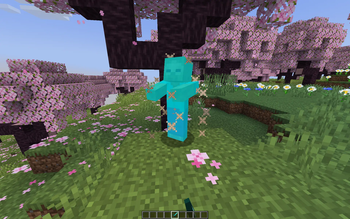
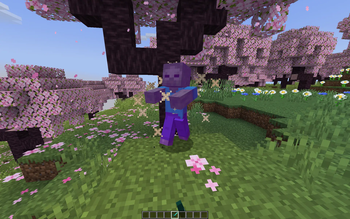
Custom Damage Overlay Color
This resource pack allows to change overlay color of all entities when they take damage. By defult this resource pack changes it to green, as an example.
Versions: 1.17 — 1.21.11
Works with both Optifine and Sodium.
How to change the color
Go into the resource pack and open a file assets/minecraft/shaders/include/change_damage_overlay.glsl, choose a color and put it into the second line of the file. For example if you want to change the color to purple (#AA00FF) with 50% transparency, the second line of the file would look like this:
vec4 RGBColor = vec4(170,0,255,127);And if you want cyan (#00FFFF) color with the same transparency as in vanilla, it would look like this:
vec4 RGBColor = vec4(0,255,255,178);请登录后举报
请 登录 后赞助作者。
暂无评论,抢个沙发吧~