
AuricNetwork - Network no proxy
作者:rebot | 分类:模组
Minecraft 版本: 1.21 1.21.1 1.21.2 1.21.3 1.21.4 1.21.5 1.21.6 1.21.7 1.21.8 1.21.9 1.21.10 1.21.11 26.1 26.1.1 26.1.2 26.2
平台: paper purpur
标签: magic technology utility
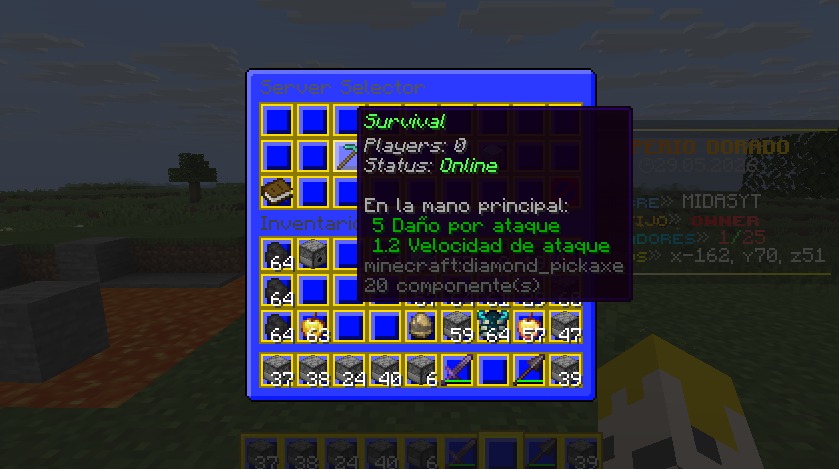
🌟 AuricNetwork – Zero-Proxy Network System
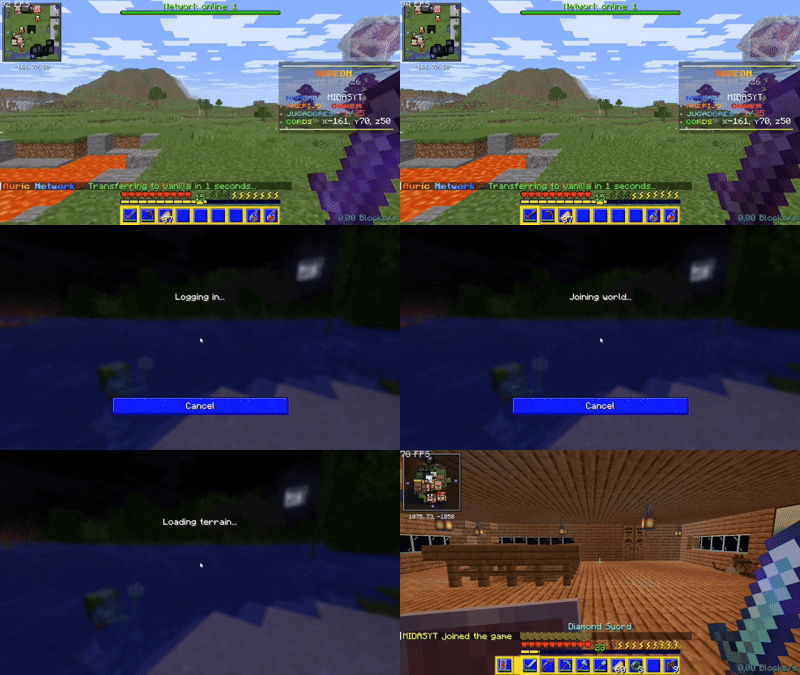
A free network? No proxy? No multiple worlds overloading the server's RAM? Yes, it's possible with AuricNetwork.
AuricNetwork lets you build a Minecraft server network without any proxy (BungeeCord, Velocity). It uses Paper's native Player#transfer (1.21+).
🔗 Dependencies
- PlaceholderAPI (Optional)
📦 Installation
- Place
AuricNetwork.jarinto thepluginsfolder of every server in your network. - On every target server, set
accepts-transfers=trueinserver.properties. - Start or restart all servers.
- Configure your network and server connections from the files generated in
plugins/AuricNetwork/. - Make sure AuricNetwork is configured consistently across all servers that participate in the network.
🔄 Updating
- For minor updates (for example,
1.1.0→1.1.1), replace the existing.jarfile with the new version on every server and restart them. - For major updates (for example,
1.1.0→1.2.0), back up your current configuration and important network data on every server, replace the.jarfiles, delete the oldplugins/AuricNetwork/folders, and restart the servers so the new files can be generated. - After the update, restore or reapply your previous configuration and review the new configuration options before bringing the network back online.
Core Features
- Direct server transfers – No single point of failure, lower latency.
- Full loot & stats transfer – Inventory, ender chest, XP, health, potion effects, gamemode and even Vault economy balance can follow the player across servers, carried in signed cookies with no database needed — and automatically backed up locally if a transfer ever fails.
- Graphical server selector – Fully configurable chest GUI with placeholders
%online_<server>%and%status_<server>%. - Rank-based welcome system – Title, subtitle, chat message, action bar, sound, fireworks and a damage-free lightning strike on join, all tied to numeric rank permissions.
- Configurable hotbar – Give players custom items on join with click actions (transfer, command, open menu, sound, message...) and protection against dropping, moving, picking up or swapping them.
- Named announcements – Broadcast a specific announcement on demand by its id, with per-id permissions and tab-completion.
- Maintenance mode – Take any server out of rotation; transfer attempts are rejected with a message instead of failing silently.
- Party system – Invite, accept, kick and disband; when the leader transfers servers, the whole party follows automatically.
- Rescue server (fallback) – On graceful shutdown, all players are auto-transferred to a configured rescue server, with an optional fallback list. Console shows how many were moved.
- Multi-lobby balancing –
/lobbypicks a server from a list, either at random or always the one with the fewest players. - Join & respawn spawns – Set teleport locations for join and respawn events.
- Live server status – Pulls real-time online players and online/offline/full status from
api.mcsrvstat.us. - Network placeholders – Works with or without PlaceholderAPI, exposing online counts, server status, queue position and party info as
%auricnetwork_*%/%an_*%.
Commands
/auricnetwork reload– Reload config. (auricnetwork.command.reload)/auricnetwork status– List every server's live status. (auricnetwork.command.status)/auricnetwork announce <id>– Broadcast a named announcement. (auricnetwork.command.announce or auricnetwork.command.announce.\<id>)/auricnetwork menu– Open server selector GUI. (auricnetwork.command.menu)/auricnetwork setjoinspawn– Set join spawn at your location. (auricnetwork.command.setjoinspawn)/auricnetwork setrespawnspawn– Set respawn spawn. (auricnetwork.command.setrespawnspawn)/server <name> [player]– Transfer to another server, or send another player. (auricnetwork.command.server / auricnetwork.command.server-others)/spawn [join|respawn]– Teleport to spawn. (auricnetwork.command.spawn)/lobbyor/hub– Go to lobby (supports random or least-players balancing). (auricnetwork.command.lobby)/party <invite|accept|deny|leave|kick|list|disband>– Manage your party. (auricnetwork.command.party)
Every subcommand above also works directly under /auricnetwork (e.g. /auricnetwork server survival).
Permissions
auricnetwork.admin– Parent node for every administrative permission: reload, announce, status, set spawns, server-others.auricnetwork.command.server/auricnetwork.command.server-others– Transfer yourself, or transfer other players.auricnetwork.command.menu– Open the server selector GUI.auricnetwork.command.spawn– Parent node forauricnetwork.command.spawn.joinandauricnetwork.command.spawn.respawn.auricnetwork.command.lobby– Use/lobby//hub.auricnetwork.command.party– Parent node forinvite,accept,deny,leave,kick,listanddisband, each with its own individual permission.auricnetwork.command.announce– Broadcast any announcement, orauricnetwork.command.announce.<id>for a single one.auricnetwork.welcome.<number>– Unlocks the welcome rank with that exact numeric key in the config.auricnetwork.queue.<number>– Queue priority; any number works, the highest one wins.
Every command permission is split as granularly as possible, so you can remove access to one specific feature without affecting the rest.
💡 AuricNetwork now handles inventory, stats and economy natively, no database needed for those. For anything outside that scope, like player ranks, a database connected to each server still works well.
💡 Since a proxy is not being used, the plugins must be installed on all servers; they will not be transferred between them.
🌐 My Socials (Spanish Content / Contenido en Español)
🧪 Auric Tester Program
Get early access to upcoming Auric plugins and help test new features before their release.
Join if you're interested in testing plugins.
- No experience required, you can test only what you want and there's nothing to give in return.
👇

请登录后举报
请 登录 后赞助作者。
暂无评论,抢个沙发吧~