
CopySign
作者:rebot | 分类:模组
Minecraft 版本: 1.21 1.21.1 1.21.2 1.21.3 1.21.4 1.21.5 1.21.6 1.21.7 1.21.8 1.21.9 1.21.10 1.21.11
平台: folia paper purpur spigot
标签: decoration game-mechanics utility
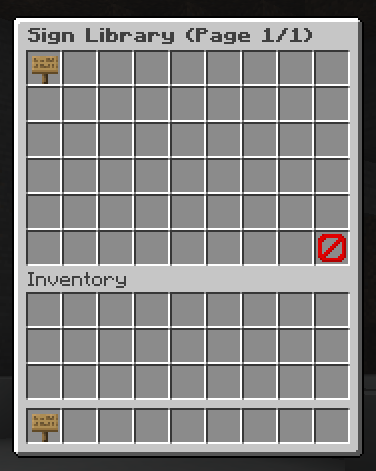
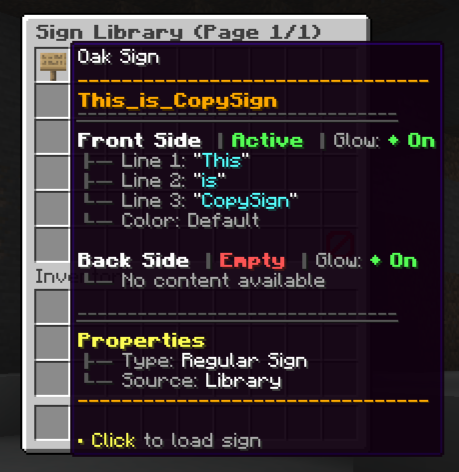
CopySign
Stop retyping signs. Copy any sign with a click, save your favorites, paste them anywhere.
CopySign turns sign creation into a one-click workflow. Shift+left-click any sign while holding a blank one and the text, colors, and glow state transfer instantly. Place the sign and it writes itself. Save the ones you use often to a personal library, browse them in a GUI, and let admins push server-wide templates for shops, rules, warps, and anything else your server needs to look consistent.
Features
- One-click copy and paste for any sign, regular or hanging
- Full preservation of text, colors, and glow effects
- Personal sign library with GUI browsing, save, load, and delete
- Server templates for admin-managed, server-wide signs
- Per-player toggle so the feature only triggers when you want it
- Folia support with thread-safe operations
- WorldGuard integration that respects region protections
- Granular permissions for every feature, sign type, and bypass
- Customizable messages, sounds, and cooldowns through config files
- NBT-based storage for reliable, persistent sign data
Quick Start
- Run
/copysign onto enable the feature - Hold a sign in your main hand
- Shift + left-click any sign with text to copy it
- Place your sign normally and the text applies automatically
To save and reuse:
/cs save <name>after copying to add it to your library/cs load <name>to apply a saved template to a held sign/cs libraryto open the GUI browser
Commands
| Command | Description |
|---|---|
/cs on / /cs off |
Toggle the copy feature for yourself |
/cs clear |
Clear NBT data from a held sign |
/cs save <name> |
Save a copied sign to your library |
/cs load <name> |
Load a saved template onto your held sign |
/cs delete <name> |
Remove a sign from your library |
/cs library |
Open the personal library GUI |
/cs templates list |
Browse server-wide templates |
/cs templates create <name> |
Save a copied sign as a server template (admin) |
/cs templates use <name> |
Apply a server template to your held sign |
/cs reload |
Reload plugin configuration |
Alias: /cs works in place of /copysign everywhere.
Requirements
- Minecraft: 1.21 or newer
- Server: Spigot, Paper, Folia, or compatible forks
- Java: 21+
- Required dependency: NBT-API v2.15.1+
Permissions
Permissions are split into core, sign type, library, template, admin, and bypass groups so you can hand out exactly the access each rank needs. Common setups:
# Basic players
copysign.use

# Trusted builders
copysign.use
copysign.copycolor
copysign.library

# Staff
copysign.*
Configuration
config.yml controls defaults, library limits, cooldowns, metrics, and debug logging. messages.yml lets you rewrite every player-facing message with full color code support.
请登录后举报
请 登录 后赞助作者。
暂无评论,抢个沙发吧~