
Discord Command Bridge
作者:rebot | 分类:模组
Minecraft 版本: 1.2.1 1.2.2 1.2.3 1.2.4 1.2.5 1.20 1.20.1 1.20.2 1.20.3 1.20.4 1.20.5 1.20.6 1.21 1.21.1 1.21.2 1.21.3 1.21.4 1.21.5 1.21.6 1.21.7 1.21.8 1.21.9 1.21.10 1.21.11
平台: bukkit paper spigot
标签: management technology utility
Discord Command Bridge
Streamline your workflow and manage your server efficiently from anywhere. This plugin seamlessly integrates your Minecraft server with Discord, empowering your staff to execute vital in-game commands directly from a secure Discord channel.
Perfect for Remote Administration: Handle moderation, player management, and emergency server fixes on the go without needing to launch Minecraft or log into a clunky panel.
🛠️ Key Features At A Glance
| Feature | What It Does | Why It Matters |
|---|---|---|
| Remote Console Power | Run core commands (/ban, /kick, /tp) directly from Discord. | Zero lag, instant execution as if typed directly into the server console. |
| Granular Role Mapping | Pair specific Discord roles to exact list of allowed Minecraft commands. | Total security. Keep junior staff restricted while giving senior admins full access. |
| Channel Locking | Restrict the bot's listening capability to a single, hidden channel. | Prevents regular players from seeing staff activity or trying to spam commands. |
| Instant Feedback | Returns real-time execution success, format errors, or permission denials. | Staff always know if their command went through or if it failed. |
🧭 How It Works: The Lifecycle of a Command
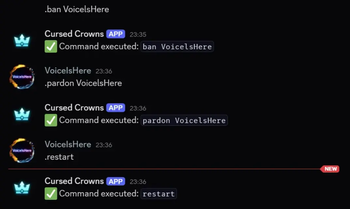
The process moves from Discord to Minecraft and back in milliseconds. Here is exactly how the plugin handles a remote request:
-
Command Received: Discord Side.
An authorized staff member types a command in the designated channel using your custom prefix.
Example: .kick Notch "Griefing" -
Security Check: Internal Guard.
The plugin intercepts the message and crosses-checks the user's highest Discord role against your config.yml permissions layout. -
Console Execution: Minecraft Side.
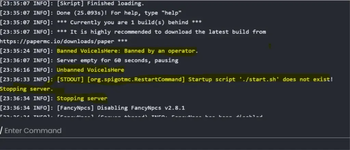
If authorized, the plugin pushes the command to the Minecraft server pool, executing it instantly with Console-level privileges. -
Status Report: Discord Side.
The bot replies to the channel. It provides a green success message (e.g., Command executed: kick Notch...) or a red denial alert if permissions were lacking.
🔐 Permission Hierarchy Example
You can customize permissions precisely in the config.yml. The plugin evaluates roles strictly, and even supports a wildcard (*) for ultimate control. Here is a common setup model:
-
Discord Role: @Admin
-
Allowed Commands: (Full console access)*
-
Discord Role: @Moderator
-
Allowed Commands: kick, ban, mute, tempban
-
Discord Role: @Helper
-
Allowed Commands: tp, warn, history
⚙️ Quick Configuration Preview
Setting up your bridge takes less than two minutes. Your config.yml handles everything seamlessly:
# Discord Command Bridge Configuration
bot-token: "YOUR_DISCORD_BOT_TOKEN_HERE"
command-prefix: "." # Change to !, /, or whatever fits your style
channel-id: "123456789012345678" # Restrict bot execution to this channel only

# Map your Discord Role IDs to allowed Minecraft commands (exclude the slash)
role-mappings:
  "987654321098765432": # Admin Role ID
    - "*"
  "876543210987654321": # Mod Role ID
    - "kick"
    - "ban"
    - "warn"
请登录后举报
请 登录 后赞助作者。
暂无评论,抢个沙发吧~