webplugin
作者:rebot | 分类:模组
Minecraft 版本: 1.21 1.21.1 1.21.2 1.21.3 1.21.4 1.21.5 1.21.6 1.21.7 1.21.8 1.21.9 1.21.10
平台: bukkit paper purpur spigot
标签: management technology
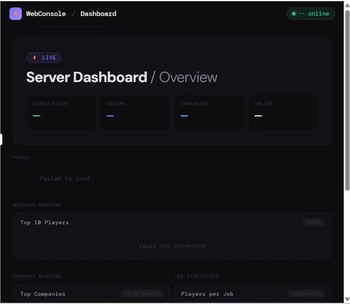
WebConsolePlugin
A web-based dashboard plugin for Paper servers.
Access a public status page and a password-protected admin panel from any browser — no client-side mods required.
📦 What's Included
🌐 Main Menu
A homepage automatically served at your server's IP and port.
Displays server status and links to any subpages you add to the public_html/ folder.
Adding a new folder creates a new card on the homepage automatically — no restart needed.
🔐 Admin Panel
Player Management - Ban, kick, unban players - Give, take, or set player balance *(requires Vault)* Online Monitor - View all online players with coordinates, HP, ping, and game mode in real time Console - Execute server commands directly from the browser - Command history saved for quick re-use Whitelist - Toggle whitelist on/off - Add and remove players Server Log Viewer - View `logs/latest.log` with keyword filtering - Auto-refresh mode *(updates every 3 seconds)* Action Log - Every admin action is recorded with timestamp and operator - Persisted to disk — survives server restarts - Individual entries can be selected and deleted *(owner role only)* Login History & Fail Alerts - Records every successful login with username and timestamp *(up to 500 entries)* - Records failed login attempts with IP address Scheduled Messages & Emergency Kick - Set up recurring broadcast messages at custom intervals - Kick all online players at once with a custom message👑 Role System
Two roles are available: admin and owner.
| Feature | admin | owner |
|---|---|---|
| All management features | ✅ | ✅ |
| Delete action log entries | ❌ | ✅ |
| Clear login history | ❌ | ✅ |
Setting Up Accounts and Roles
Edit plugins/WebConsole/config.yml:
admin:
  session-expire-minutes: 60
  accounts:
    - username: "alice"
      password: "yourpassword"
      role: "admin"          # Regular administrator
    - username: "bob"
      password: "ownerpassword"
      role: "owner"          # Full privileges
Run
/wc reloadto apply changes — no restart required.
You can add as many accounts as you need.
⚙️ Setup
1. Drop the .jar into plugins/ and start the server.
2. Set your port in plugins/WebConsole/config.yml:
port: 8080 # Change to a port that is open on your server⚠️ Make sure the port is open in your firewall or hosting panel.
3. Set up admin accounts (see Role System above).
4. Open in your browser:
- Main menu:
http://your-server-ip:PORT/ - Admin panel:
http://your-server-ip:PORT/admin/
⌨️ Commands
| Command | Description |
|---|---|
/wc reload |
Reload config.yml |
/wc bridges |
List active plugin bridges |
/wc modules |
List registered admin modules |
Permission: webconsole.admin (default: OP)
🔌 Optional Dependencies
All are soft dependencies — the plugin works without them.
- Vault — Balance display and management
- JobsReborn — Job statistics
- CompanyPlugin — Company rankings
- MarketPlugin — Item market prices
WebConsolePlugin(日本語)
Paper サーバー向けの Web ダッシュボードプラグインです。
公開ステータスページとパスワード保護された管理者パネルをブラウザからアクセスできます。クライアント側の Mod は不要です。
📦 同封されるもの
🌐 メインメニュー
サーバーの IP とポートにアクセスすると表示されるトップページです。
サーバーの稼働状況と、public_html/ フォルダに追加したサブページへのリンクを表示します。
フォルダを追加するだけで自動的にカードが生成されます — 再起動不要。
🔐 管理者パネル
プレイヤー管理 - BAN・キック・BAN解除 - 残高の付与・徴収・セット *(Vault 必須)* オンライン監視 - 全オンラインプレイヤーの座標・HP・Ping・ゲームモードをリアルタイム表示 コンソール実行 - ブラウザからサーバーコマンドを実行 - コマンド履歴を保存して素早く再実行 ホワイトリスト管理 - ホワイトリストの ON/OFF 切り替え - プレイヤーの追加・削除 サーバーログ閲覧 - `logs/latest.log` をキーワードで絞り込んで閲覧 - 3秒ごとの自動更新モードあり 操作ログ - すべての管理操作を日時・操作者とともに記録 - ディスクに永続保存(サーバー再起動後も保持) - エントリを選択して個別削除可能 *(owner ロールのみ)* ログイン履歴・失敗アラート - ログイン成功のたびにユーザー名と日時を記録 *(最大500件・永続化)* - ログイン失敗時のIPアドレスを記録 定期メッセージ・緊急キック - 指定した間隔でサーバー全体に自動ブロードキャスト - 全オンラインプレイヤーを任意のメッセージと一括キック👑 ロール管理
admin(通常管理者)と owner(オーナー)の2段階です。
| 機能 | admin | owner |
|---|---|---|
| すべての管理機能 | ✅ | ✅ |
| 操作ログの個別削除 | ❌ | ✅ |
| ログイン履歴の削除 | ❌ | ✅ |
アカウントとロールの設定方法
plugins/WebConsole/config.yml を編集します:
admin:
  session-expire-minutes: 60
  accounts:
    - username: "alice"
      password: "パスワード"
      role: "admin"          # 通常管理者
    - username: "bob"
      password: "パスワード2"
      role: "owner"          # 特権操作が可能
/wc reloadを実行するだけで反映されます — 再起動不要。
アカウントは何件でも追加できます。
⚙️ セットアップ手順
1. .jar を plugins/ に入れてサーバーを起動します。
2. plugins/WebConsole/config.yml でポートを設定します:
port: 8080 # 自分のサーバーで開放しているポートに変更してください⚠️ ファイアウォールやホスティングパネルでそのポートを開放してください。
3. 管理者アカウントを設定します (上の「ロール管理」参照)。
4. ブラウザでアクセスします:
- メインメニュー:
http://サーバーIP:ポート番号/ - 管理者パネル:
http://サーバーIP:ポート番号/admin/
⌨️ コマンド
| コマンド | 説明 |
|---|---|
/wc reload |
config.yml を再読み込み |
/wc bridges |
有効なプラグインブリッジ一覧 |
/wc modules |
登録済み管理モジュール一覧 |
権限: webconsole.admin (デフォルト: OP)
🔌 オプション依存プラグイン
すべてソフト依存です。なくても動作しますが、関連機能は非表示になります。
- Vault — 残高の表示・操作
- JobsReborn — ジョブ統計
- CompanyPlugin — 企業ランキング
- MarketPlugin — アイテム価格
请登录后举报
请 登录 后赞助作者。
暂无评论,抢个沙发吧~