
Quill
作者:rebot | 分类:模组
Minecraft 版本: 1.20 1.20.1 1.20.2 1.20.3 1.20.4 1.20.5 1.20.6 1.21 1.21.1 1.21.2 1.21.3 1.21.4 1.21.5 1.21.6 1.21.7 1.21.8 1.21.9 1.21.10 1.21.11
平台: bukkit paper purpur spigot
标签: management social utility
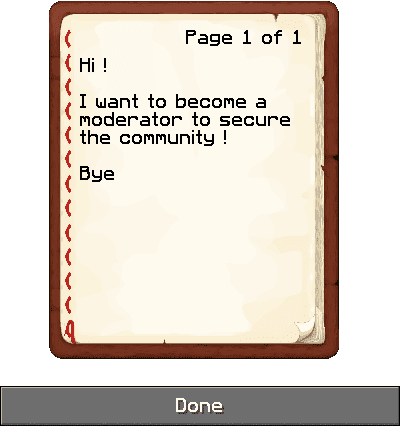
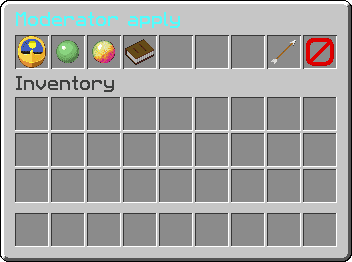
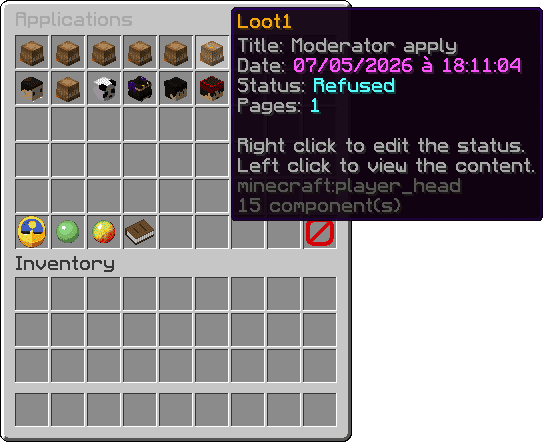
📖 What is Quill?
Quill modernizes a very old-school server workflow: players write something in a signed book, submit it with a single command, and the staff team reviews it later through a dedicated in-game interface.
The original workflow was simple but awkward — write a book, physically drop it into a hopper, and hope an admin reads it eventually. Quill keeps the charm of that system while replacing everything that made it painful.
Even if its main use case is player applications, the system works for any book-based submission: whitelist forms, staff applications, roleplay character sheets, player reports, event registrations, lore entries, and much more.
✨ Features
- One-command submission — players submit their signed book directly with
/quill apply - MySQL storage — every submission saves title, content, author UUID, date and status
- Paginated review GUI — staff can browse all submissions in a clean, scrollable interface
- Status management — change submission status (Pending / Accepted / Refused / Archived) from a dedicated GUI
- Status filters — filter the global list by one or multiple statuses using toggle buttons
- Per-player view — browse a specific player's submissions with
/quill look <player> - Self-review — players can check their own submissions with
/quill self - Staff notification on join — staff members are notified when pending submissions are waiting

- Discord webhook — optional notification for every new submission (author, title, page count)
- Live reload — reload the full configuration including the database connection with
/quill reload - Async database access — all DB queries run off the main thread to avoid any server lag
- Legacy compatibility — reads and converts old book data formats transparently
- Fully customizable — every message, GUI title, item name and status label is configurable in
config.yml
🚀 Installation
- Download the Quill JAR and place it in your
plugins/folder - Start or restart your server to generate
plugins/Quill/config.yml - Edit the file and fill in your MySQL credentials
- Optionally paste a Discord webhook URL
- Restart the server or run
/quill reload
⚙️ Commands & Permissions
Commands:
| Command | Permission | Description |
|---|---|---|
/quill |
quill.look |
Opens the global submissions GUI |
/quill apply |
quill.apply |
Submits the signed book in the player's main hand |
/quill look <player> |
quill.look |
Opens the submissions of a specific player |
/quill self |
quill.self |
Displays the player's own submitted books |
/quill reload |
quill.reload |
Reloads the configuration |
Permissions:
| Permission | Description |
|---|---|
quill.apply |
Allows submitting a signed book |
quill.look |
Allows browsing all submissions |
quill.self |
Allows viewing own submissions |
quill.status |
Allows changing the status of a submission |
quill.notify |
Allows receiving pending/new submission notifications |
quill.reload |
Allows reloading the plugin configuration |
quill.* |
Grants all plugin permissions (OP by default) |
🔗 Discord Webhook (optional)
Quill can send a message to a Discord channel whenever a new book is submitted.
- Create a webhook in your Discord channel settings
- Paste its URL into
discord.webhook-urlinconfig.yml - Restart the server or run
/quill reload - Submit a signed book with
/quill apply
The notification includes the author's name, the book title, and the page count.
📦 Requirements
| Requirement | Details |
|---|---|
| Server | Spigot / Paper 1.20.6 or higher |
| Java | 21 or higher |
| Database | MySQL — Required |
👤 Author
| Role | Author |
|---|---|
| Plugin design, development & implementation | Loot1 |
请登录后举报
请 登录 后赞助作者。
暂无评论,抢个沙发吧~