
AesirAFK
作者:rebot | 分类:模组
Minecraft 版本: 1.21.11
平台: fabric
标签: game-mechanics social utility
MsHai AFK
A client-side Fabric mod that automates the repetitive steps of staying AFK on the AesirMC Minecraft server. It logs in for you, picks your game mode from the server's menu, moves to the AFK area, and gets you back in place after a restart or a disconnect.
Made by MsHai
Features
- Auto login. Sends
/login <password>after spawn and waits for the server's confirmation. - Game mode selection. Opens the server menu (nether star) and clicks the sub-server you chose — Towny, ASMP, Skyblock, BoxPVP, MMORPG or Faction. The list is read from the menu automatically, so it keeps working if the server changes things around.
- AFK area. On supported modes it runs
/afkand clicks the AFK zone you picked. - Queue handling. If the mode is closed or full, the server puts you in a queue and can drop you from it. The mod keeps re-joining the queue every 15 seconds until you actually get in.
- Resource pack aware. Waits until the server's texture pack has finished loading before clicking anything.
- Auto reconnect. If you get kicked or lose connection, it counts down and reconnects — and keeps retrying until it succeeds. It does nothing if you disconnect on purpose.
- Lobby rejoin. If the server restarts only your game mode and drops you to the lobby (without kicking you), the mod detects it and returns you to your mode without logging in again.
- Auto jump. Keeps you jumping so you don't get flagged as AFK. Toggle with Ctrl + Left Shift + J.
- Status display. Shows the current step in the top-left corner.
There is no economy, trading, /pay or item handling of any kind — intentionally left out.
Usage
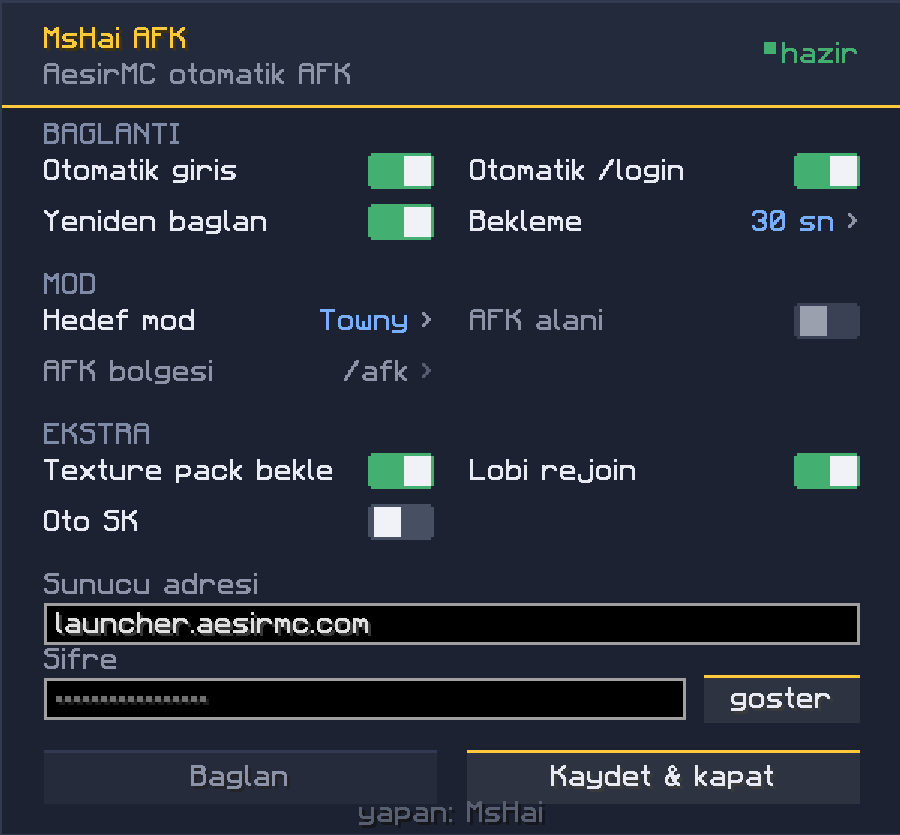
Open the settings screen with Ctrl + Left Shift + K — works both in the main menu and in-game. The interface is fully custom-drawn, grouped into sections with simple on/off switches.
| Setting | What it does |
|---|---|
| Auto login | Runs the whole flow after you join |
Auto /login |
Sends your password after spawn |
| Reconnect / Delay | Reconnects after a disconnect, and how long it waits |
| Target mode | Which sub-server to enter |
| AFK area / AFK zone | Runs /afk and clicks the zone you picked (not available on every mode) |
| Wait for texture pack | Doesn't act until the pack is loaded |
| Lobby rejoin | Returns you to your mode if you get dropped to the lobby |
| Auto jump | Keeps you jumping (also Ctrl + Left Shift + J) |
| Server address / Password | Text fields |
One-time AFK area setup
The zones in the /afk menu all use the same item, so they are matched by their label. The list fills itself the first time the menu is opened:
- Join the mode and type
/afkonce yourself. - Press Ctrl + Left Shift + K and click AFK zone to cycle through the zones.
- Turn AFK area on.
After that it is fully automatic.
Version support
Minecraft 1.21 – 1.21.11. Every Minecraft version has its own jar — download the one that matches your game. Minecraft changed its client API twice in this range (in 1.21.2 and 1.21.9), so a single jar cannot cover all of them. Each jar is pinned to its exact version, so if you install the wrong one Fabric will simply refuse to load it instead of breaking your game.
26.1 and 26.2 are not supported — Fabric moved to different mappings in those versions.
Requirements
- Fabric Loader
- Fabric API
- Java 21
Notes
- Your password is stored in plain text in
config/mshaiafk.json. Keep that in mind if you share your computer. - This mod sends commands and clicks menus on your behalf. Make sure the rules of the server you play on allow this.
- Client-side only — you do not need to install it on a server.
请登录后举报
暂无评论,抢个沙发吧~