
Compressed Chests
作者:rebot | 分类:模组
Minecraft 版本: 1.21 1.21.1 1.21.2 1.21.3 1.21.4 1.21.5 1.21.6 1.21.7 1.21.8 1.21.9 1.21.10 1.21.11
平台: paper
标签: game-mechanics management utility
CompressedChests
Store far more than a vanilla chest in the same block. Turn any chest or
barrel into a compressed container that holds huge stacks of each item type —
deposit normally, withdraw normal 64-stacks, and never run out of space again.
✨ Features
- Massive storage — each item type stacks far beyond 64:
- Single chest / barrel: up to 512 per item type
- Double chest: up to 1024 per item type
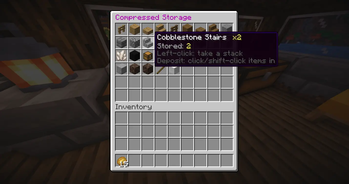
- Clean custom GUI — a 6-row interface shows each stored item with its real
amount in the name (e.g.Cobblestone x512) and lore, so you always see the
true count even though Minecraft can't draw big numbers on an icon. - Auto-sorted — stored items are grouped by material family (all the oak
items together, all the iron items together, ore → ingot → block) instead of
deposit order, so the GUI always stays tidy. - Deposit & withdraw naturally — click or shift-click items in to store them;
click a slot to take out a normal stack. Overflow that doesn't fit stays with you. - Works on chests and barrels (including trapped chests).
- Smart double-chest handling:
- Add a chest beside a compressed one → it upgrades to a double automatically
(capacity grows, contents kept). - Break one half → it downgrades to a single (contents preserved; only the
excess above the single cap drops out).
- Add a chest beside a compressed one → it upgrades to a double automatically
- Absorbs existing items — converting a chest that already has items pulls them
straight into compressed storage. - Protected against the things that would wreck your storage:
- 🧨 Explosion-proof (creepers, TNT, etc.)
- 🚫 Hopper-proof (automation can't bypass the virtual inventory)
- ⚠️ Break confirmation — breaking a full chest asks for a second hit so you
don't dump a fortune by accident.
- Persistent — storage is saved to disk on close, on a timer, and on shutdown,
and reloaded on start. - Permissions-plugin friendly — standard Bukkit nodes, works out of the box with
LuckPerms and similar.
🎮 How to use
- Place a chest or barrel (or a double chest for the bigger cap).
- Look at it and run
/compchest— or sneak + right-click it with a
Nether Star renamed toChest Compressorin an anvil. - Right-click the container to open the compressed storage GUI.
- Deposit: click / shift-click items into the GUI.
Withdraw: click a stored item to take out a normal stack.
Sneak + right-click while holding a block places the block as usual, just like a
normal chest — it won't open the GUI.
❗ Good to know
- Storage tracks items by type only — enchantments, custom names, and
durability are not preserved (an enchanted book becomes a plain one). Don't
store gear or NBT items you care about. - Use a full restart to install/update (not
/reload).
⌨️ Commands
| Command | Description |
|---|---|
/compchest |
Convert the chest/barrel you're looking at into a compressed one |
/compchest info |
Show a container's stats (type, item types, total items, capacity) |
🔑 Permissions
| Node | Default | Description |
|---|---|---|
compressedchests.use |
everyone | Open & use compressed containers, run /compchest info |
compressedchests.create |
op | Convert containers (command or Chest Compressor item) |
compressedchests.* |
op | Everything above |
Example with LuckPerms:
/lp group builder permission set compressedchests.create true
/lp group default permission set compressedchests.use true
⚙️ Configuration (config.yml)
# Max amount of a single item type, per type.
single-capacity-per-item: 512    # single chests & barrels
double-capacity-per-item: 1024   # double chests

# How many distinct item types one container can hold (GUI is 54 slots).
max-slots: 45

# Drop stored items on the ground when a container is broken.
drop-items-on-break: true

# Total items above this trigger a "break again to confirm" prompt.
warn-threshold: 1000

# Item name (a renamed Nether Star) used for the shift-right-click shortcut.
compressor-item-name: "Chest Compressor"

# Auto-save interval in seconds (0 disables; data still saves on close/shutdown).
autosave-seconds: 300
🚀 More from me
Plugins are a side thing for me — my main work is building web apps
tools. Come take a look at what I'm building over at
pixltd.dev. 💙
请登录后举报
请 登录 后赞助作者。
暂无评论,抢个沙发吧~